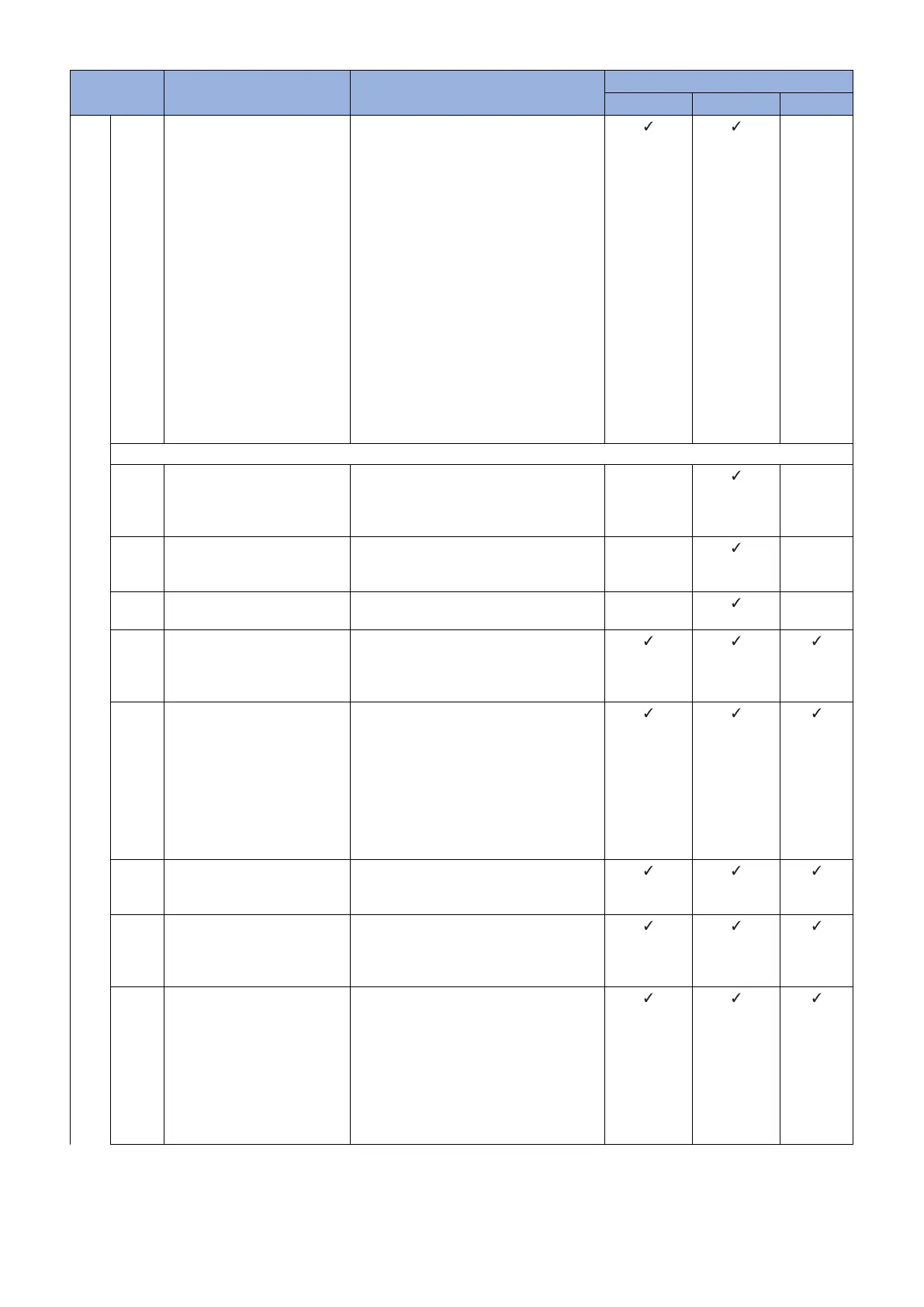
Error Code Description Remedy Cause of error
CDS server UPDATER Network
8xxx
4302 <In the case of scheduled up-
date>
In response to a download start
notification sent from the de-
vice, the distribution server re-
turned an error and stopped the
operation of the device within a
certain period of time before the
distribution server mainte-
nance time.
<In the case of distribution exe-
cuted by specifying the date
and time>
The firmware version of the de-
vice at the time when the distri-
bution settings were specified
and the version at the time im-
mediately before update are
different.
<In the case of scheduled update>
Specify the distribution settings again,
making sure that the distribution server
maintenance time and the scheduled up-
date time do not overlap.
<In the case of distribution executed by
specifying the date and time>
Specify the distribution settings again,
making sure that the firmware version of
device at the time when the distribution set-
tings are specified and the version at the
time immediately before update are the
same.
-
HTTP communication
5101 Specified Hash Algorithm is un-
known
Contact the support department of the
sales company.
(Attach the Debug log and update log of the
device.)
-
-
5102 Download file URL is invalid Check the URL setting of CDS server, reset
the setting, and then start the operation
again.
-
-
5103 No network cable connection
(device side)
Check the network environment of the de-
vice, and start the operation again.
-
-
5201 Invalid HTTP request Contact the support department of the
sales company.
(Attach the Debug log and update log of the
device.)
5202 Failed to connect to the server Check the network environment of the de-
vice (such as the examples shown below)
and start the operation again.
• Check if the network cable is discon-
nected.
• Check if connection with the proxy
server has failed.
• Check if there is any problem with the
DNS server.
5203 Failed to find the server Check the network environment of the de-
vice (the proxy settings, etc.), and start the
operation again.
5204 An input/output error occurred
during the connecting process
to the server
Check that no problem is found in the two
items displayed during the communication
test. If any problem was found, check the
network environment.
5205 Failed to read a HTTP re-
sponse.
An error or time-out has occur-
red because the line speed is
low.
Check that no problem is found in the two
items displayed during the communication
test. If any problem was found, check the
network environment.
If it occurs again, contact the support de-
partment of the sales company.
(Together with information regarding the
network environment of the user and the
system log/debug log of the device)
3. Technical Explanation (System)
74










 To Next Page