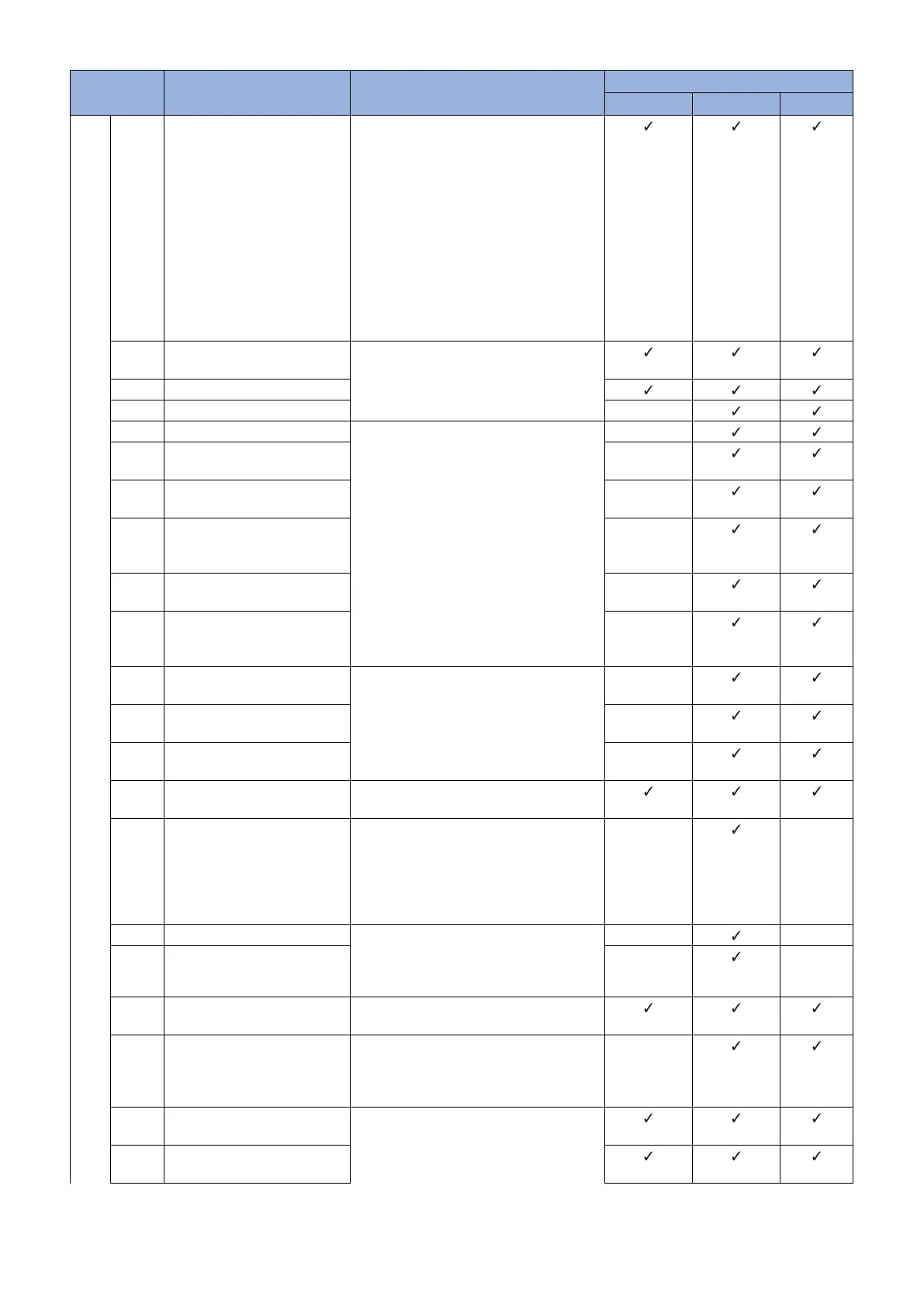
Error Code Description Remedy Cause of error
CDS server UPDATER Network
8xxx
5206 An HTTP status code other
than 206 or 200 was returned
from HTTP.
Check the network environment of the de-
vice (such as the examples shown below).
• Check if the user authentication of the
proxy is wrong.
• Check if an invalid response or time-
out has been returned from the gate-
way, proxy server, or DNS server.
If it occurs again, contact the support de-
partment of the sales company.
(Together with the system log/debug log of
the device, the distribution log of the Up-
dater, the SOAP message notifying of the
error, and the log of the proxy server)
5207 Generation of secure socket
failed.
Contact the support department of the
sales company.
(Attach the Debug log and update log of the
device.)
5208 Certificate check error
5209 Connection time-out -
520A The port number is invalid. Check the network environment of the de-
vice and start the operation again.
If it occurs again, contact the support de-
partment of the sales company.
(Together with information regarding the
network environment of the user and the
system log/debug log of the device)
-
520B The port number is invalid
(when using a proxy server).
-
520C The remote host cannot be ac-
cessed.
-
520D The remote host cannot be ac-
cessed (when using a proxy
server).
-
520E The host name cannot be re-
solved.
-
520F The host name cannot be re-
solved (when using a proxy
server).
-
5301 Failed to retrieve the data
stream
Contact the support department of the
sales company.
(Attach the Debug log and update log of the
device.)
-
5302 Failed to create the file object
for receipt
-
5303 Failed to create the data stream
of the file for receipt
-
5304 Failed to receive the data Check the network environment of the de-
vice, and start the operation again.
5305 An error about reserving the file
data for receipt
Check that no problem is found in the stor-
age device.
When this error occurs again, contact Sup-
port Group of sales companies.
(Attach the Debug log and update log of the
device.)
-
-
5306 Failed to close the data stream Contact the support department of the
sales company.
(Attach the Debug log and update log of the
device.)
-
-
5307 Failed to close the file data for
receipt
-
-
5308 Invalid hash code of the down-
load file
Check the network environment of the de-
vice, and start the operation again.
5309 The proxy authentication meth-
od is not supported, or access
to the CDS file server is not per-
mitted.
Check the proxy authentication method be-
ing used, change the setting to use a sup-
ported proxy authentication, and then start
the operation again.
-
530A A privilege error during creation
of a file
Check the network environment of the de-
vice and start the operation again.
530B A privilege error during output
of a file
3. Technical Explanation (System)
75










 To Next Page