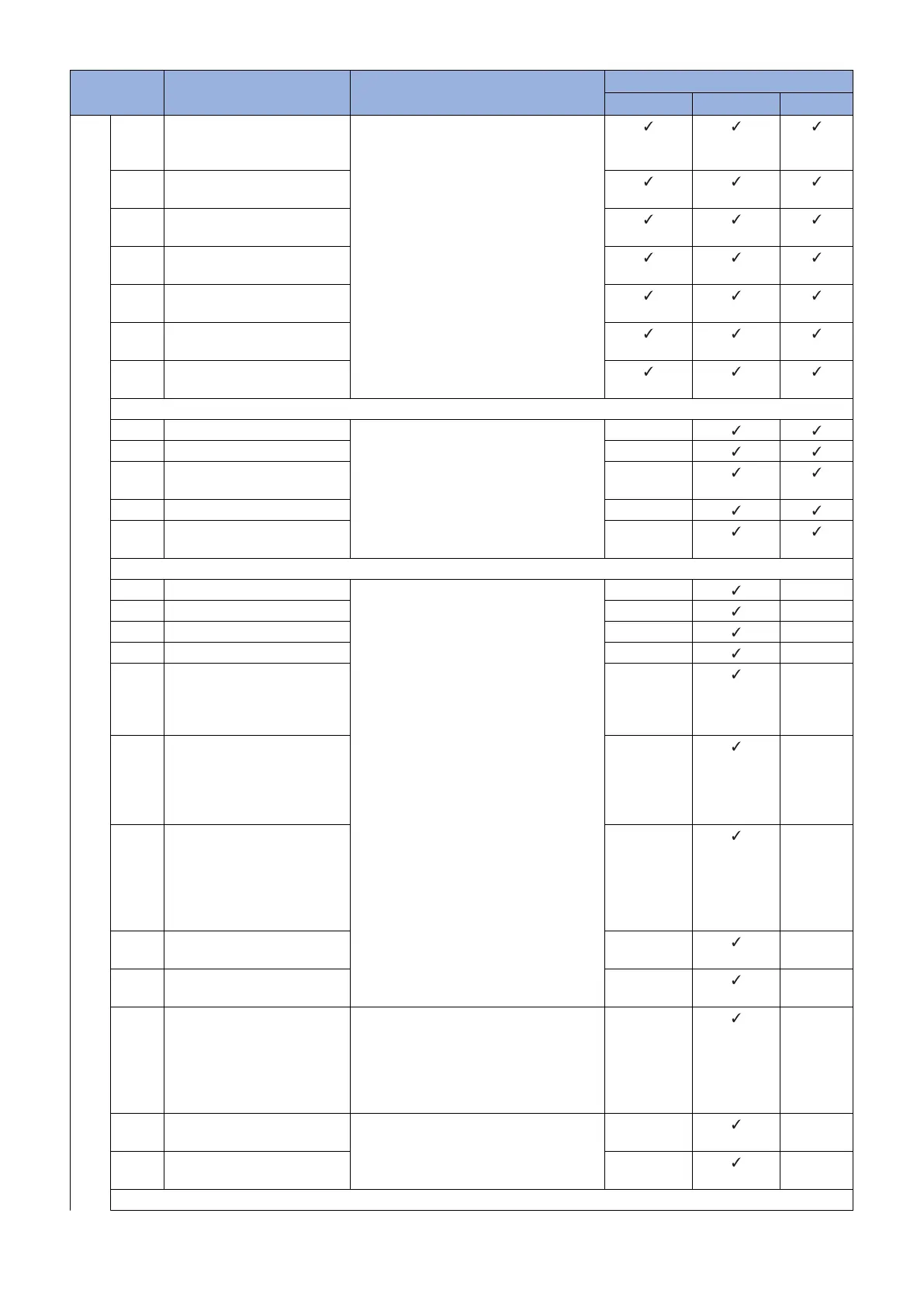
Error Code Description Remedy Cause of error
CDS server UPDATER Network
8xxx
530C The data of an HTTP response
from an invalid input stream
was read.
Check the network environment of the de-
vice and start the operation again.
530D An error in reading the data of
an HTTP response
530E An error in reading the data of
an HTTP response
530F An error in reading the data of
an HTTP response
5310 An error in reading the data of
an HTTP response
5311 The hash code length of the file
to download is invalid.
5312 The hash code of the file to
download is invalid.
Socket communication
6101 Failed to connect the eRDS Contact the support department of the
sales company.
(Attach the Debug log and update log of the
device.)
-
6102 No response from eRDS -
6103 No notice of start from the
eRDS
-
6104 Error of socket reading -
6105 Socket communication time-
out
-
Other internal codes
71xx An error by using invalid API Contact the support department of the
sales company.
(Attach the Debug log and update log of the
device.)
-
-
72xx An internal error in SMS -
-
7301 No existence of delivery ID -
-
7302 Invalid delivery ID -
-
7303 The updated firmware informa-
tion is not identical with the firm-
ware information after activa-
tion of the Updater
-
-
7304 The process of firmware down-
lo d is incomplete
It occurs when the power of the
device is turned OFF during
download.
-
-
7305 The update process is incom-
plete
The power was turned OFF af-
ter completion of download and
before start of update process-
ing.
-
-
7401 Failed to retrieve delivery infor-
mation
-
-
7501 Failed to execute the delivery
process
-
-
7502 The scheduled distribution had
not been executed even after a
certain period of time due to the
power of the device being OFF
at the scheduled time or other
reasons.
Scheduled deliveries not executed within
the defined period of time are abandoned,
so register a scheduled delivery again.
When setting the date and time of the
scheduled delivery, be sure to designate a
time when the device is ON
-
-
7503 The download results could not
be obtained.
Contact the support department of the
sales company.
(Attach the Debug log and update log of the
device.)
-
-
7504 There is no download list infor-
mation.
-
-
Internal module
3. Technical Explanation (System)
76










 To Next Page