Registering the Quantity that You Frequently Copy (Up
to T
wenty-nine Copies)
85RS-023
Y
ou can call a registered quantity using one-touch button to copy by registering a copy quantity.
You can register the copy quantity up to twenty-nine copies.
" Basic Cop
y Operations(P. 76) "
<Before registering the copy quantity>
Register the quantity after pr
essing [
] to reset the settings.
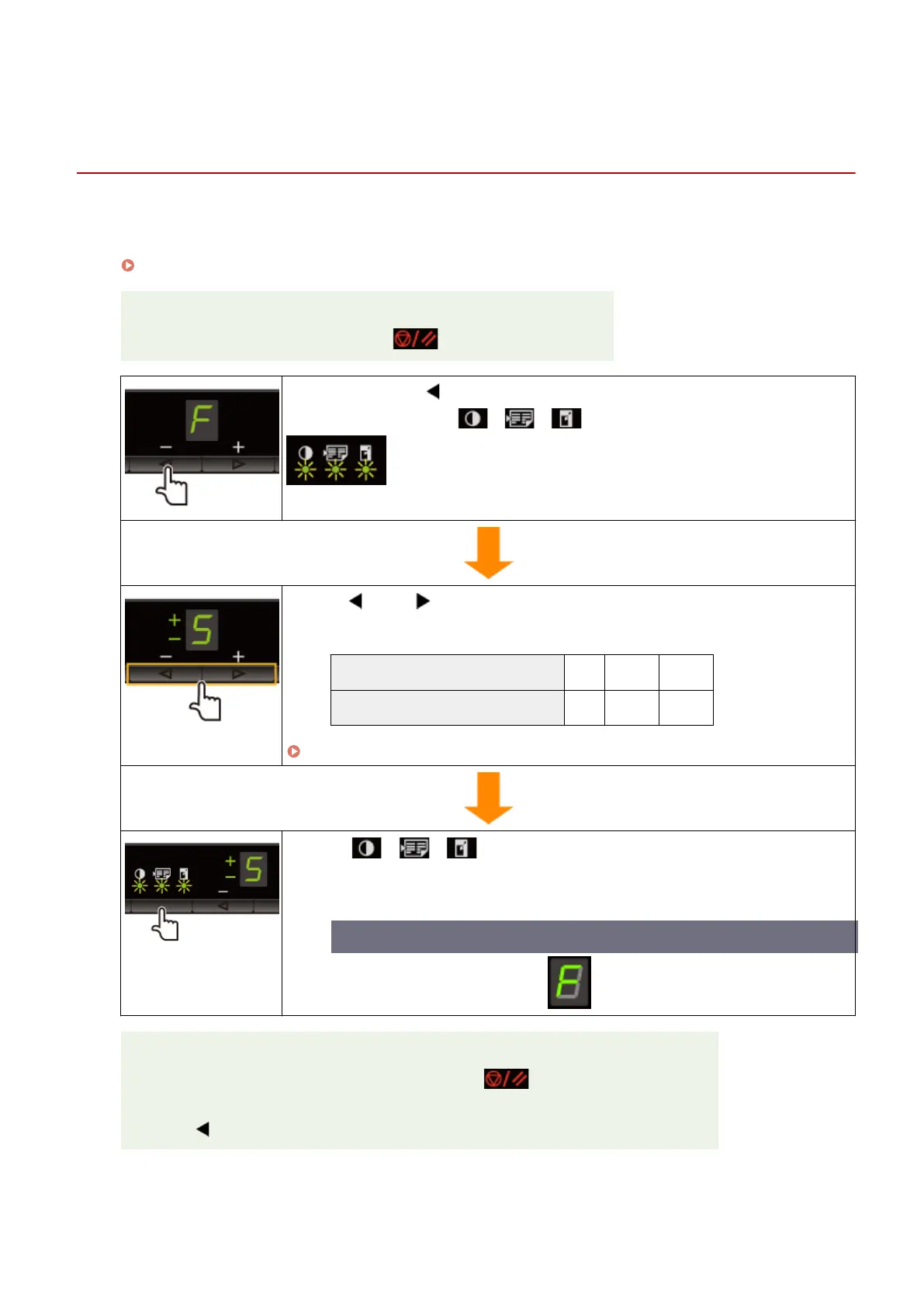
Press and hold [ ] more than 5 seconds.
After this, "F" is on, and [ ] (Copy setting key) blinks.
Press [ ] or [ ] to display the quantity that you want to
register.
The quantity that you want to register: 1 to 9 10 to 19 20 to 29
Display: 1 to 9 +0 to +9 ±0 to ±9
" Setting List(P
. 31) "
Press [ ] (Copy setting key) to conrm the setting.
→ The specied quantity is displayed after "F
."
Example) When the quantity is set to twenty-five copies
Saving the registered quantity
The r
egistered quantity is saved even if you press [
] or turn the power OFF.
T
o display "F"
When [
] is pressed, "F" is displayed.
Copy
78












 To Next Page