Paper Selection
1-20
1
Introduction to the Copying Functions
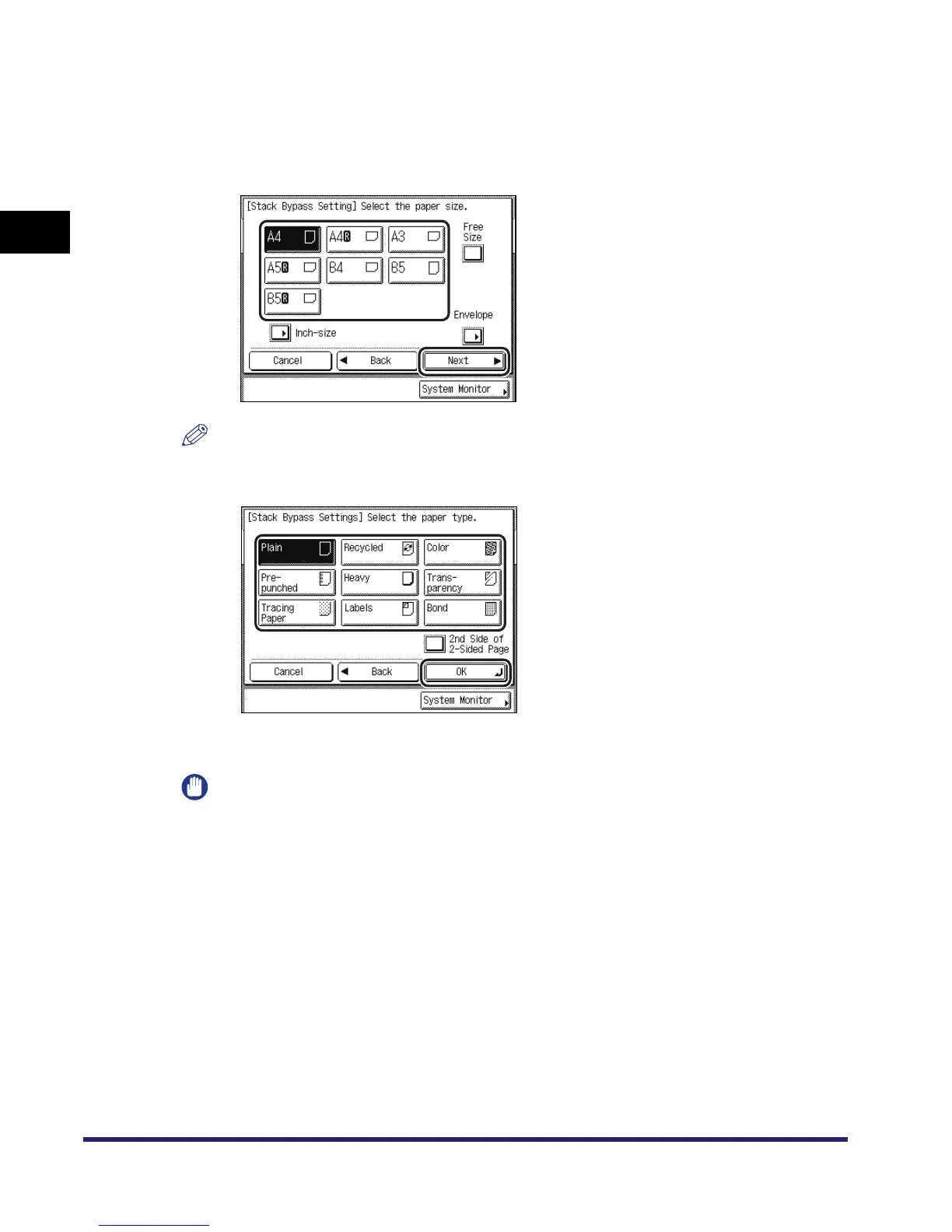
● To copy on standard size paper loaded in the stack bypass:
❑ Press [Stack Bypass].
If you want to select the stack bypass when a paper size/type is already selected for the
current or reserved job, press [StackBypass Setting] to specify the desired paper size/type.
❑ Select the desired paper size ➞ press [Next].
NOTE
To select an inch paper size, press [Inch-size].
❑ Select the desired paper type ➞ press [OK].
If you are copying onto the back side of a previously printed sheet, press [2nd Side of
2-Sided Page].
IMPORTANT
When printing on special types of paper, such as heavy paper or transparencies, be sure to
correctly set the paper type, especially if you are using heavy paper. If the type of paper is not set
correctly, it could adversely affect the quality of the image. Moreover, the fixing unit may become
dirty, or the paper could jam, and a service repair may be needed.



 To Next Page