EasyManua.ls Logo

Canon MV430 - Page 31

Canon MV430
152 pages
Print Icon
To Next Page IconTo Next Page
To Previous Page IconTo Previous Page
Loading...
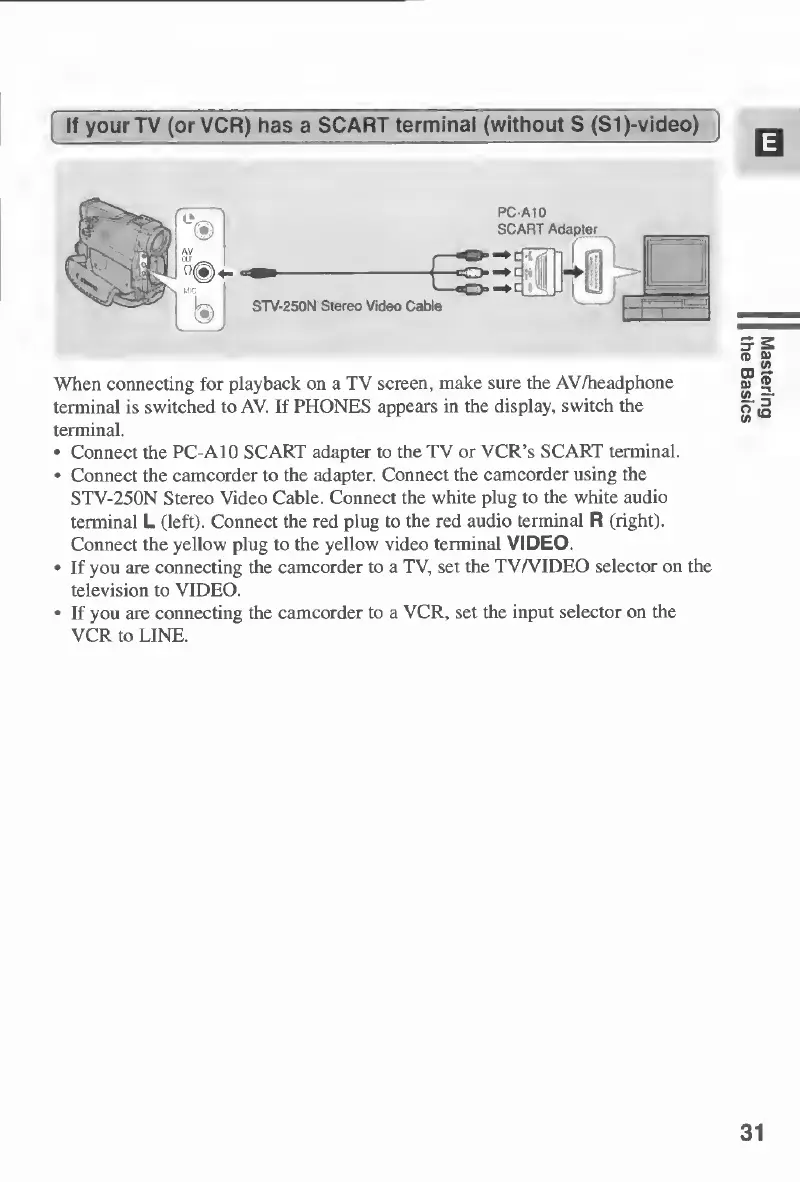
If
your
TV
(or
VCR)
has
a
SCART
terminal
(without
S
(Sl)-video)
|
When
connecting
for
playback
on
a
TV
screen,
make
sure
the
AV/headphone
terminal
is
switched
to
AV.
If
PHONES
appears
in
the
display,
switch
the
terminal.
Connect
the
PC-A10
SCART
adapter
to
the
TV
or
VCR’s
SCART
terminal.
Connect
the
camcorder
to
the
adapter.
Connect
the
camcorder
using
the
STV-250N
Stereo
Video
Cable.
Connect
the
white
plug
to
the
white
audio
terminal
L
(left).
Connect
the
red
plug
to
the
red
audio
terminal
R
(right).
Connect
the
yellow
plug
to
the
yellow
video
terminal
VIDEO.
If
you
are
connecting
the
camcorder
to
a
TV,
set
the
TV/VIDEO
selector
on
the
television
to
VIDEO.
If
you
are
connecting
the
camcorder
to
a
VCR,
set
the
input
selector
on
the
VCR
to
LINE.
31
Mastering
the
Basics

Table of Contents

Other manuals for Canon MV430

Related product manuals