EasyManua.ls Logo

Canon MV430 - Page 32

Canon MV430
152 pages
Print Icon
To Next Page IconTo Next Page
To Previous Page IconTo Previous Page
Loading...
Mastering
the
Basics
If
your
TV
(or
VCR)
has
an
S
(SI)
-video
input
terminal
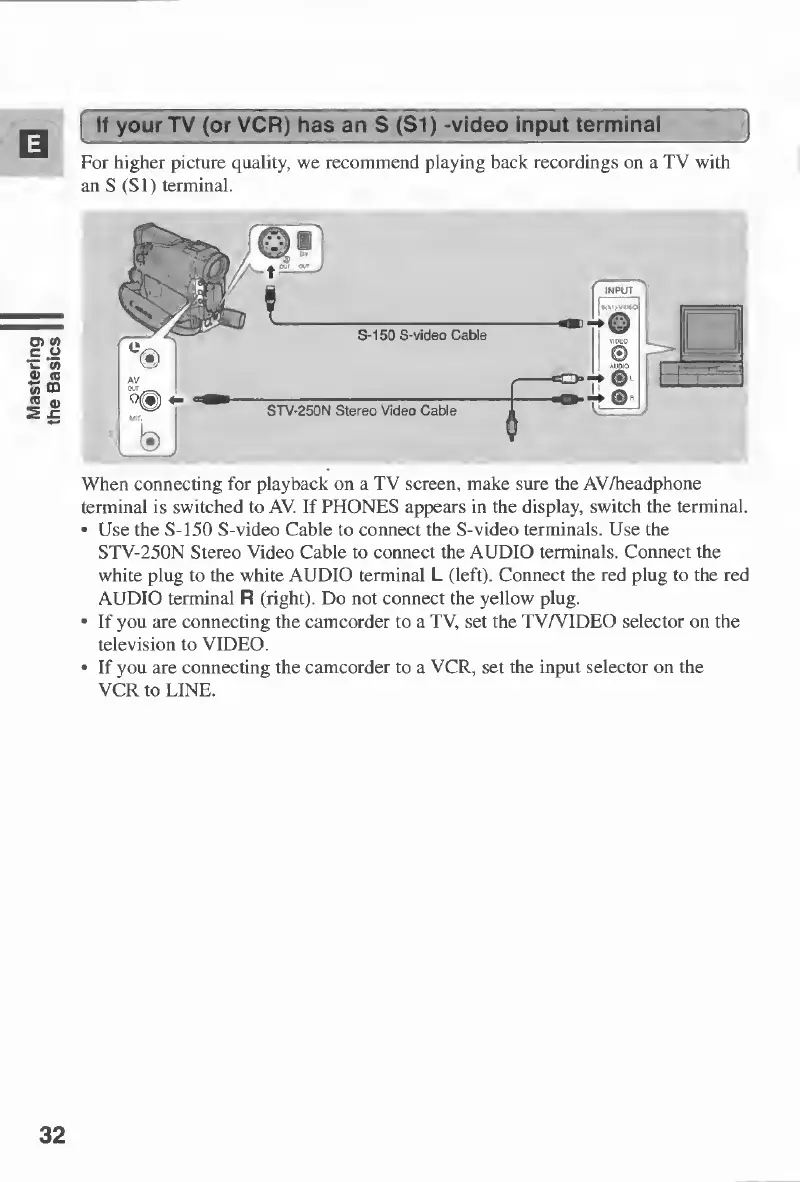
For
higher
picture
quality,
we
recommend
playing
back
recordings
on
a
TV
with
an
S
(SI)
terminal.
When
connecting
for
playback
on
a
TV
screen,
make
sure
the
AV/headphone
terminal
is
switched
to
AV.
If
PHONES
appears
in
the
display,
switch
the
terminal.
Use
the
S-150
S-video
Cable
to
connect
the
S-video
terminals.
Use
the
STV-250N
Stereo
Video
Cable
to
connect
the
AUDIO
terminals.
Connect
the
white
plug
to
the
white
AUDIO
terminal
L
(left).
Connect
the
red
plug
to
the
red
AUDIO
terminal
R
(right).
Do
not
connect
the
yellow
plug.
-
If
you
are
connecting
the
camcorder
to
a
TV,
set
the
TV/VIDEO
selector
on
the
television
to
VIDEO.
If
you
are
connecting
the
camcorder
to
a
VCR,
set
the
input
selector
on
the
VCR
to
LINE.
32

Table of Contents

Other manuals for Canon MV430

Related product manuals