EasyManua.ls Logo

Canon MV430 - Page 39

Canon MV430
152 pages
Print Icon
To Next Page IconTo Next Page
To Previous Page IconTo Previous Page
Loading...
Pressing
the
start/stop
button
or
the
PHOTO
button
will
close
the
menu
and
start
recording.
You
can
display
the
menus
on
a
connected
TV
screen
by
turning
TV
SCREEN
(CX
136)
on
through
the
menu
or
using
the
wireless
controller’s
TV
SCREEN
button.
See
p.
30
for
TV
hookup
instructions.
List
of
Menus
Turn
to
appropriate
page
for
a
detailed
explanation
of
each
function.
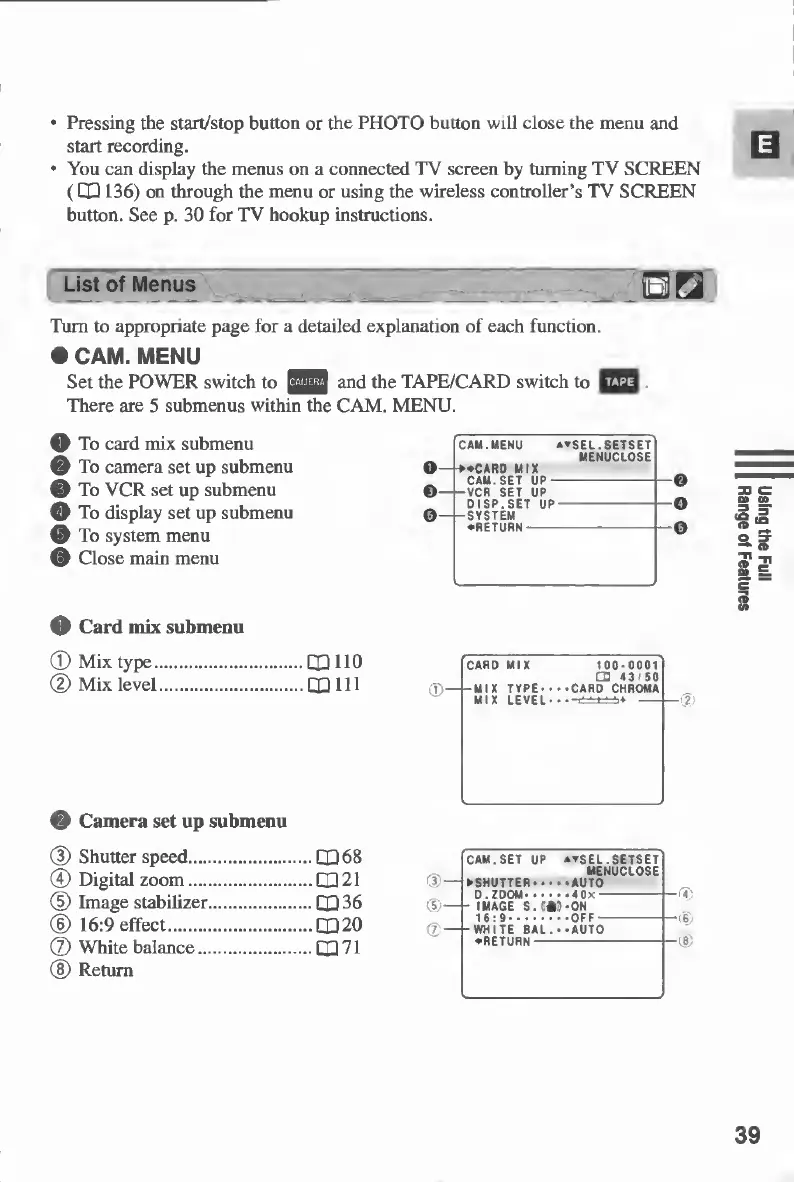
CAM.
MENU
Set
the
POWER
switch
to
and
the
TAPE/CARD
switch
to
£^3
There
are
5
submenus
within
the
CAM.
MENU.
O
To
card
mix
submenu
)
To
camera
set
up
submenu
O
To
VCR
set
up
submenu
O
To
display
set
up
submenu
0
To
system
menu
(D
Close
main
menu
O
Card
mix
submenu
©
Mix
type.110
<D
Mix
level.(XI
HI
©
Camera
set
up
submenu
©
Shutter
speed.QU
68
@
Digital
zoom.(X)
21
©
Image
stabilizer.(XI36
©
16:9
effect.CQ20
©
White
balance.LX
71
®
Return
39
Using
the
Full
Range
of
Features

Table of Contents

Other manuals for Canon MV430

Related product manuals