EasyManua.ls Logo

Canon MV430 - Page 41

Canon MV430
152 pages
Print Icon
To Next Page IconTo Next Page
To Previous Page IconTo Previous Page
Loading...
O
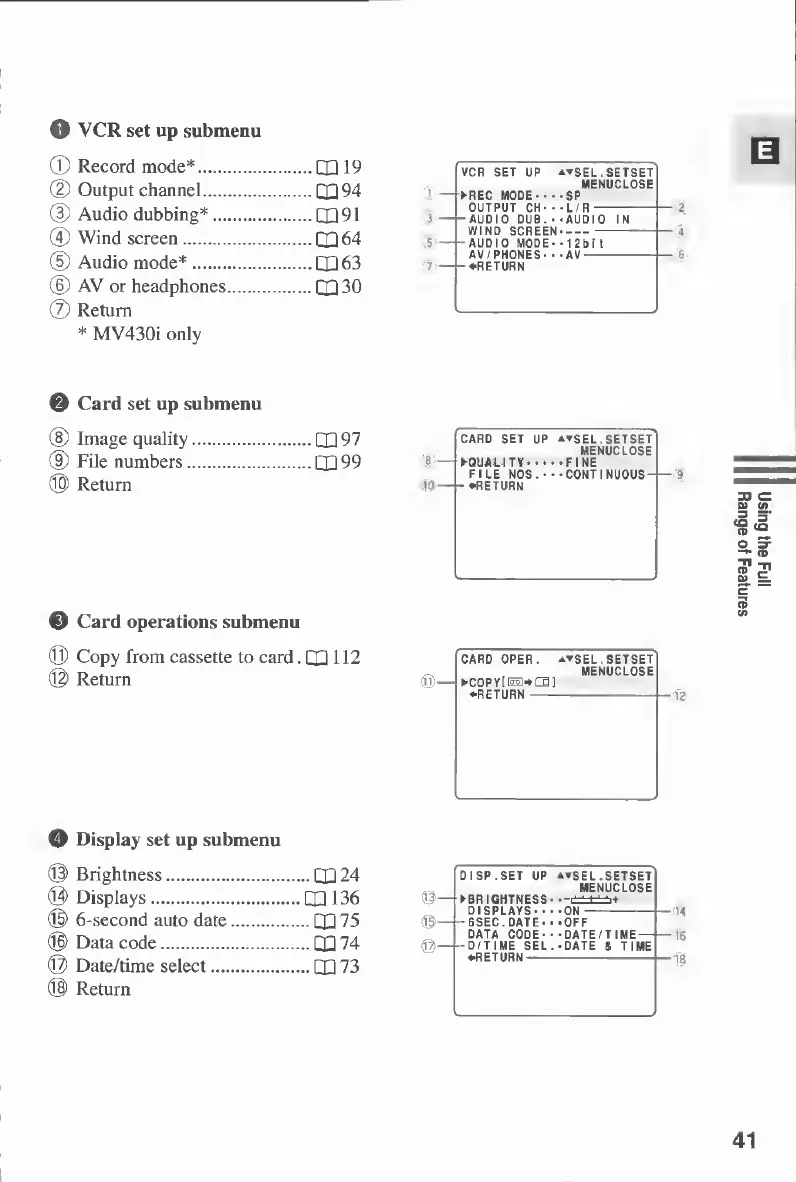
VCR
set
up
submenu
©
Record
mode*.QQ
19
(D
Output
channel.QQ
94
(D
Audio
dubbing*.Qp
91
@
Wind
screen.QQ
64
(5)
Audio
mode*.
P
p
63
(6)
AV
or
headphones.CXI
30
®
Return
*
MV430i
only
0—
(3)—
VCR
SET
UP
atSEL,SETSET
MENUCLOSE
REC
MODE-SP
(D—
y-lv
AUDIO
MODE*•12bit
0
Card
set
up
submenu
®
Image
quality.
P
p
9
7
®
File
numbers.CX99
©
Return
10
-
card
SET
UP
atSEL,SETSET
MENUCLOSE
QUALITY.FINE
FILE
NOS.•••CONTINUOUS-
-
•RETURN
©
Card
operations
submenu
©
Copy
from
cassette
to
card.
CP
112
©
Return
©—I
CARD
OPER.
cop
y[
isi*
ca
]
•RETURN
atSEL.SETSET
MENUCLOSE
0
Display
set
up
submenu
©
Brightness.LQ
24
©
Displays.Q136
©
6-second
auto
date.QQ
75
©
Data
code.PH
74
©
Date/time
select.
P
p
7
3
©
Return
©
DISP.SET
UP
A^SEL.SETSET
MENUCLOSE
BRIGHTNESS->-
±±±±±
+
DISPLAYS-ON-
-6SEC.DATE••-OFF
DATA
CODE-•-DATE/TIME
-D/TIME
SEL.-DATE
&
TIME
•RETURN-
41
Using
the
Full
Range
of
Features

Table of Contents

Other manuals for Canon MV430

Related product manuals