EasyManua.ls Logo

Canon MV430 - Page 42

Canon MV430
152 pages
Print Icon
To Next Page IconTo Next Page
To Previous Page IconTo Previous Page
Loading...
Using
the
Full
Range
of
Features
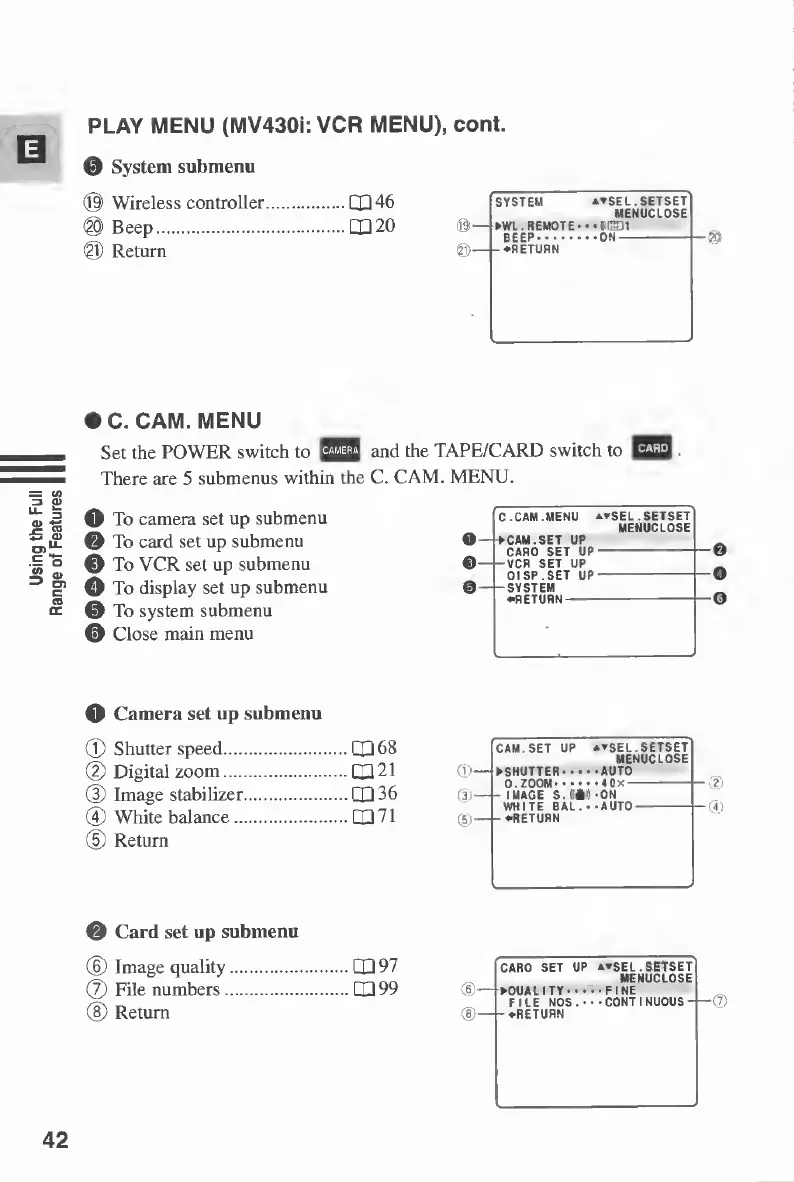
PLAY
MENU
(MV430i:
VCR
MENU),
cont.
0
System
submenu
©
Wireless
controller.CQ46
©
Beep.1X120
©
Return
SYSTEM
**SEL.SETSET
MENUCLOSE
WL.REMOTE-
••GDI
BEEP.
-
RETURN
-
ON-
>C.
CAM.
MENU
Set
the
POWER
switch
to
and
the
TAPE/CARD
switch
to
There
are
5
submenus
within
the
C.
CAM.
MENU.
O
To
camera
set
up
submenu
0
To
card
set
up
submenu
0
To
VCR
set
up
submenu
O
To
display
set
up
submenu
0
To
system
submenu
©
Close
main
menu
o
C.CAM.MENU
ATSEL.SETSET
MENUCLOSE
CAM.SET
UP
0-
CARD
SET
UP
VCR
SET
UP
0-
-SYSTEM
O
Camera
set
up
submenu
(D
Shutter
speed.X
08
(D
Digital
zoom.X
21
(3)
Image
stabilizer.X
36
®
White
balance.X71
(D
Return
CAM
SET
UP
♦▼
SEL.SETSET
MENUCLOSE
SHUTTER-•••
AUTO
D
ZOOM.
40/-
-IMAGE
S
AM
•ON
WHITE
BAL
•AUTO-
-
RETURN
(D
<D
0
Card
set
up
submenu
(D
Image
quality
(7)
File
numbers.
®
Return
X97
X99
(e>
CARD
SET
UP
atsEL.SETSET
MENUCLOSE
QUALITY.FINE
.
^
FILE
NOS.
••-CONTINUOUS-}—(7)
-
^RETURN
42
©
©
©

Table of Contents

Other manuals for Canon MV430

Related product manuals