EasyManua.ls Logo

Canon MV430 - Page 80

Canon MV430
152 pages
Print Icon
To Next Page IconTo Next Page
To Previous Page IconTo Previous Page
Loading...
Editing
HEC
PAUSE
(LINE-IN)
FOCUS
AESHFT
SEARCH
I
SEAHC
Preparations
Example
dubbing
to
the
camcorder
The
MV430i
is
equipped
with
the
DV
Recording
function.
Digital
video
equipment
fitted
with
the
DV
terminal
lets
you
edit,
copy
and
transfer
data
digitally,
with
virtually
no
generation
loss
in
image
and
sound
quality.
The
DV
terminal
is
for
both
line-in
and
line-out,
since
a
single
DV
cable
can
handle
data
in
both
directions.
If
a
digital
VCR
is
connected
and
an
anomalous
signal
is
sent
from
the
VCR,
the
images
recorded
on
the
tape
may
also
be
anomalous
(although
it
may
not
appear
so
on
the
TV
image),
or
not
recorded
at
all.
You
are
unable
to
dub
tapes
recorded
with
the
copyright
protective
signal.
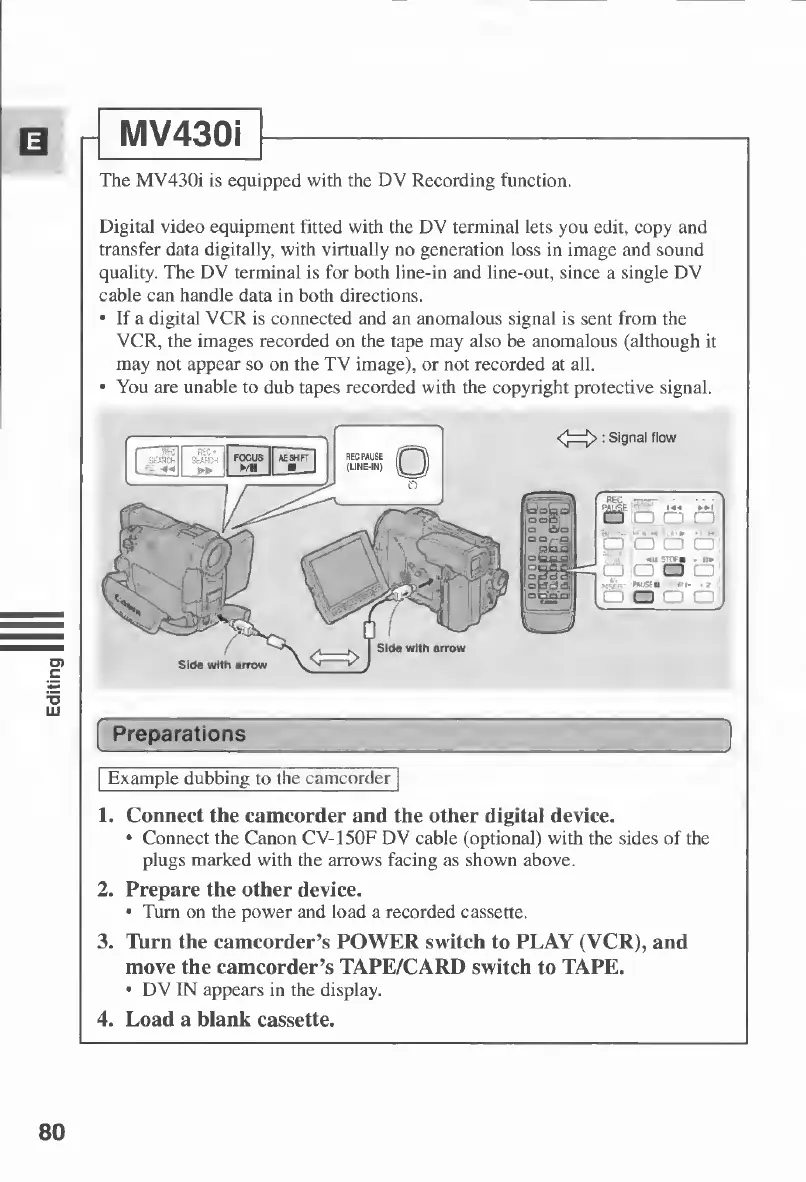
<^>
:
Signal
flow
1.
Connect
the
camcorder
and
the
other
digital
device.
Connect
the
Canon
CV-150F
DV
cable
(optional)
with
the
sides
of
the
plugs
marked
with
the
arrows
facing
as
shown
above.
2.
Prepare
the
other
device.
Turn
on
the
power
and
load
a
recorded
cassette.
3.
Turn
the
camcorder’s
POWER
switch
to
PLAY
(VCR),
and
move
the
camcorder’s
TAPE/CARD
switch
to
TAPE.
DV
IN
appears
in
the
display.
4.
Load
a
blank
cassette.
MV430i
80

Table of Contents

Other manuals for Canon MV430

Related product manuals