Loading ink tank (23.7 fl oz (700 ml))
1.
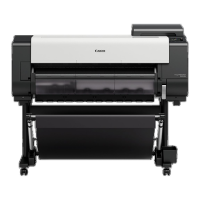
Before opening the pouch, hold the new ink tank with both hands and tilt it to the left and
right as shown, shaking it gently seven or eight times.
Caution
• A 23.7 fl oz (700 ml) ink tank is heavy, so use your whole arm to agitate it instead of just your
wrist. If you agitate the ink tank using just your wrist, you may injure your wrist.
Important
•
Do not remove and agitate an ink tank that has already been installed in the printer. Ink may
leak out.
•
Failure to agitate the ink tank may cause the ink components to precipitate and may affect
printing quality.
Note
•
If the ink tank is at a low temperature, allow it to warm up to room temperature before installing.
2. Open the pouch and remove the ink tank.
419


 To Next Page