78
5-4 Negative Values and Bitwise Operations
While binary, octal, decimal, or hexadecimal is set as the default number system,
press 2 (LOG) to display a menu of negation and bitwise operators.
•{Neg} ... {negation}*
1
•{Not}/{and}/{or}/{xor}/{xnor} ... {NOT}*
2
/{AND}/{OR}/{XOR}/{XNOR}*
3
kk
kk
k Negative Values
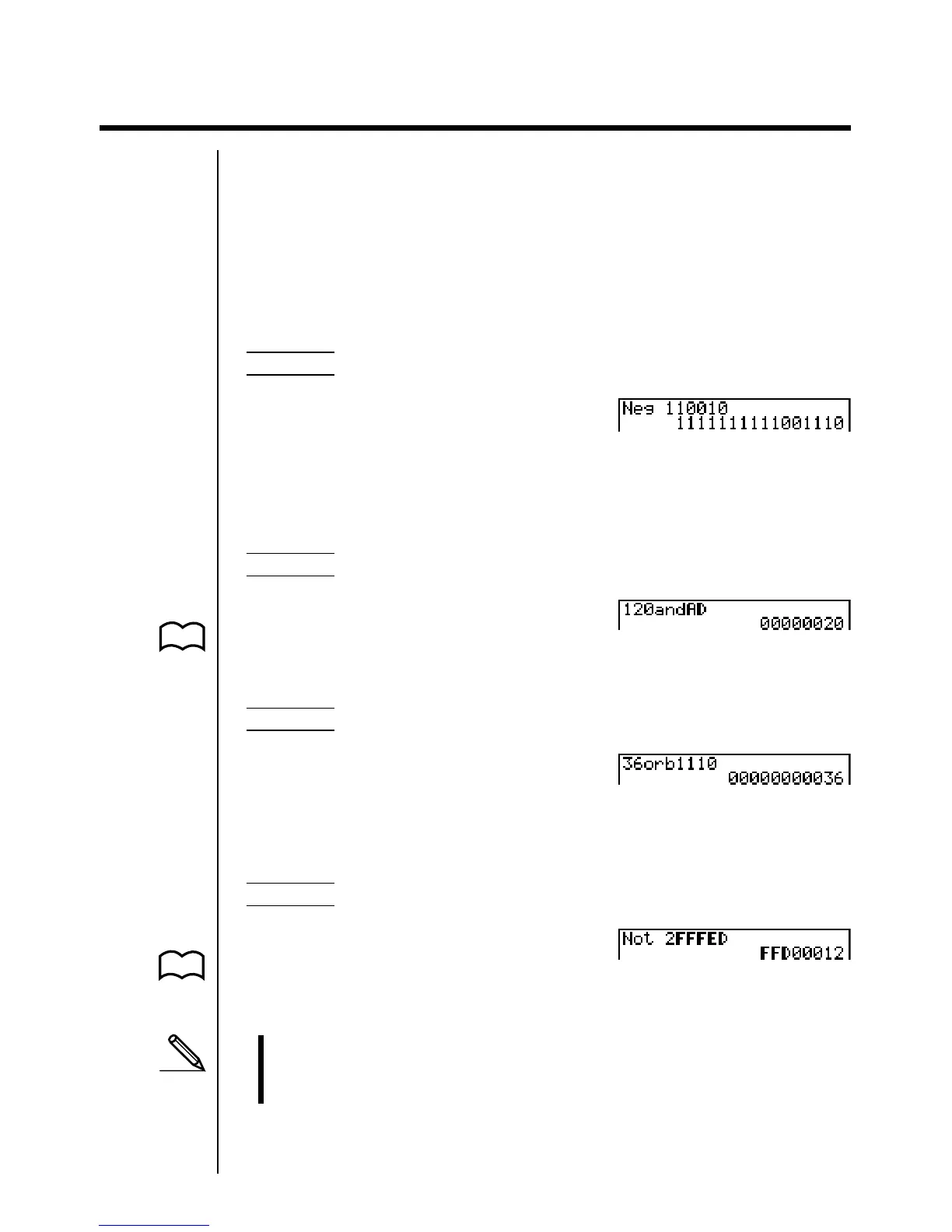
Example To determine the negative of 1100102
!Z4(Bin)J
A2(LOG)1(Neg)
bbaabaw
kk
kk
k Bitwise Operations
Example 1 To input and execute “12016 and AD16”
!Z3(Hex)J
Abca2(LOG)
3(and)ADw
Example 2 To display the result of “368 or 11102” as an octal value
!Z5(Oct)JJ
Adg2(LOG)
4(or)J1(d~o)3(b)
bbbaw
Example 3 To negate 2FFFED16
!Z3(Hex)JJ
A2(LOG)2(Not)
cFFFEDw
*
1
two’s complement
*
2
one’s complement (bitwise complement)
*
3
bitwise AND, bitwise OR, bitwise XOR, bitwise XNOR
P.74
P.74



 To Next Page