22
1-2 Memory
kk
kk
k Variables
This calculator comes with 28 variables as standard. You can use variables to
store values to be used inside of calculations. Variables are identified by single-
letter names, which are made up of the 26 letters of the alphabet, plus r and
θ
.
The maximum size of values that you can assign to variables is 15 digits for the
mantissa and 2 digits for the exponent. Variable contents are retained even when
you turn power off.
uu
uu
uTo assign a value to a variable
[value] a [variable name] w
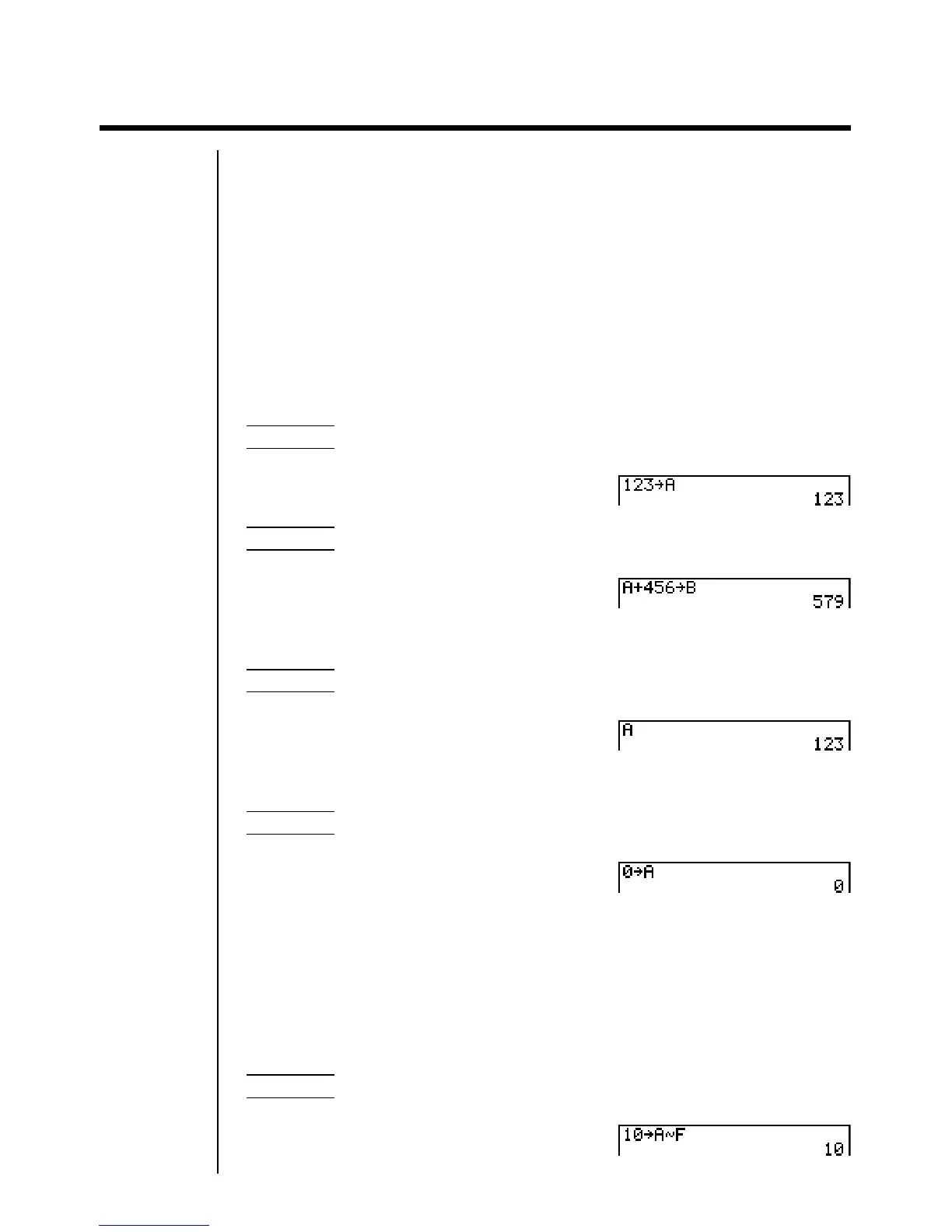
Example To assign 123 to variable A
AbcdaaAw
Example To add 456 to variable A and store the result in variable B
AaA+efgaaBw
uu
uu
uTo display the contents of a variable
Example To display the contents of variable A
AaAw
uu
uu
uTo clear a variable
Example To clear variable A
AaaaAw
•To clear all variables, select “Memory Usage” from the MEM Mode.
uu
uu
uTo assign the same value to more than one variable
[value]a [first variable name]a3(~) [last variable name]w
•You cannot use “r ” or “
θ
” as a variable name in the above operation.
Example To assign a value of 10 to variables A through F
Abaa!aA
3(~)Fw


 To Next Page