140
8-8 Graph Background
You can use the set up screen to specify the memory contents of any picture
memory area (Pict 1 through Pict 6) as the Background item. When you do, the
contents of the corresponding memory area is used as the background of the
graph screen.
•You can use a background in the RUN, STAT, GRAPH, DYNA, TABLE,
RECUR, CONICS Modes.
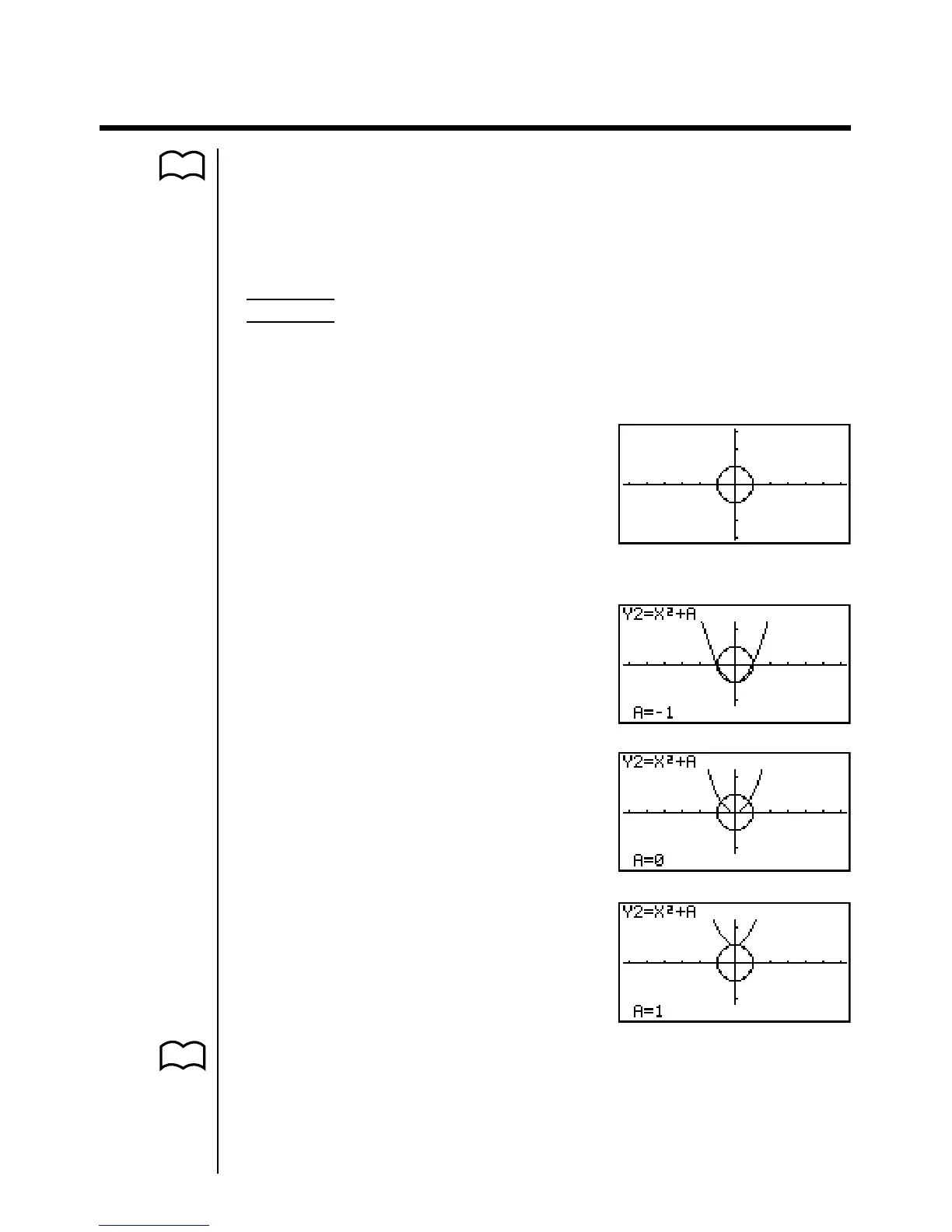
Example 1 With the circle graph X
2
+ Y
2
= 1 as the background, use
Dynamic Graph to graph Y = X
2
+ A as variable A changes value
from –1 to 1 in increments of 1.
Recall the background graph.
(X
2
+ Y
2
= 1)
Draw the dynamic graph.
(Y = X
2
– 1)
↓↑
(Y = X
2
)
↓↑
(Y = X
2
+ 1)
•See “14. Conic Section Graphs” for details on drawing a circle graph, and
“13. Dynamic Graph” for details on using the Dynamic Graph feature.
P.6
P. 193
P. 181


 To Next Page