89
w
•An error occurs if memory becomes full as you are inputting data.
•You can also use the above format inside a program that inputs matrix data.
uu
uu
uTo input an identity matrix
Use the matrix operation menu’s Identity command (1) to create an identity
matrix.
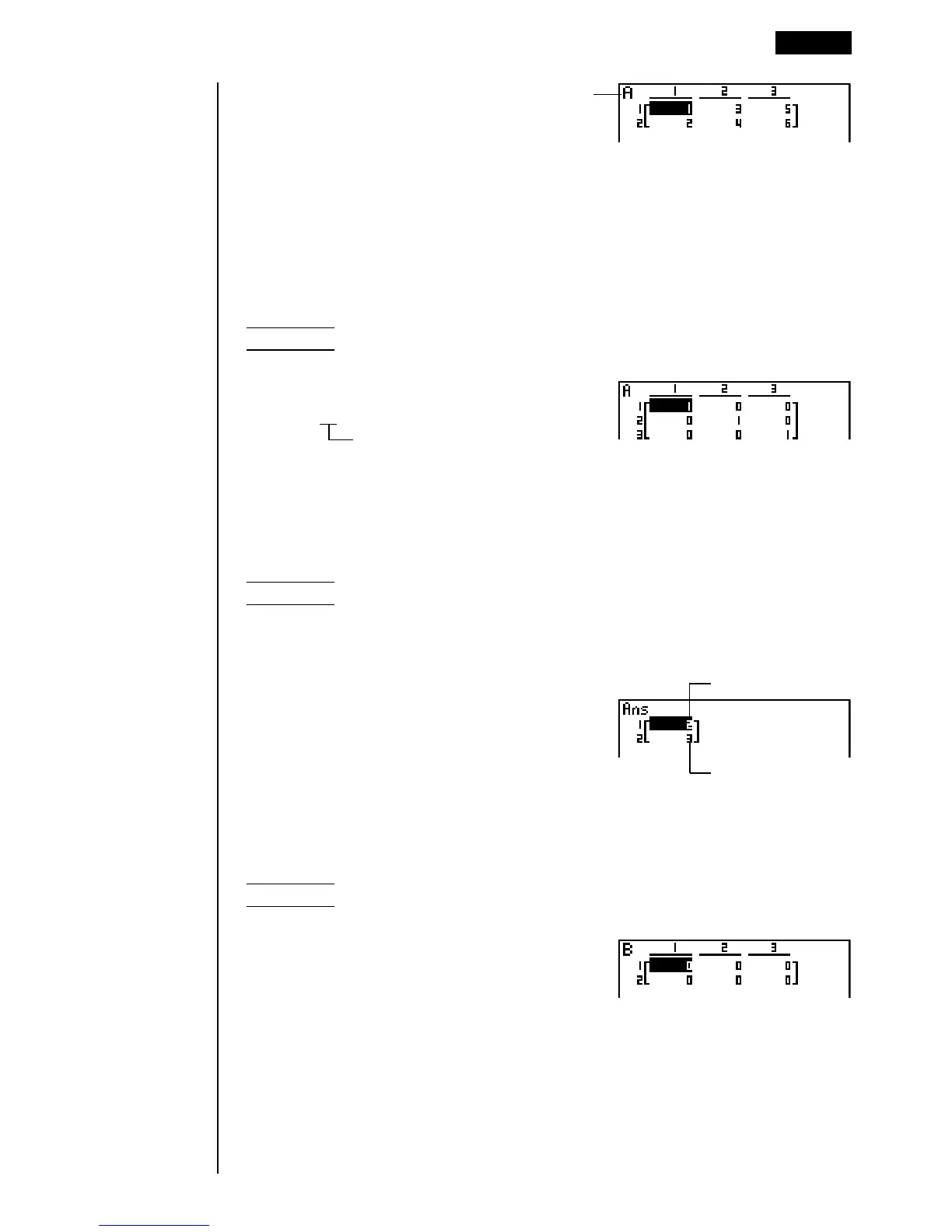
Example 2 To create a 3 × 3 identity matrix as Matrix A
K2(MAT)6(g)1(Iden)
da6(g)1(Mat)aAw
Number of rows/columns
uu
uu
uTo check the dimensions of a matrix
Use the matrix operation menu’s Dim command (2) to check the dimensions of
an existing matrix.
Example 3 To check the dimensions of Matrix A, which was input in
Example 1
K2(MAT)6(g)2(Dim)6(g)
1(Mat) aAw
The display shows that Matrix A consists of two rows and three columns.
You can also use {Dim} to specify the dimensions of the matrix.
Example 4 To specify dimensions of 2 rows and 3 columns for Matrix B
!{c,d!}aK
2(MAT)6(g)2(Dim)6(g)
1(Mat)aBw
Modifying Matrices Using Matrix Commands 6 - 3
Matrix name
Number of rows
Number of columns


 To Next Page