Citrix ADC MPX
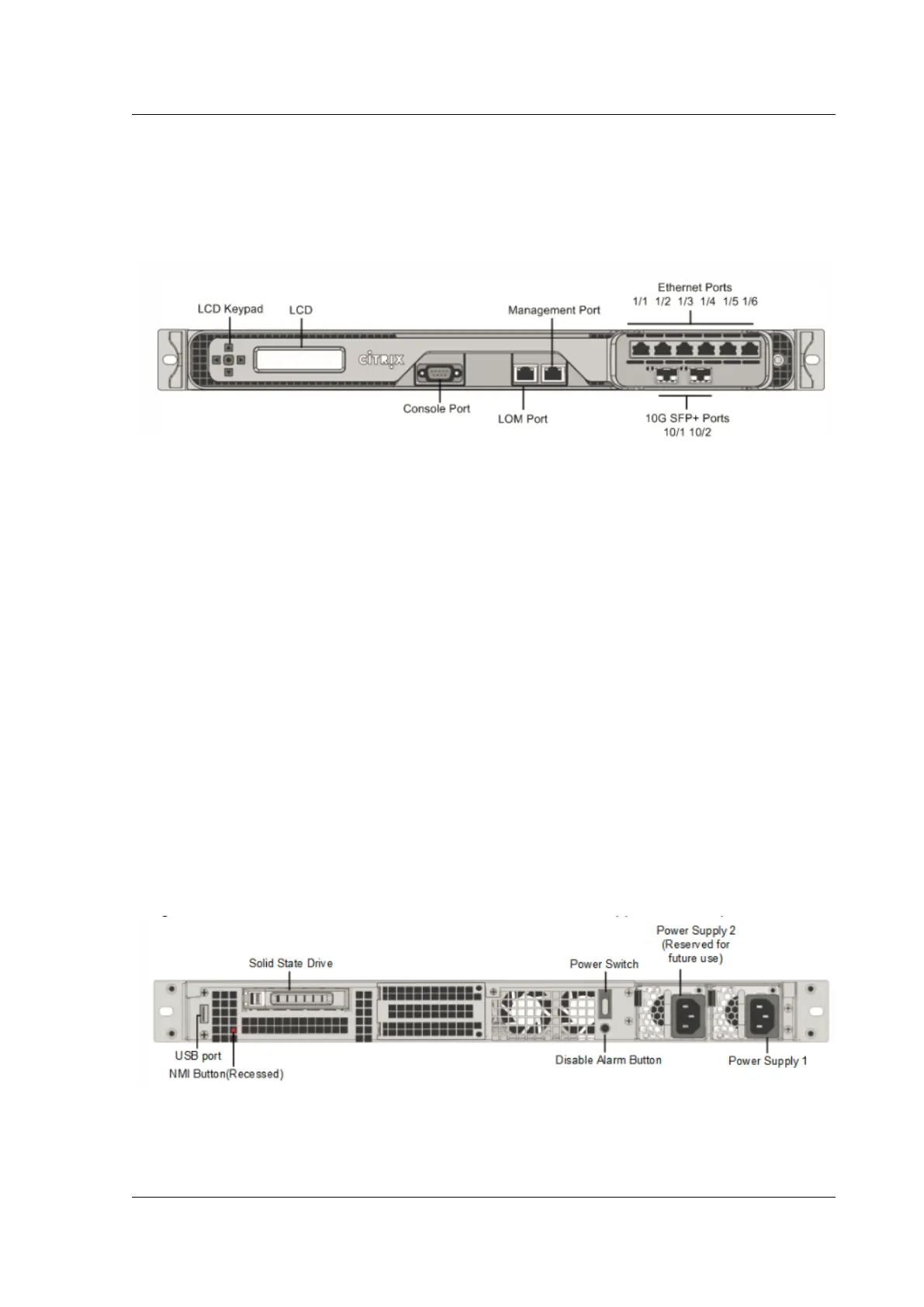
The following figureshows the front panel of the MPX 8005/8015/8200/8400/8600/8800(6x10/100/1000Base-
T copper Ethernet ports + 2x10G SFP+) appliance.
Figure 2. Citrix ADC MPX 8005/8015/8200/8400/8600/8800 (6x10/100/1000Base-T copper Ethernet
ports + 2x10G SFP+), front panel
Depending on the model, the appliance has the following ports:
• RS232 serial console port.
• One 10/100Base-T copper Ethernet Port (RJ45), also called LOM port. You can use this port to
remotely monitor and manage the appliance independently of the Citrix ADC soware.
• One 10/100/1000Base-T copper Ethernet management port (RJ45), numbered 0/1. The manage-
ment port is used to connect directly to the appliance for system administration functions.
• Network Ports
– MPX 8005/8015/8200/8400/8600/8800 (6x10/100/1000Base-T copper Ethernet ports +
6x1G SFP). Six 10/100/1000BASE-T copper Ethernet ports (RJ45) numbered 1/1, 1/2, 1/3,
1/4, 1/5, and 1/6 on the top row from le to right, and six 1-gigabit copper or fiber 1G SFP
ports numbered 1/7, 1/8, 1/9, 1/10, 1/11, and 1/12 on the bottom row from le to right.
– MPX 8005/8015/8200/8400/8600/8800 (6x10/100/1000Base-T copper Ethernet ports +
2x10G SFP+). Six 10/100/1000BASE-T copper Ethernet ports (RJ45) numbered 1/1, 1/2, 1/3,
1/4, 1/5, and 1/6 on the top row from le to right and two 10-gigabit SFP+ ports numbered
10/1 and 10/2 on the bottom row from le to right.
The following figure shows the back panel of the MPX 8005/8015/8200/8400/8600/8800 appliance.
Figure 3. Citrix ADC MPX 8005/8015/8200/8400/8600/8800 appliance, back panel
The following components are visible on the back panel of the MPX 8005/8015/8200/8400/8600/8800
appliance:
© 1999-2019 Citrix Systems, Inc. All rights reserved. 35



 To Next Page
 Loading...

