Citrix ADC MPX
• 10/100Base-T copper Ethernet Port (RJ45), also called the LOM port. You can use this port to
remotely monitor and manage the appliance independently of the Citrix ADC soware.
• Two 10/100/1000Base-T copper Ethernet Management Ports (RJ45), numbered 0/1 and 0/2 from
le to right. These ports are used to connect directly to the appliance for system administration
functions.
• Network Ports
– MPX 22040/22060/22080/22100/22120 (12x1G SFP + 24x10G SFP+). Twelve copper or fiber
1G SFP ports and twenty-four 10G SFP+ ports.
– MPX 22040/22060/22080/22100/22120 (24x10G SFP+). Twenty-four 10G SFP+ ports.
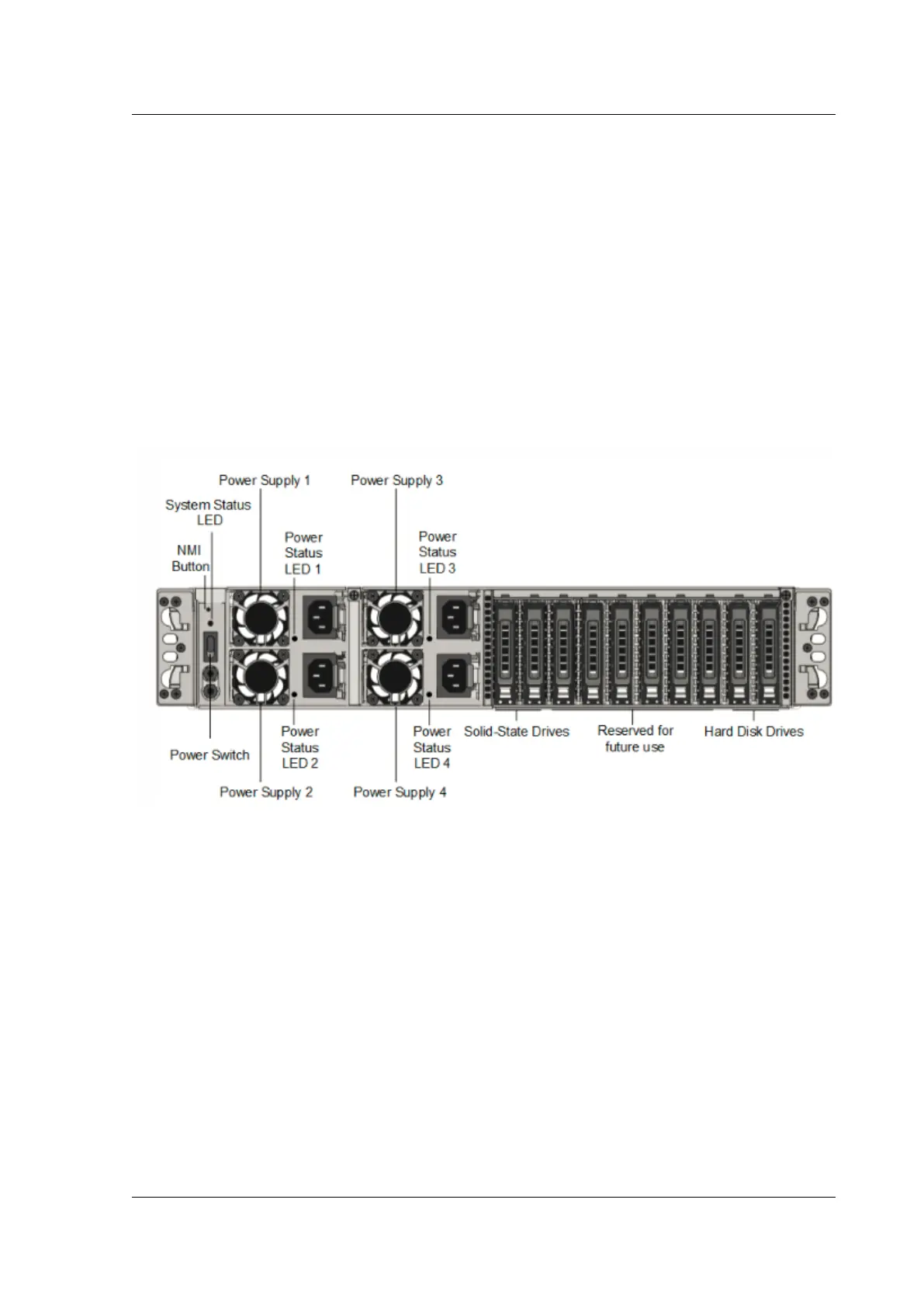
The following figure shows the back panel of the MPX 22040/22060/22080/22100/22120 appliances.
Figure 3. Citrix ADC MPX 22040/22060/22080/22100/22120, back panel
The following components are visible on the back panel of the MPX 22040/22060/22080/22100/22120
appliance:
• Non-maskable interrupt (NMI) Button, used at the request of Technical Support to initiate a core
dump. To press this red button, which is recessed to prevent unintentional activation, use a pen,
pencil, or other pointed object. The NMI Button is also available remotely over the network in
the LOM GUI, in the Remote Control menu. For more information, see Lights out management
port of the appliance topic.
• System status LED, which indicates the status of the appliance, as described in Common hard-
ware components.
Note: On an MPX 22040/22060/22080/22100/22120 appliance running LOM firmware version 3.22, the
system status LED indicates an error (continuously glows RED) even though the appliance is function-
ing properly.
© 1999-2019 Citrix Systems, Inc. All rights reserved. 65



 To Next Page
 Loading...

