EasyManua.ls Logo

Codonics Virtua - Controller and Recorder Components

Codonics Virtua
210 pages
Print Icon
To Next Page IconTo Next Page
To Previous Page IconTo Previous Page
Loading...
Codonics Virtua User’s Manual 2-5
Setting Up the Hardware
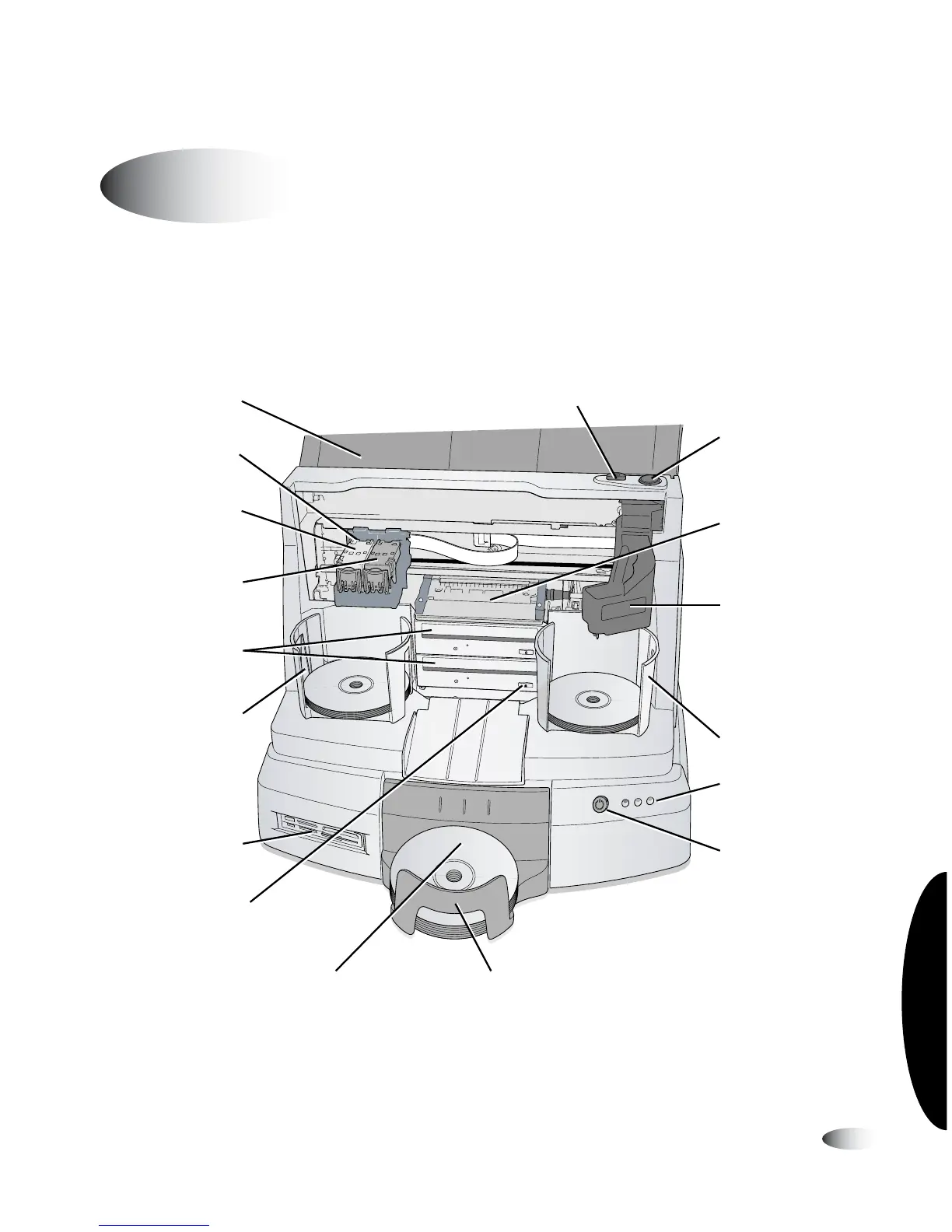
Controller and Recorder Front Components
The following illustration shows the components at the front of the
Controller and Recorder, and inside the Recorder.
Controller and Recorder front components
Identifying the Parts
Cover
Ink cartridge
carrier
Monochrome
black ink
cartridge
(not used)
CD/DVD
recorders
Recorder Tray
button
Input bin
Output bin
Input bin
Robotic disc
transporter
Ink Cartridge Load
button
Recorder soft
power button
(not used)
SmartDrive USB port
(behind output bin)
Status
indicators
Controller soft
power button
Color ink
cartridge
Printer tray
Flash card
reader/USB-2 port

Table of Contents

Other manuals for Codonics Virtua

Related product manuals