MULTICONTROL PANEL
73
Comau Robotics Product Instruction
5.2.7.5 Virtual Enabling Device
This virtual key simulates the real Enabling Device (existing on the TP5 rear side) and
must be “kept pressed” to allow the robot motion.
It can be used in Programming state (Progr) only.
When the Enabling Device is pressed, the use of the Virtual State Selector is not
allowed.
As for the real Enabling Device, it can be pressed and released. Pressing and releasing
can be simulated by means of the mouse keys, regardless whether right
or left. Each
time this virtual key is clicked, the current state is switched and the new state is kept.
5.2.8 Settings
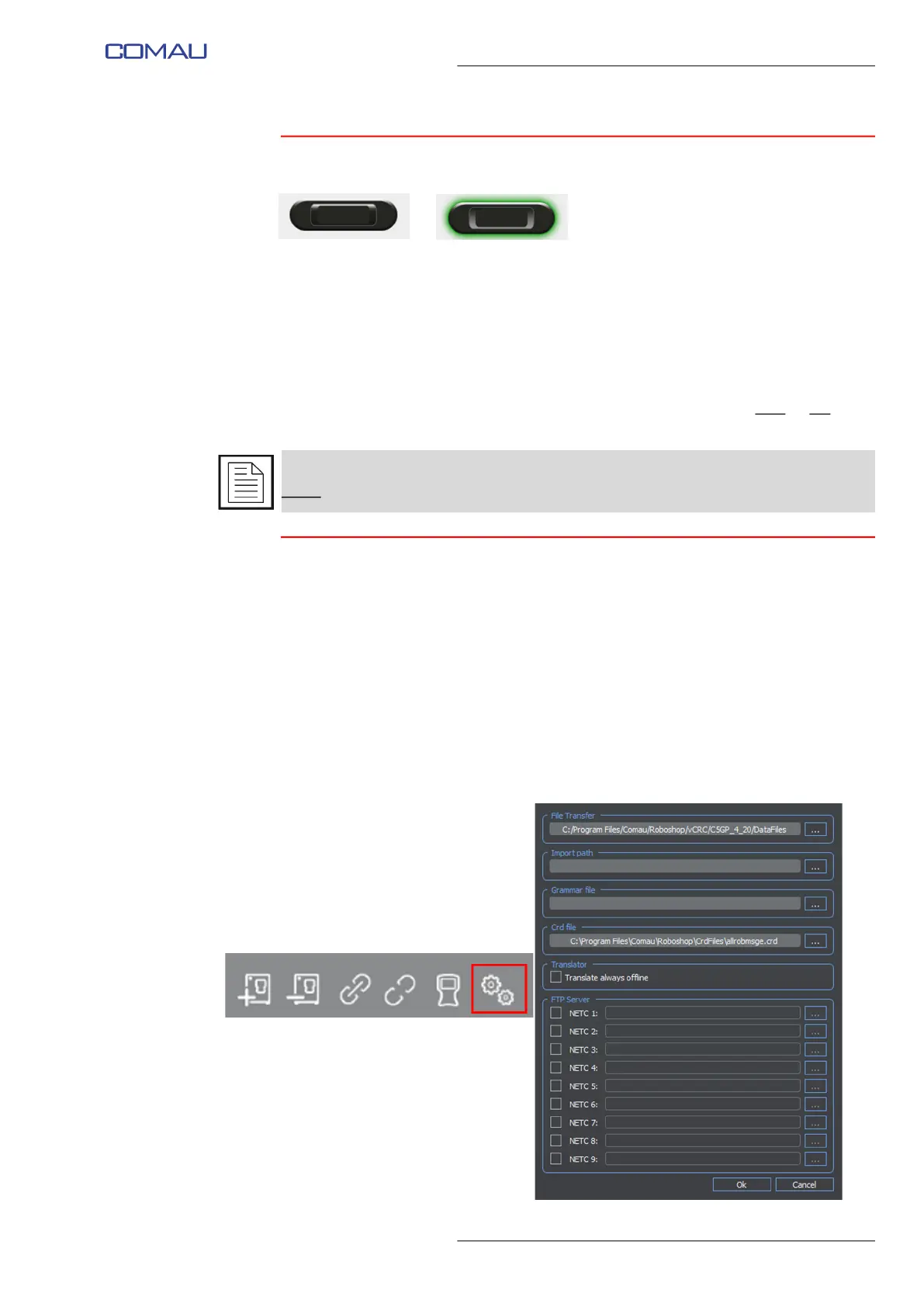
This command allows accessing the following settings. Click Ok to save settings and
close.
– File Transfer - files transer folder
– Import path - path search directory for declarations including the IMPORT clause
– Grammar file - directory including the NODAL syntax file
– Crd file - adding/removing .crd files
– Translator - setting related to the PDL2 programs offline translation
– FTP Server - connecting Roboshop and Control Units in FTP Server modality.
As shown in the previuos figures, the virtual enabling device press is represented in
green
.



 To Next Page