MULTICONTROL PANEL
65
Comau Robotics Product Instruction
– Remove node
– Connect
– Disconnect
– Teach Pendant
– Settings.
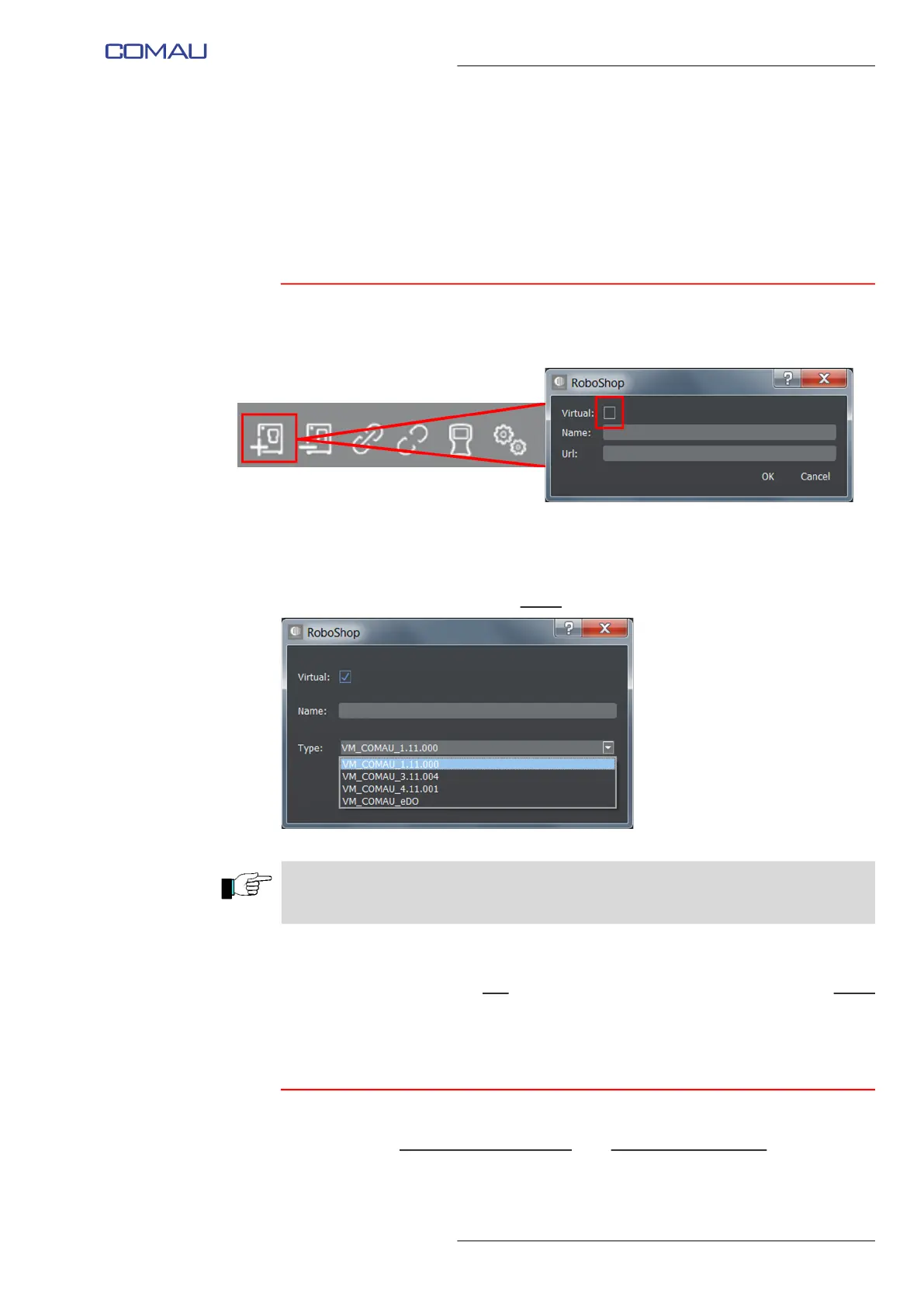
5.2.1 Add new node
It allows adding a new Node, i.e. a new Control Unit, to the Controllers folder.
In the displayed window, the following information must be supplied:
– Virtual - this checkbox is only available with complete licence .
Refer to par. 2.5 How to get a full licence for RoboShop on page 23 to acquire it.
Select the checkbox to add a virtual
Control Unit.
– Name - name to identify the being added Control Unit
– Url / Type - if adding a real
Control Unit, specify the IP address (Url); if a virtual
Control Unit is to be added, instead, open the Type menu, as shown in the figure
above, and choose the wished type.
Click OK to confirm.
5.2.1.1 Operational notes for using a Virtual Control Unit
A Virtual System activated for the first time, is in minimum configuration, i.e. in a default
configuration in which neither arms nor auxiliary axes are specified; in such a situation,
act as follows.
In case of Virtual Control Unit, carefully follow the Operational notes for using a Virtual
Control Unit.



 To Next Page