ROBOT HANDLING, ASSEMBLY AND FIRST START
19
Comau Robotics Product Instruction
3.2 Removal of the Robot from the packaging
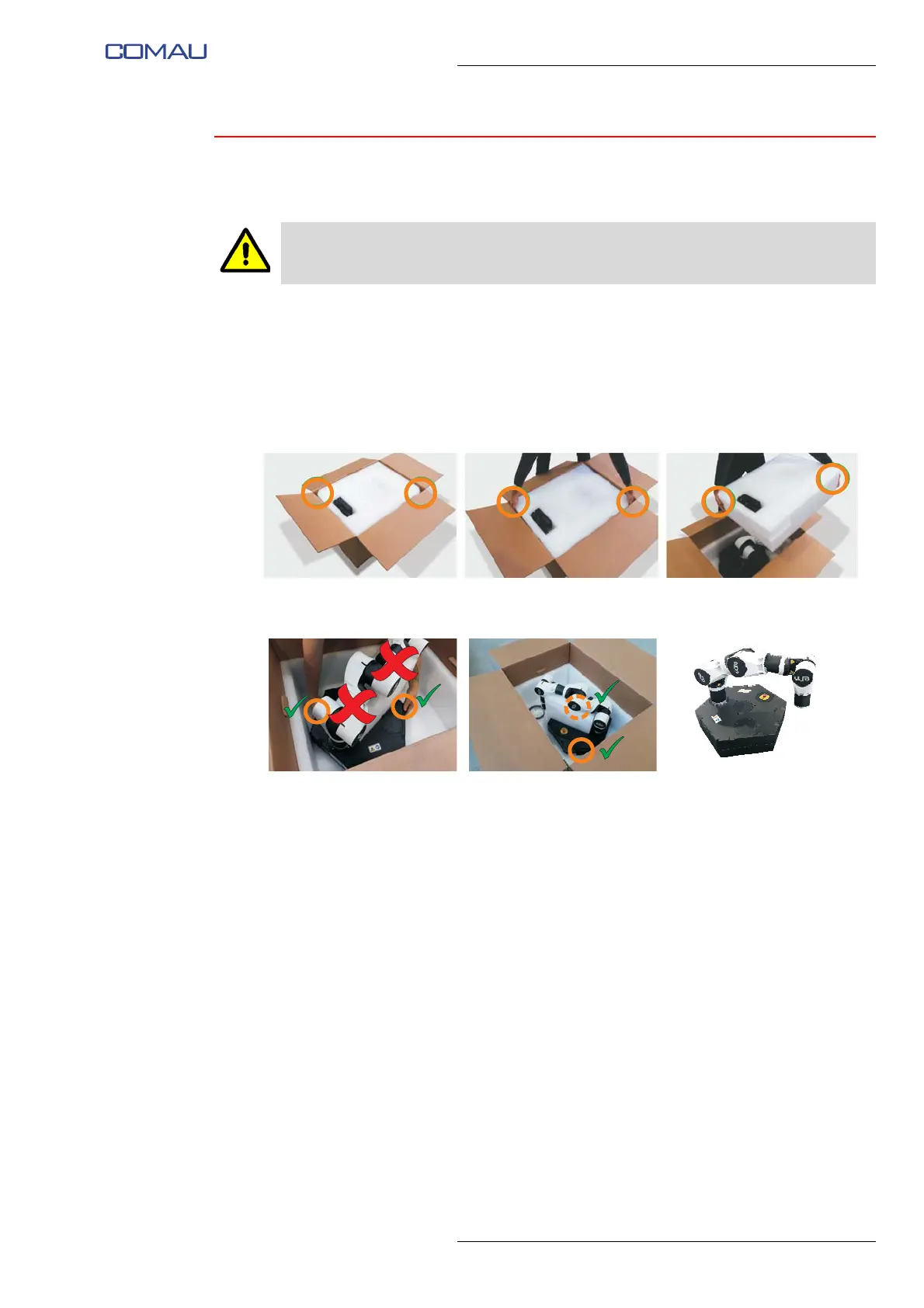
To remove the Robot from the box inside which it is packed and transported, proceed
as follows:
– open the box from the upper side, operating carefully to avoid damaging the
components inside the box;
– remove the upper layer of expanded polyethylene packaging using the 2 corners
shown in the figure as gripping points;
– remove e.DO by grasping it by the base as shown in the figure; do not grasp e.DO
by the rest of the structure to avoid possible damage;
– after removing the packaging, check that the Robot does not show signs of
damage during transport; if it does, do not install the Robot and contact the Comau
Service Centre (https://edo.cloud/support-and-contacts/);
– verify that all the components of the Robot are correctly and permanently fixed and
that there are no wobbly parts or elements;
– check that the power supply and cables provided are intact and do not show
damage, cuts, fraying, etc.
Do not handle the Robot and perform the installation working with wet or damp hands
or feet.





 To Next Page