52
If the Self-ignition function is selected:
CONFIGURE SELF-IGNITION
Not assigned
Not assigned
Not assigned
Not assigned
Not assigned
Not assigned
Edit
1. Press the button.
2. Press
to activate the function.
Left Right
CONFIGURE SELF-IGNITION
Active:
Automatic camera
Camera number
ViP address
0 0 0 0 0 0 0 0
1
3. Select the elds which can be changed using , and change the
value using , or .
If the Alarm function is selected:
1. Select the type of call you wish to assign to the button using
,
and press
to con rm.
Alarms
Alarm
Panic
Fire
Priority call 4
For call con guration, see page 54.
If you press the button a priority call will be sent to the con gured VIP
address.
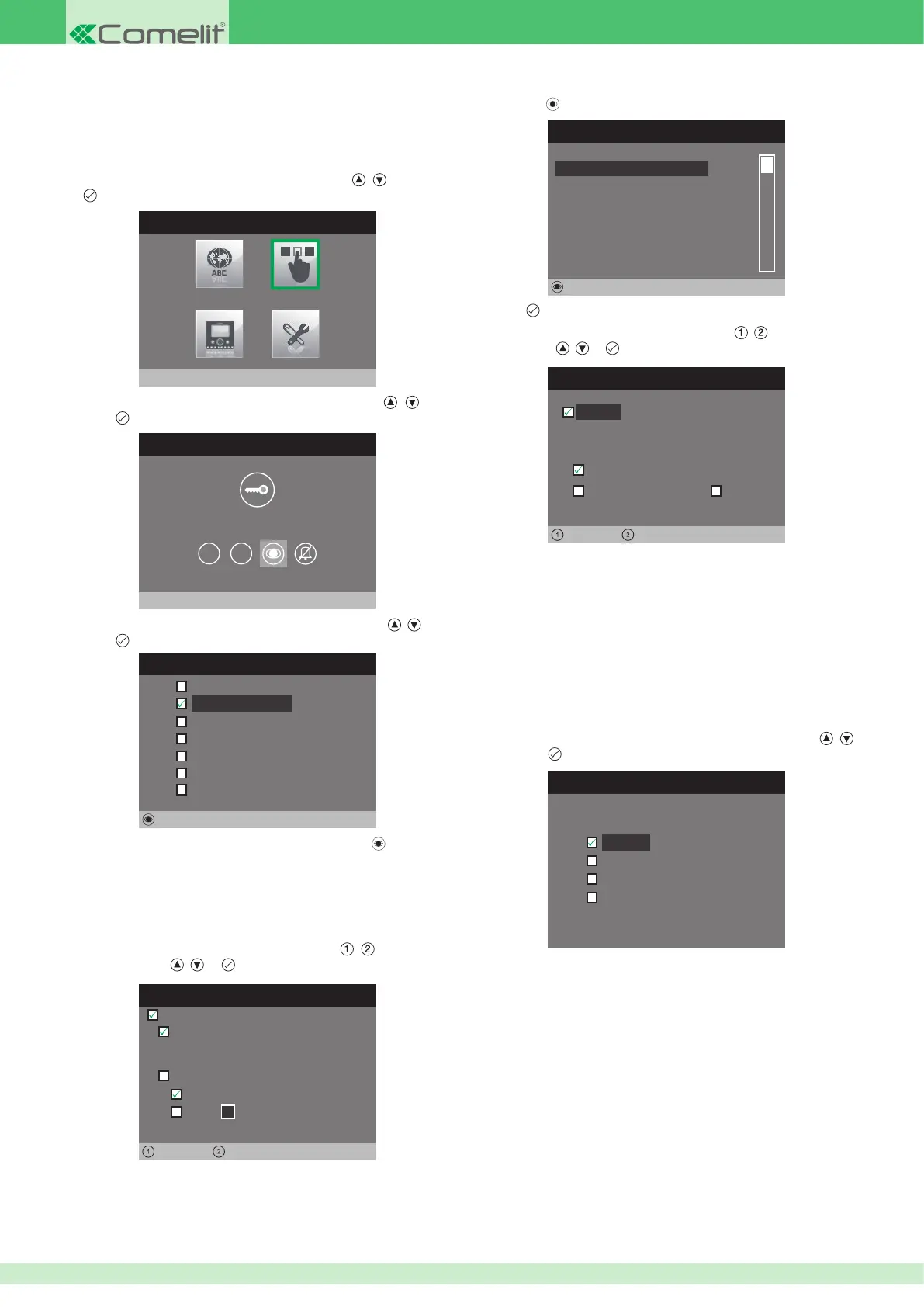
• Con guring 1 - 2 or Self-ignition buttons
1. Access the installer menu.
2. Select the Con gure buttons menu by pressing
, and press
to access it.
INSTALLER MENU
Configure buttons
3. Select the Con gure Self-Ignition menu by pressing , and
press to access it.
BUTTON PROGRAMMING MENU
Configure Self-Ignition
1 2
CONFIGURE SELF IGNITION
Intercom
Self-ignition
Alarms
Edit
Lock-release
Actuator
Activate output
Function disabled
4. Select the function you wish to assign to the button using , and
press
to con rm.
5. Once the desired function has been selected, press
to change
the settings.
If the Intercom function is selected:
CONFIGURE VIP ADDRESS
0 0 0 0 0 1 0 1
ViP address:
Left Right
Slave
Master
Backplate:
1
Active:
Select the elds which can be changed using , and change
the value using , or .
• The VIP address function determines the address of the internal unit
to be called once the button is pressed.
• The Backplate function determines whether to call the main or
secondary internal unit with the same VIP address.
1 - 2 and Self-ignition buttons are programmed in the same way and
can perform the same functions. The programming procedure, which
applies to all 3 buttons, is described below.
•
The VIP address function determines the address of the external
unit or remote camera module Art. 1445.
•
Select the Automatic camera function to link the camera for external
unit Art. 4662C.
•
Select the Camera number function and enter the input number
from the 4 available when using a remote camera module Art. 1445.












 To Next Page