53
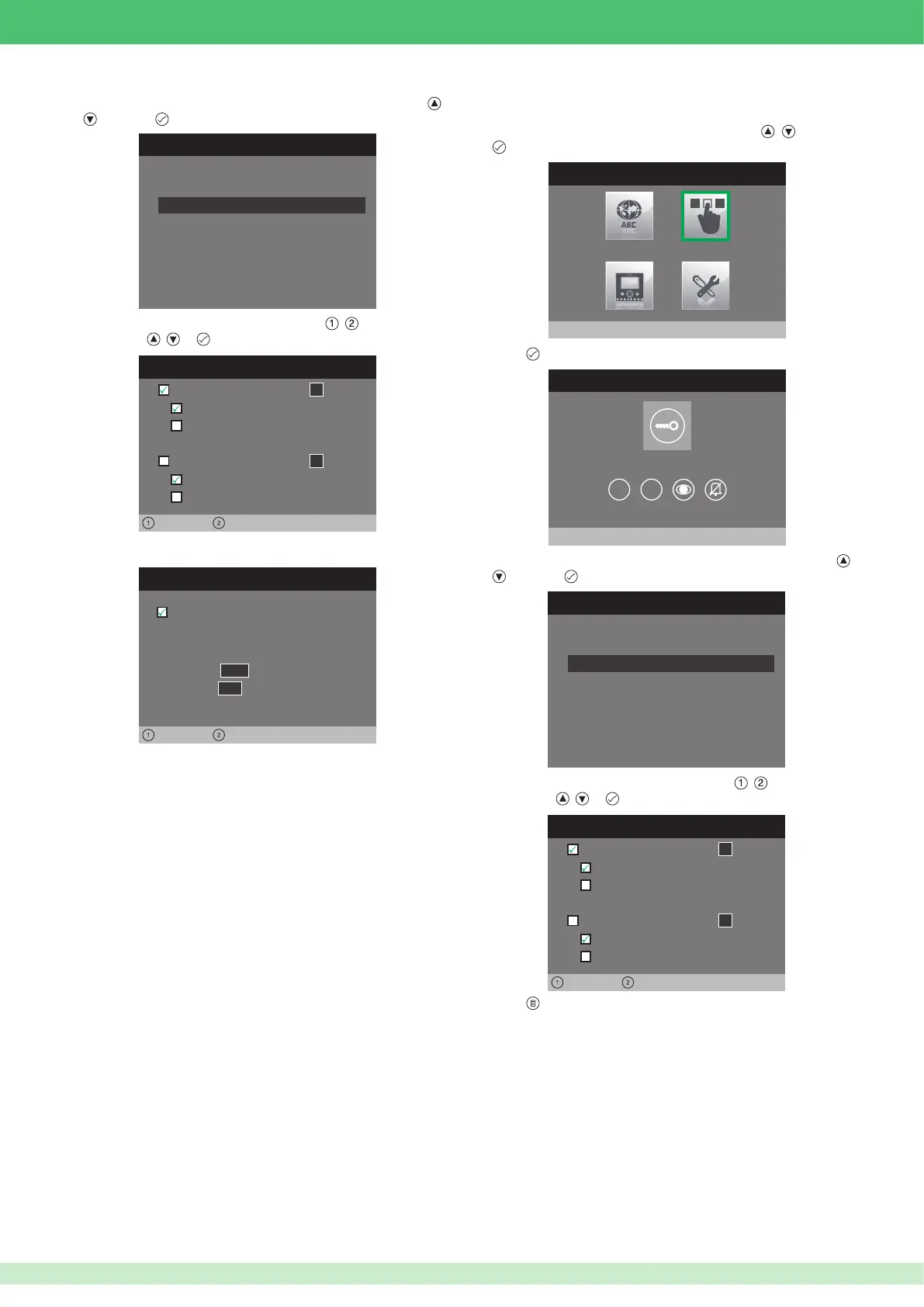
If the Lock-release function is selected:
1. Select the mode for which you wish to change the function using
,
and press to con rm.
CONFIGURE RELAY
Configuration at rest time
Configuration during call
2. Select the elds which can be changed using , and change the
value using , or .
RELAY DURING CALL
Door 0 0 0 0 0 0 0 0
Interlocutor
Active:
Left Right
Relay
1
Door 0 0 0 0 0 0 0 0
Interlocutor
Active:
Relay
1
• Con guring the key button
1. Access the installer menu.
INSTALLER MENU
Configure buttons
2. Select the Con gure buttons menu by pressing , and press
to access it.
3. Press
to access it.
CONFIGURE BUTTONS
Configure key button
1 2
4. Select the mode for which you wish to change the function using ,
and press to con rm.
CONFIGURE RELAY
Configuration at rest time
Configuration during call
5. Select the elds which can be changed using , and change the
value using , or .
RELAY DURING CALL
Door 0 0 0 0 0 0 0 0
Interlocutor
Active:
Left Right
Relay
1
Door 0 0 0 0 0 0 0 0
Interlocutor
Active:
Relay
1
6. Press to exit and save the changes.
0 0 0 0 0 1 0 1
ViP address:
Output
Module
255
Active:
0 1
If the Actuator function is selected:
• The VIP address e l d i d e n t i e s a c t u a t o r m o d u l e A r t . 1 4 4 3 .
• In the Module e l d , s e l e c t w h e t h e r t o a c t i v a t e t h e r e l a y s o n b o a r d
the module (255) or those on the expansion module Art. SK9071
connected to it (1 to 10).
• In the Output e l d , s e l e c t t h e r e l a y y o u i n t e n d t o a c t i v a t e . 1 or 2 if
you enter 255 in the module eld. 1 to
10 if you enter an expansion
module in the module eld.
If the Activate Output function is selected:
The button will control an NC/NO output which can be programmed as
monostable or bistable.
For output con guration, see page 56.












 To Next Page