67
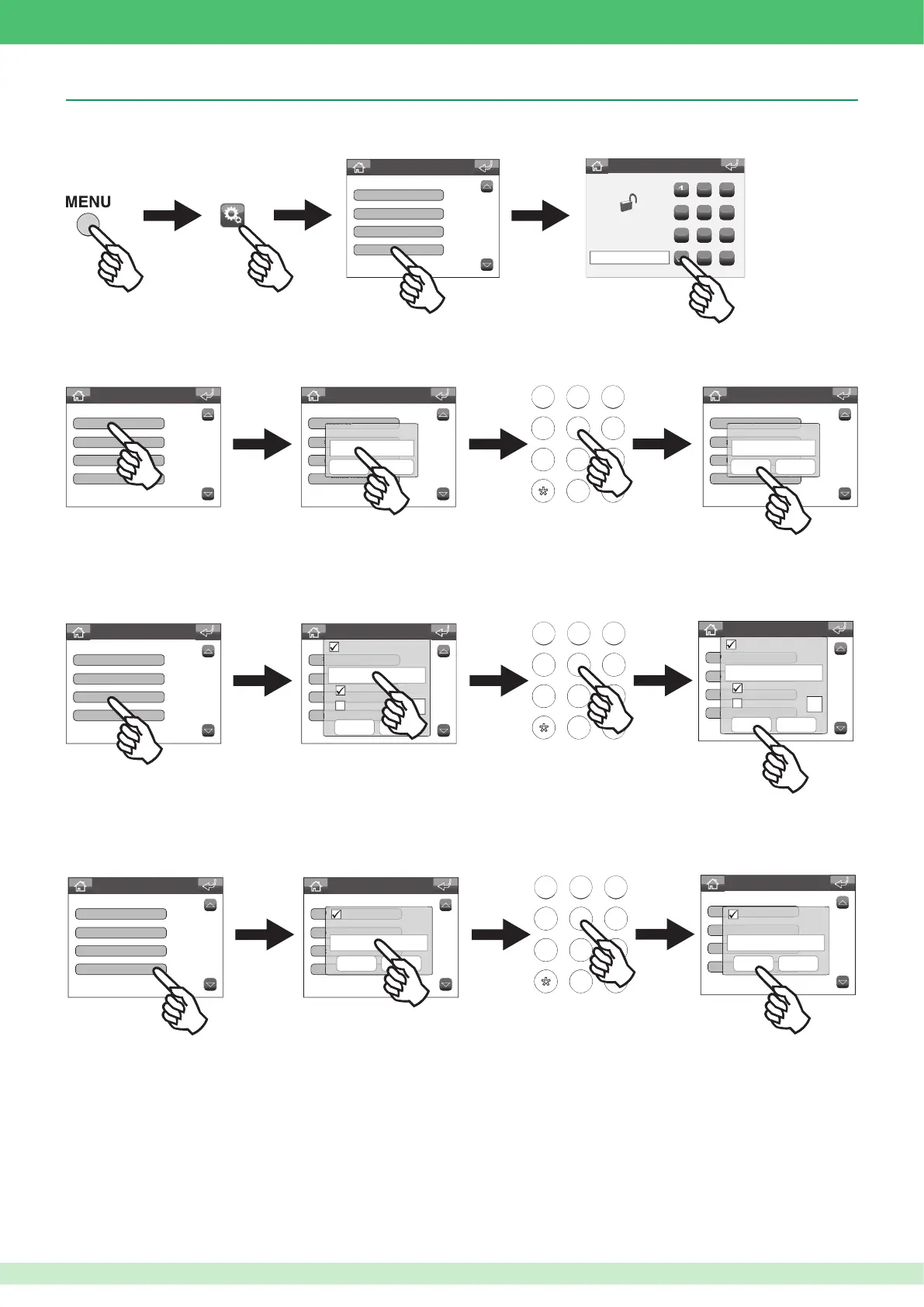
• Accessing the installer menu
Settings menu
Door open
Calibration
Short cut keys
Advanced
1
PASSWORD:
2 3
4
5 6
7
8 9
0
C
Enter password
****
• Setting the VIP Address
Advanced Settings
ViP address
About
Associated camera
Associated video output
Advanced Settings
ViP address
About
Associated camera
Associated video output
ViP address
Confirm Cancel
Advanced Settings
ViP address
About
Associated camera
Associated video output
ViP address
Confirm Cancel
00000001
456
789
456
789
0#
ABC DEF
MNOJKLGHI
WXYZTUVPQRS
• Setting the associated camera
Advanced Settings
ViP address
About
Associated camera
Associated video output
Advanced Settings
ViP address
About
Associated camera
Associated video output
456
789
456
789
0#
ABC DEF
MNOJKLGHI
WXYZTUVPQRS
Active:
Confirm Cancel
Camera ViP address
Automatic camera
Camera number
Advanced Settings
ViP address
About
Associated camera
Associated video output
Active:
Confirm Cancel
Camera ViP address
Automatic camera
Camera number
00002001
• Setting the associated video output
Advanced Settings
ViP address
About
Associated camera
Associated video output
Advanced Settings
ViP address
About
ssociated camera
Associated video output
456
789
456
789
0#
ABC DEF
MNOJKLGHI
WXYZTUVPQRS
Active:
Confirm Cancel
Video output ViP address
Advanced Settings
ViP address
About
Associated camera
Associated video output
Active:
Confirm Cancel
Video output ViP address
00003001
Porter switchboard Art. 1952
This function can be used to associate a camera with the switchboard, via module Art. 1445. The images from this camera will be displayed on the
internal unit monitor during the conversation.
This function should be used in conjunction with the previous function (Associated camera). If the VIP address of an IP/PAL module Art. 1446 on the connected
monitor is set to the same as the latter, the images from the associated camera will be displayed when the switchboard enters conversation mode.












 To Next Page