UGE048/1103 CSC Combination Puller/Cutter
I
NSTALLATION 3-7
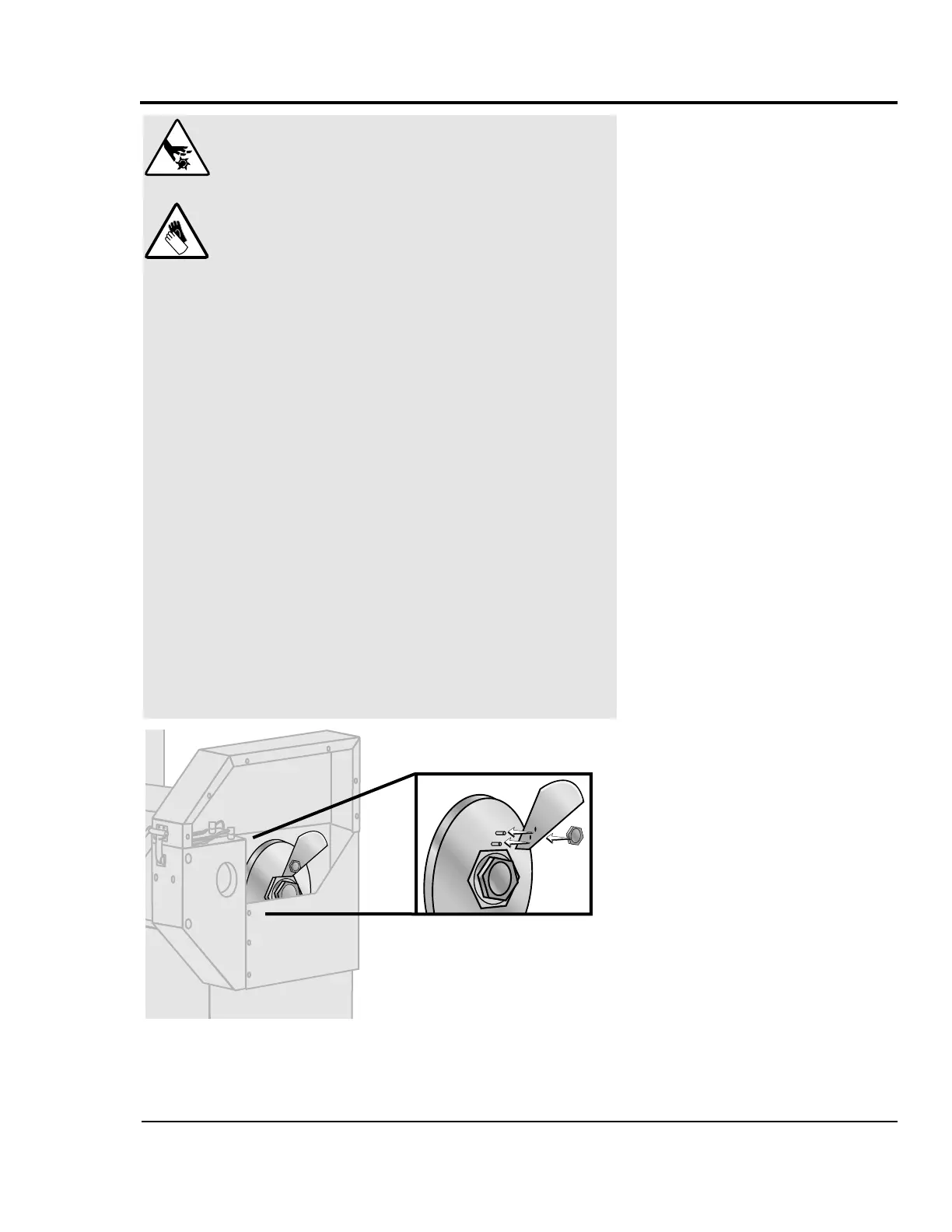
For on-demand cutting, mount the blade at the “on-demand”
position stamped on the cutter head.
For more information about choosing the appropriate blade
for your material, see the Appendix B.
INSTALLING THE
CUTTER
BLADES
DANGER: Sharp blades!
Most injuries caused by knife blades occur
when the cutter has been turned off. Handle
blades with care at all times.
● Always wear cut-resistant gloves when the
cutting chamber is open and when handling
blades.
● Always lock out power to the cutter before
opening the cutting chamber.
● Always wait until the cutter head has com-
pletely stopped before opening the knife
guard.
Combination puller/cutters are equipped with
several safety devices to ensure safe opera-
tion. Never remove or disable these devices to
sustain production. Operating without these
devices can cause severe injury.
● When the knife guard is opened, the knife
guard switch stops the cutter.
● Two proximity-type safety switches prevent
operation unless the cutter bushings are in
place.
● The Cutter Stop button activates a circuit
that stops the cutter head.
Attach blade to cutter head
with blade screw.


 To Next Page