OPERATION 4-19
UGE048/1103 CSC Combination Puller/Cutter
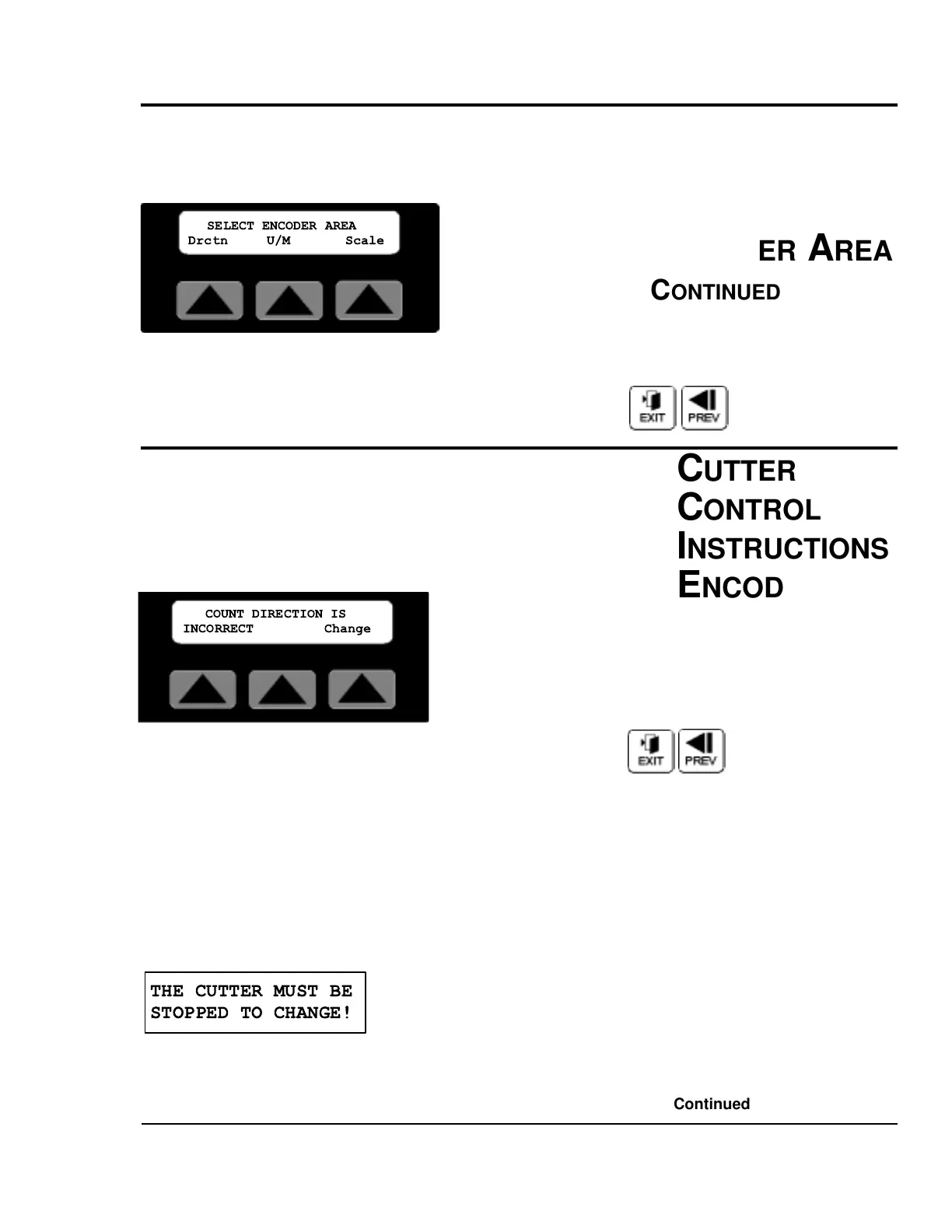
Encdr Softkey
By pressing the soft key located under the word Encdr on the
Maint. Area Screen, there are three sub-menus, Drctn, U/M,
and Scale accessible. Additional information on how
to access this screen can be found in the Maintenance Area of
the operator display overview section of this manual.
Exit or Prev, Pressing Exit or Prev will return the display to
the Maint. Area screen.
DIRECTION SOFTKEY
By pressing the soft key located under the word Dirctn on the
Encdr. Area Screen, the direction of the encoder rotation can
be changed. Located on the lower left side of the display is the
status text (INCORRECT/CORRECT) for the encoder direc-
tion.
Exit or Prev, Pressing Exit or Prev will return the display to
the Encoder Area screen.
Change Softkey
With the machine stopped, by pressing the soft key located
under the word Change. The direction of the encoder is
reversed. After the change if the count direction is positive, the
status text will now display the word CORRECT.
Attempting to change the encoder direction with the cutter
running will result in the following message.
This message will be displayed for 3 seconds or until any key
is pressed. Press stop on the operator panel then try again.


 To Next Page