Product Views
Operator’s Manual 11
2.4 Product Views
2.4.1 Front Panel and Display Components
Front and Side Panels
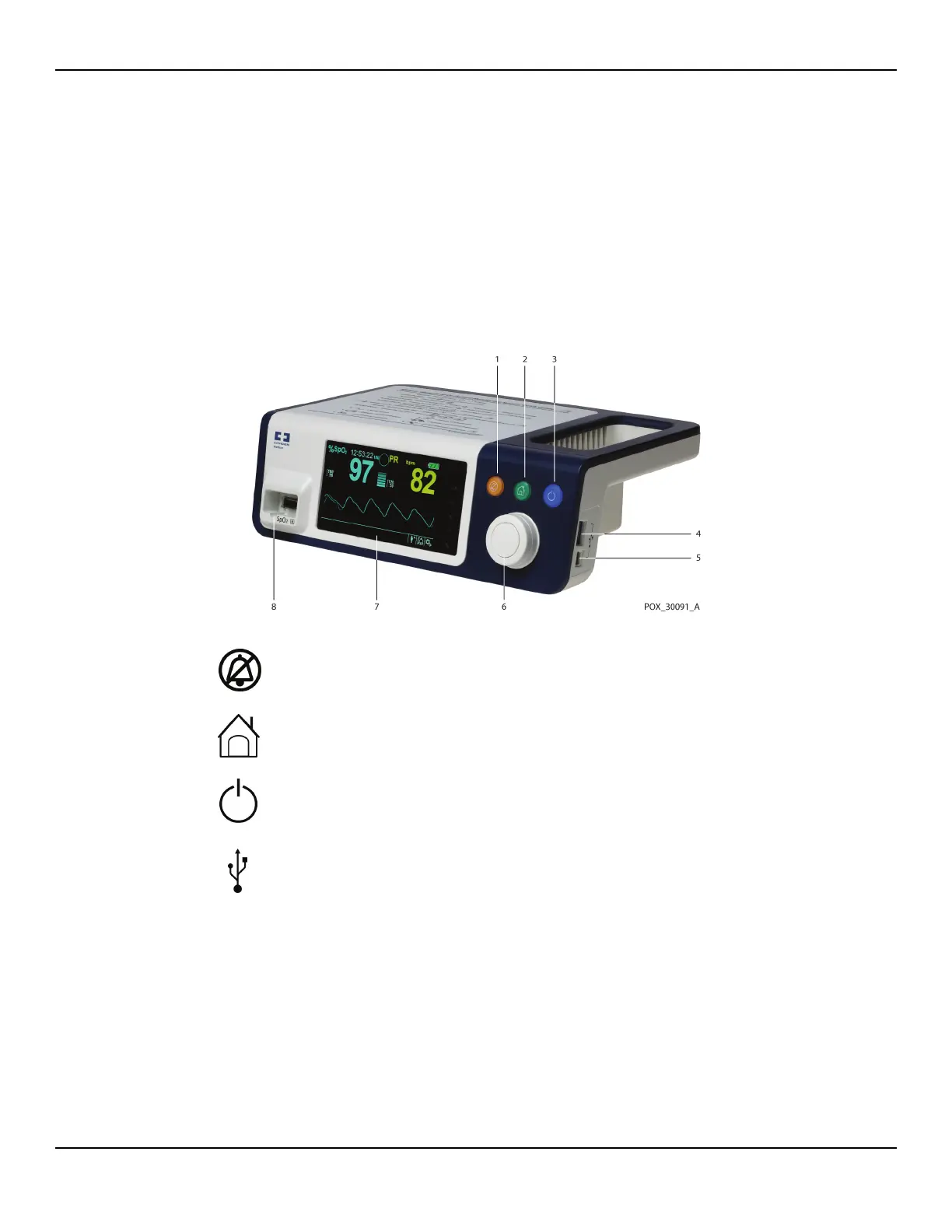
Figure2-1. Front and Side Panel Components
1 Alarm Audio Paused
button
Press to toggle between disabling and re-enabling the
audible alarm. Reference Menu Options Navigation, p.
4-28.
2 Return button Press to exit a menu displayed on the screen and go to
the main screen. Reference Menu Options Navigation,
p. 4-28.
3 Power On/Off button
Press and hold to turn on or off the monitoring
system
, using AC power or Lithium-ion batteries. Ref-
erence Menu Options Navigation, p. 4-28.
4 USB port (USB A type) Use USB interface for firmware upgrades.
5 USB port (mini USB B type) Use mini-USB interface for trend data downloads.
6 Jog dial
Use to navigate and control of display and monitoring
system functions.
7 LCD display panel Use to monitor all graphic and numeric patient infor-
mation as well as status conditions and warning mes-
sages.
8 SpO
2 connector
Use to connect to the interface cable and SpO
2 sensor.















 To Next Page