Product Manual – DOC. 8432A Crestron Pyng OS 2 for CP4-R • 69
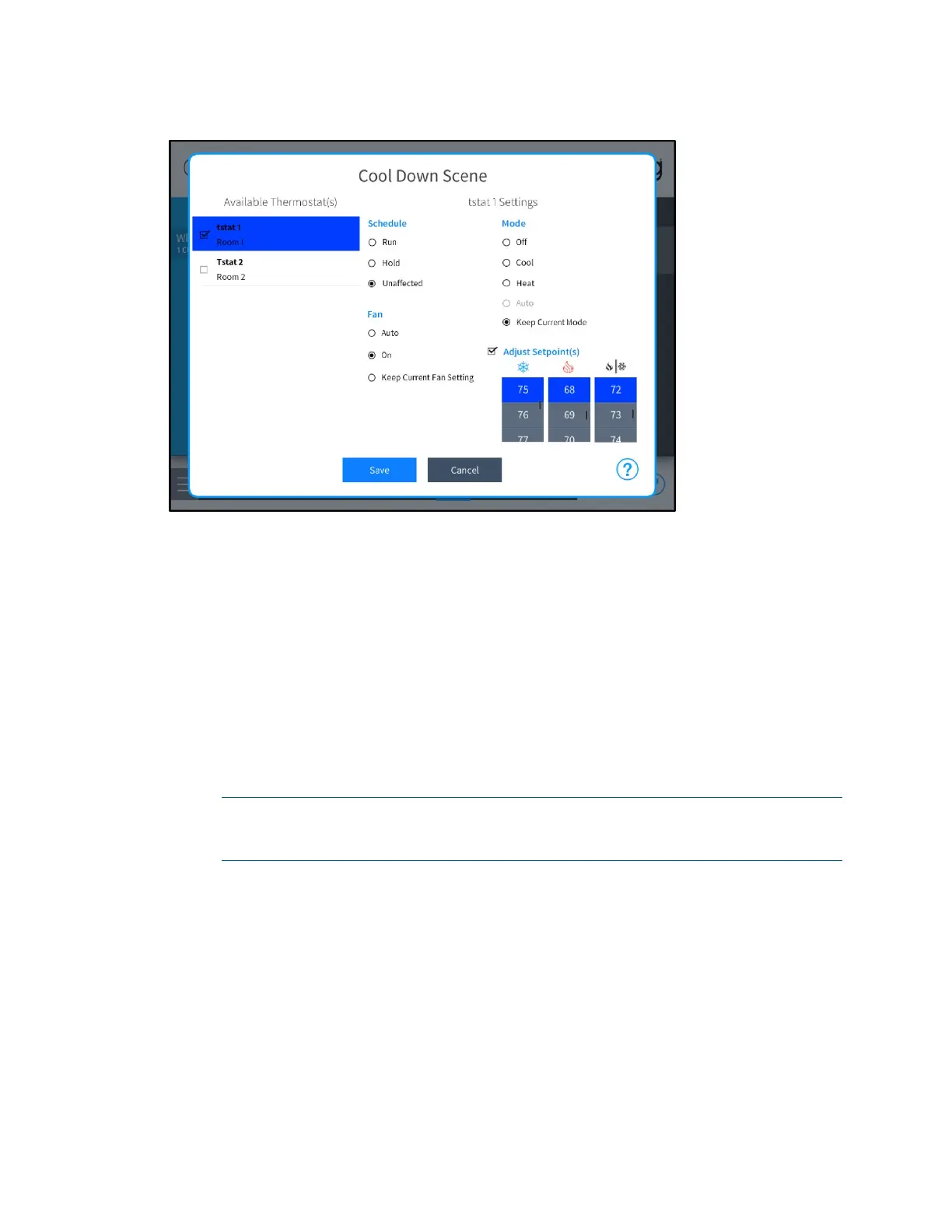
Cool Down Scene Dialog Box
The following settings may be configured for each climate scene:
• Available Thermostats: Tap the check box next to one or more thermostats in
the
Available Thermostat(s) menu to add the thermostats to the climate scene.
A filled check box indicates that the thermostat is added to the scene.
Tap on a thermostat to configure its behavior within the scene.
• Schedule: Select one of the following scheduling options:
o Select Run to have the scene start the thermostat schedule.
o Select Hold to have the scene stop the thermostat schedule.
o Select Unaffected to have the scene keep the current thermostat schedule.
NOTE: If the thermostat schedule is running because Run or Unaffected was
triggered by the scene, the next scheduled climate event will overwrite the
climate scene's set points.
• Fan: Select one of the following fan behavior options:
o Select Auto to have the scene run the fan automatically.
o Select On to have the scene turn the fan on.
o Select Keep Current Fan Setting to have the scene keep the current
thermostat schedule.
• Mode: Select one of the following thermostat modes:
o Select Off to have the scene turn the thermostat off.
o Select Cool to have the scene turn cooling mode on.



 To Next Page