23
Yourbicycleissuppliedwithonefront(white),onerear(red),twowheel(white),andfourpedal(orange)reflectors.These
are an important safety and legal requirements, and should remain securely fitted and in good, clean condition at all times.
Periodicallyinspectallreflectors,bracketsandmountinghardwareforsignsofwearordamage.Replaceimmediatelyif
damageisfound.Somebicycleswillrequireyoutoinstallyourreflectorsontoyourbicycle.Pleaserefertothefollowingsection
for instructions on all the types of bicycle reflectors.
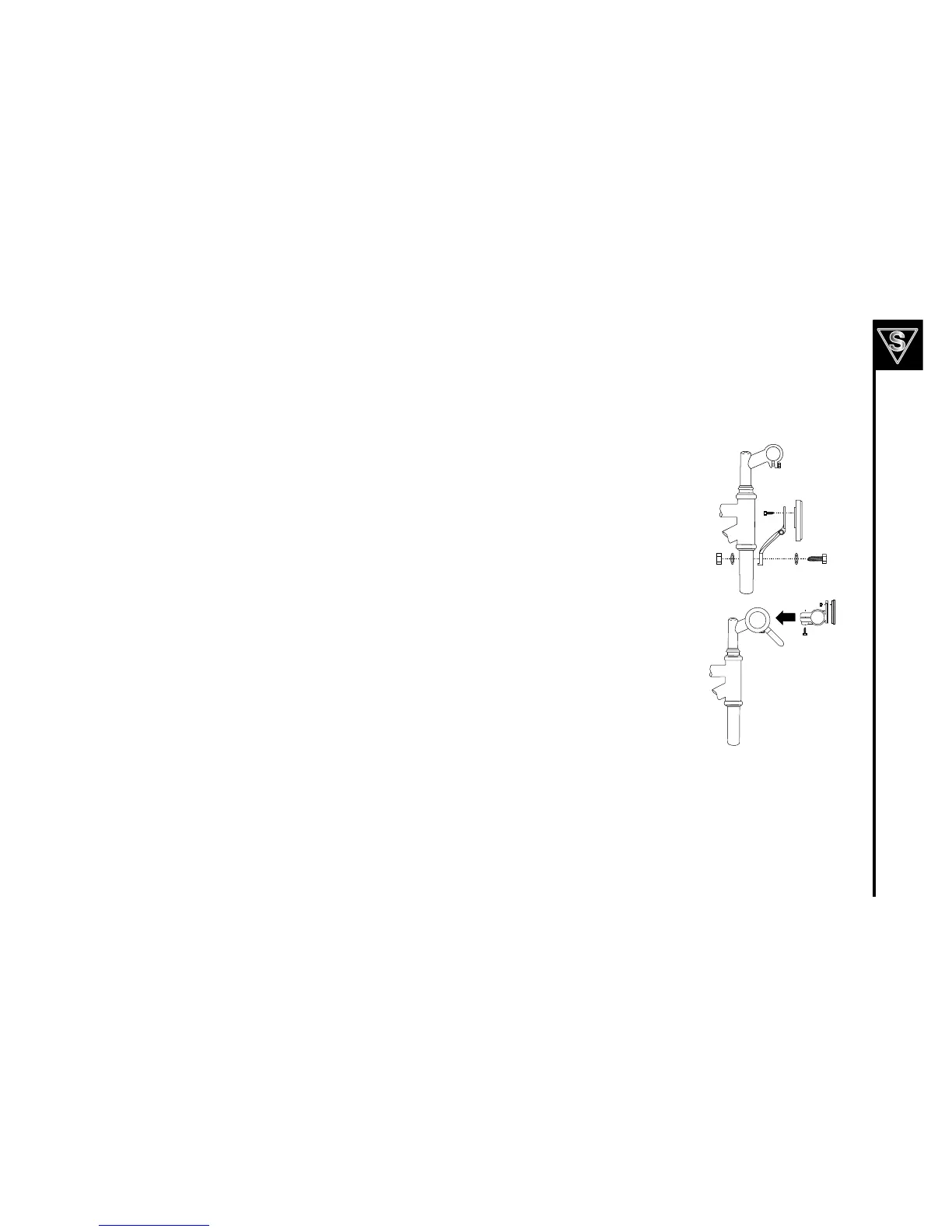
Firstinsertonewasherontothehexboltandinserthexboltthroughthereflectorbracketandthen
throughthefork.Next,insertasecondwasherontotheboltandthreadahexnutontothebolt
behindthefork.Tightenboltsuntilsnug,makingsurethereflectorisinanuprightposition.See
diagram at the right.
Firstattachthereflectortothereflectorbracketwiththereflectorscrew,ifnotalreadydone.Next,
removetheclampscrewandopenthereflectorclampbracket.Placereflectorclampbracketaround
thehandlebar.Tightentheclampscrewtoholdreflectorassemblyinplace.Finally,adjustthe
reflector assembly in place and ensure that it is upright and facing away from the bike.



 To Next Page