57
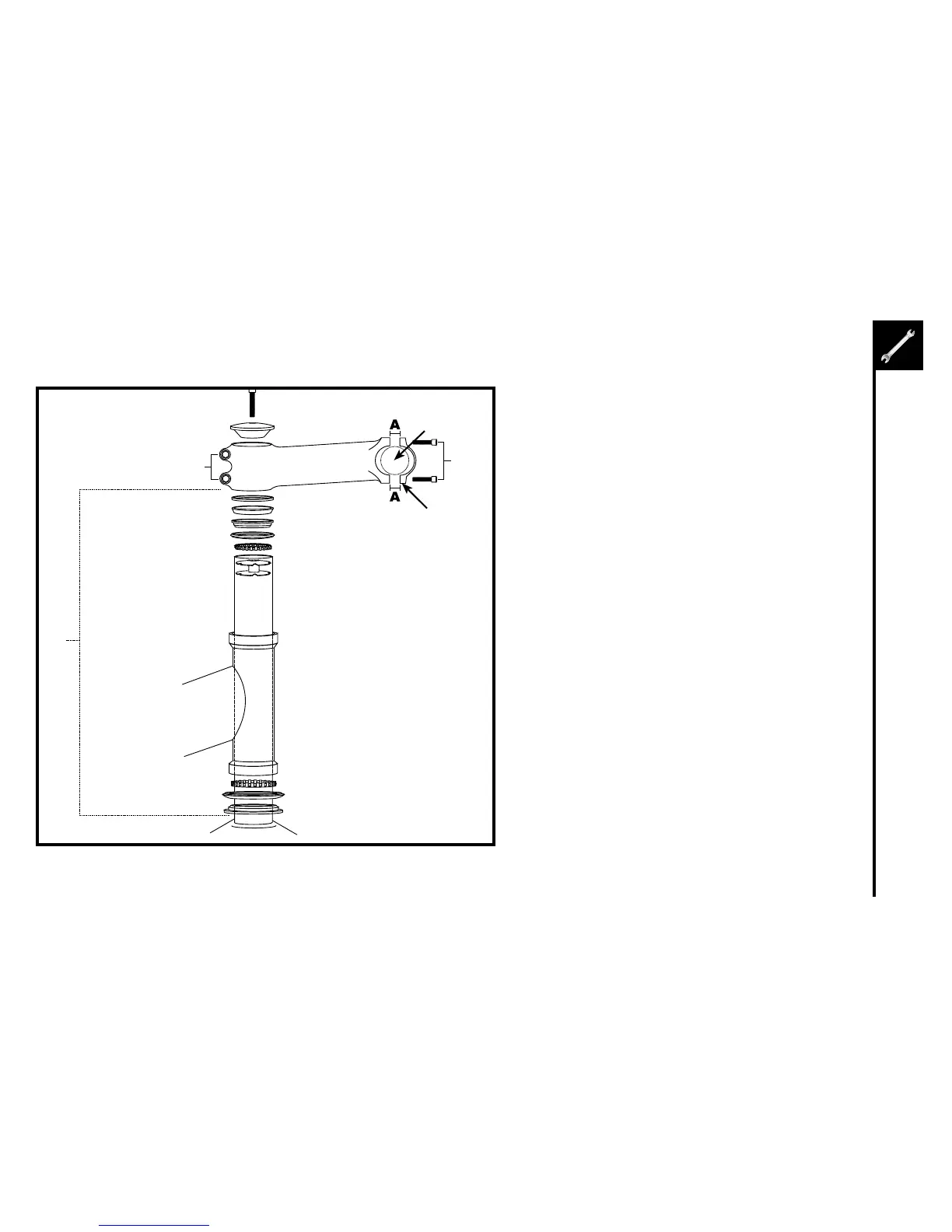
1. Insertthecompressionboltthroughthetop
cap and the stem. Begin threading into the
star nut.
2. Tightencompressionboltsoitremovesall
play from the fork, but allows the fork to rotate
smoothly.
3. Alignthestemwiththefrontwheel.Tighten
the stem clamp bolts to secure the stem to the
steerer tube.
1. Removethestemcapboltsandstemcap.
2. Inserthandlebarintothestemcap.
3. Tightenthestemcapboltsequally.Notethe
distancebetweenthestemandstemcap"A"
should be equal on the top and bottom of the
stem cap.
Installed
by
factory
Compression Bolt
Top Cap
StemClampBolts
Spacer
Headset Wedge
BearingRace
BearingDustCover
BearingRetainer
StarNut
(InsideSteererTube)
UpperHeadsetCup
Headtube
LowerHeadsetCup
BearingRetainer
BearingDustCover
HeadsetCrownRace
Fork
SteererTube
Handlebar
StemCap
Bolts
StemCap



 To Next Page