92
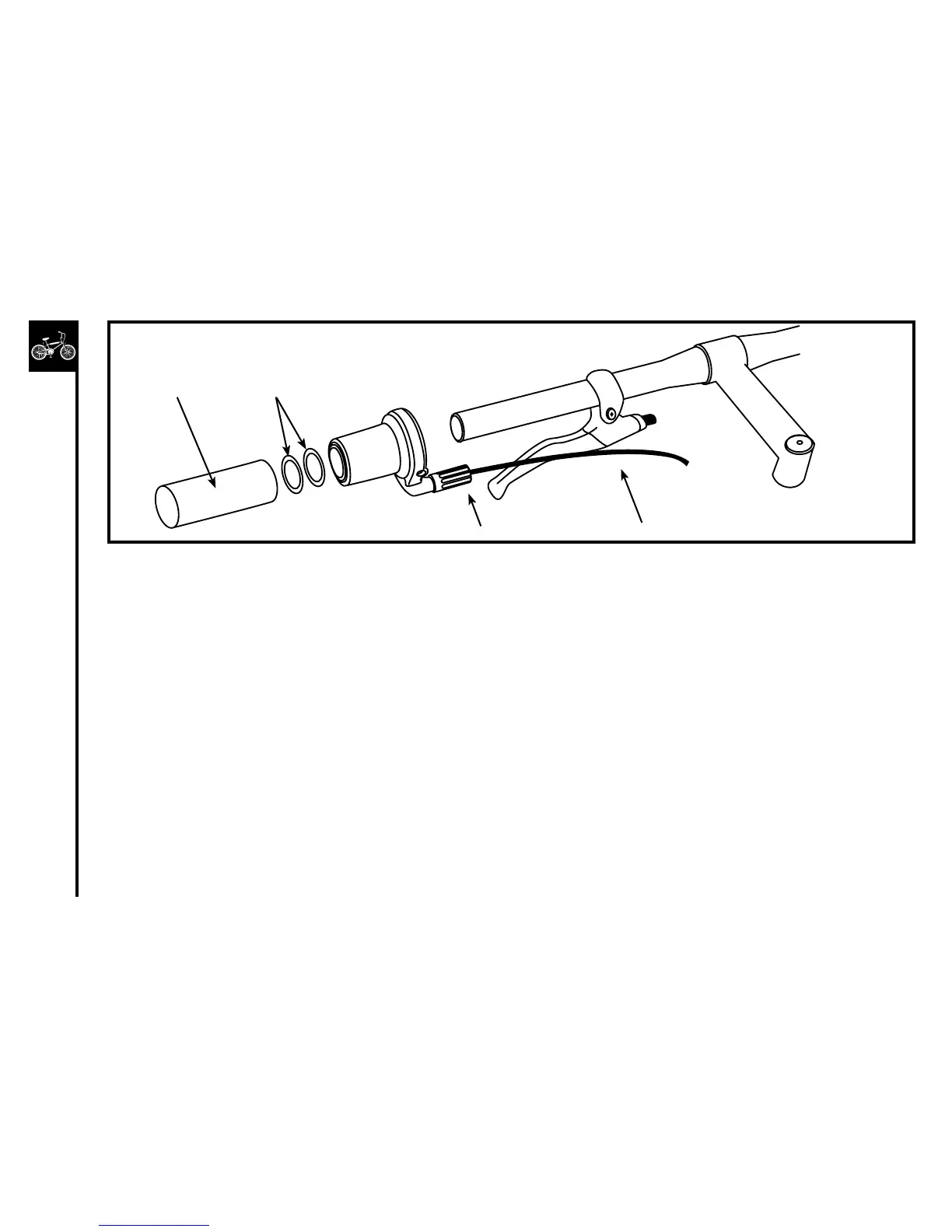
1. SlidefrontGripShift™assemblyoverleftsideofhandlebarleavingproperclearanceforhandlebargrip.Ifnecessary,
movethebrakelevertoaccommodateGripShift™andhandlebargrip.
2. Rotateassemblyuntilcableexitsbeneathbrakeleverwithadequateclearanceforbrakelevermovement.
3. Firmlytightenrecessedclampscrew.Installationtorqueshouldbe20in.-lbs.
4. Slidethetwo7/8”plasticwashersoverhandlebar.ThewasherspreventthegripfrominterferingwithGripShift™
rotation.
5. Slidehandlebargripoverhandlebar.Threadthecableinnerwirethroughcablehousingsandframe,andattachto
derailleur.MakesurethatthecableisintheVgrooveatthederailleurattachmentbolt.Iftrimmingthecablehousingis
necessary, be sure to replace the housing end cap.
6. Adjustindexing.
7. SliderearGripShift™overrightsideofhandlebarandrepeatsteps2-6.
8. Actuatefrontandrearbrakeleverstobecertainofproperoperation.IfGripShift™interfereswithbrakelever
movement,rotatebrakeleverorGripShift™.
Grip 7/8”PlasticWashers
BarrelAdjuster Cable



 To Next Page