EasyManua.ls Logo

Currie tech IZIP - Brake System Setup

Default Icon
123 pages
Print Icon
To Next Page IconTo Next Page
To Previous Page IconTo Previous Page
Loading...
68









Determinewhichtypeofbrakeyourbikeisequippedwithandreferto
theappropriateassemblyinstructions.Formoreinformationonbrake
adjustmentandmaintenance,refertopages70-77.

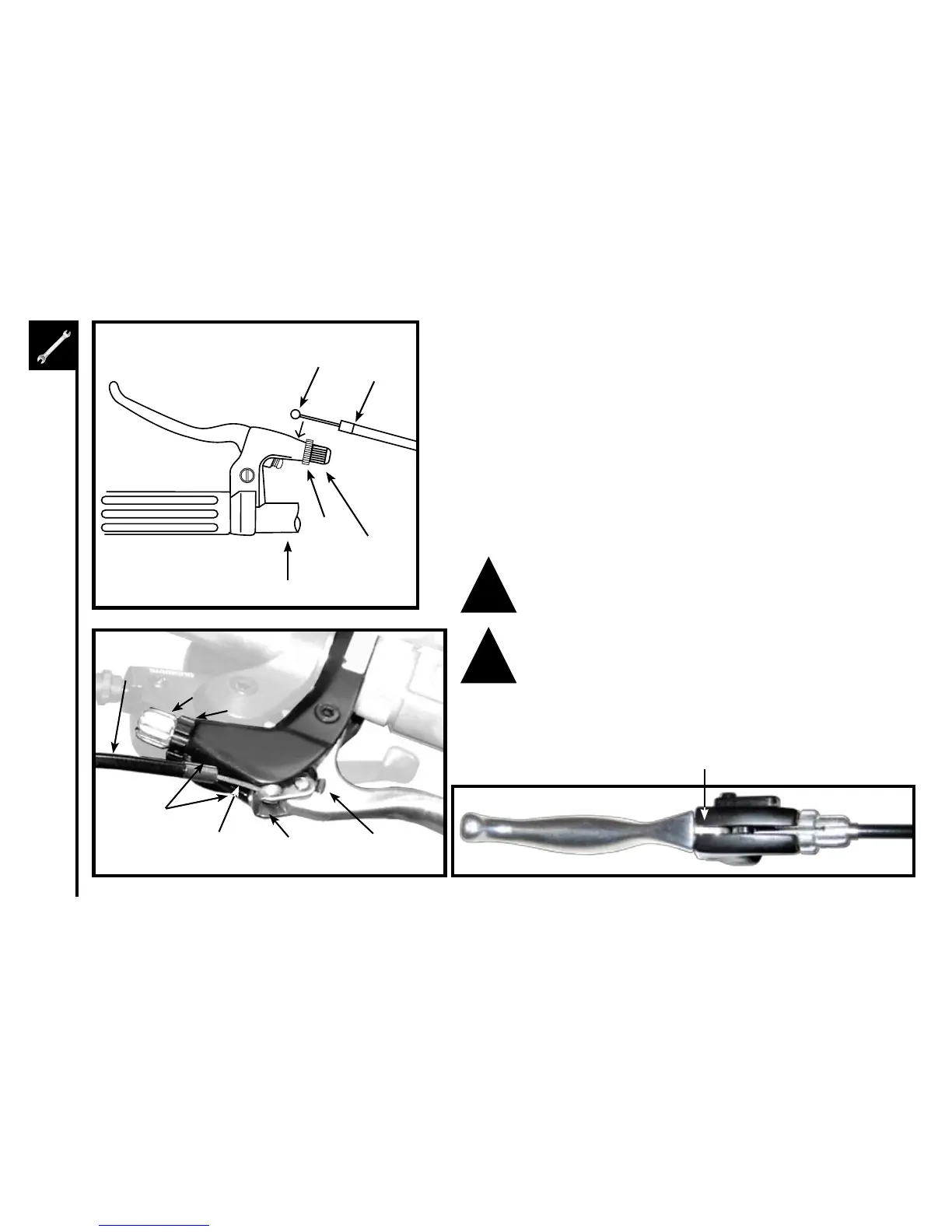
Squeezethebrakeleverandplacethenippleofthebrakecableinto
thelever'scableendholder,thenreleasethelever.Lineuptheslots
in the barrel adjustor and lock nut with the slot on top of the brake
body.Pullthecablehousingintoplaceinthebarreladjustor,then
turnthebarrelsotheslotsnolongeralign.Finally,tightenthelocknut
against the brake body
Handlebar
BarrelAdjustor
LockNut
Ferrule
Nipple
BarrelAdjuster
Brake Cable
Housing
Brake Body
CableInsertionSlot
(along top)
Brake Cable Cable End
Holder
Brake Type
Selector
BrakeLever
Nipple(inside)
LockNut
!
!

Table of Contents

Other manuals for Currie tech IZIP

Related product manuals