78
Althoughthefrontandrearderailleursareinitiallyadjustedatthe
factory, you will need to inspect and readjust both before riding
the bicycle.
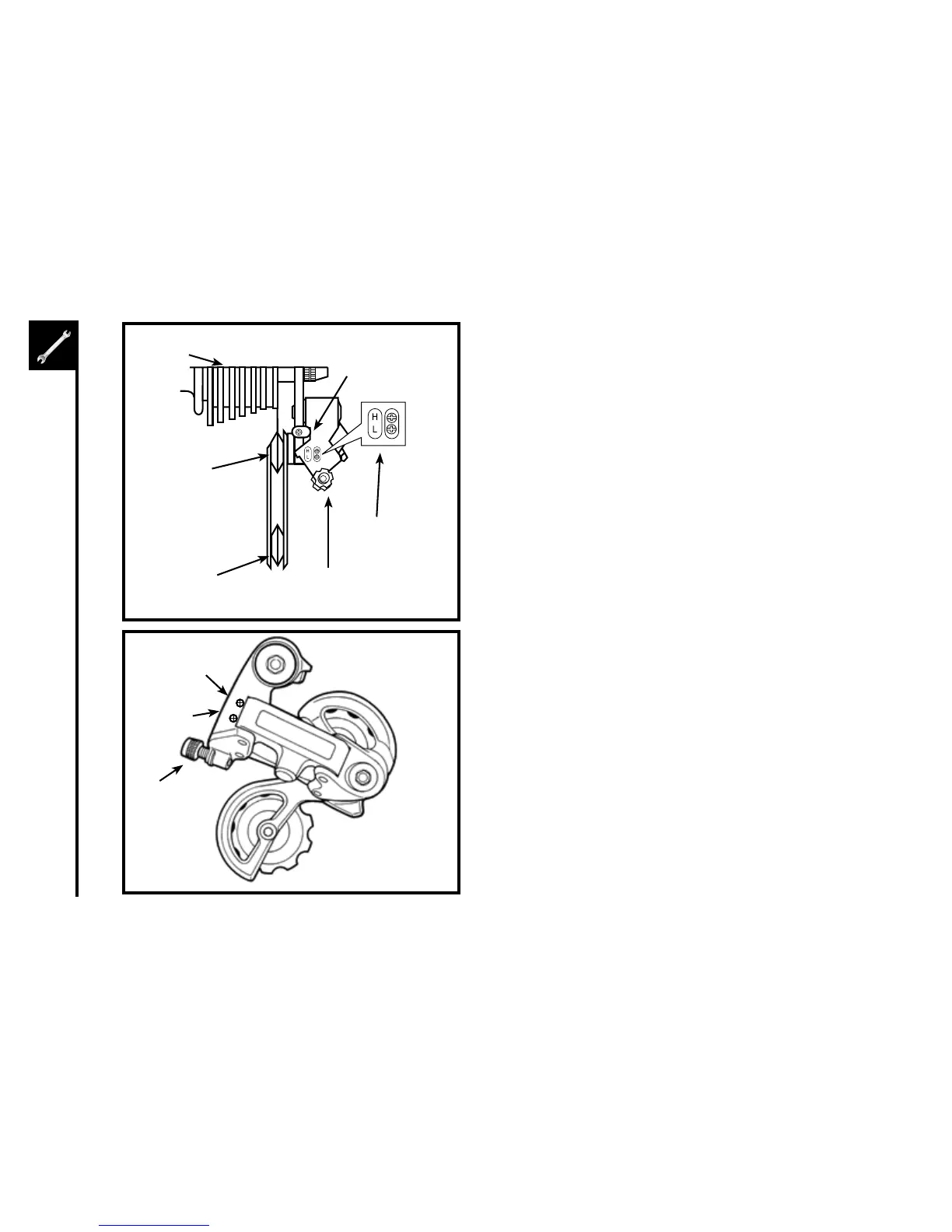
Begin by shifting the rear shifter to largest number indicated,
loosen the cable from the rear derailleur cable anchor bolt, and
place the chain on the smallest sprocket.
AdjusttheHighlimitscrewsotheguidepulleyandthe
smallestsprocketarelinedupvertically.Re-tightenthecable,
pulloutanyslack,andretightentheanchorboltsecurely.Shift
through the gears, making sure each gear achieved is done
quietlyandwithouthesitation.Ifnecessary,usethebarrel
adjuster to fine tune the cable tension by turning it the direction
youwantthechaintogo.Forexample,turningclockwisewill
loosen the cable tension and move the chain away from the
wheel, while turning counter-clockwise will tighten cable
tension and direct the chain towards the wheel.
GuidePulley
Cable Barrel
Adjuster
Adjustment
Screws
Freewheel
PulleyAdjustment
Screw
TensionPulley
HighGear
AdjustmentScrew
LowGear
Adjustment
Screw
Barrel
Adjuster
H
L
derailleur systems
The derailleur system includes the font and rear derailleurs, the shift
levers, and the derailleur control cables, all of which must function
correctly for smooth gear shifting to occur.



 To Next Page