Removing the coin-cell battery
NOTE: Before working inside your computer, read the safety information that shipped with your computer and follow the steps
in Before working inside your computer. After working inside your computer, follow the instructions in After working inside your
computer. For more safety best practices, see the Regulatory Compliance home page at www.dell.com/regulatory_compliance.
CAUTION: Removing the coin-cell battery resets the BIOS setup program’s settings to default. It is recommended that you
note the BIOS setup program’s settings before removing the coin-cell battery.
Topics:
• Prerequisites
• Procedure
Prerequisites
1. Remove the stability foot.
2. Remove the left and right side-panels. See “Removing the side panels”.
3. If you have multiple graphics cards installed, remove the graphics card. See “Removing multiple graphics cards”.
Procedure
1. Lay the chassis on the right side.
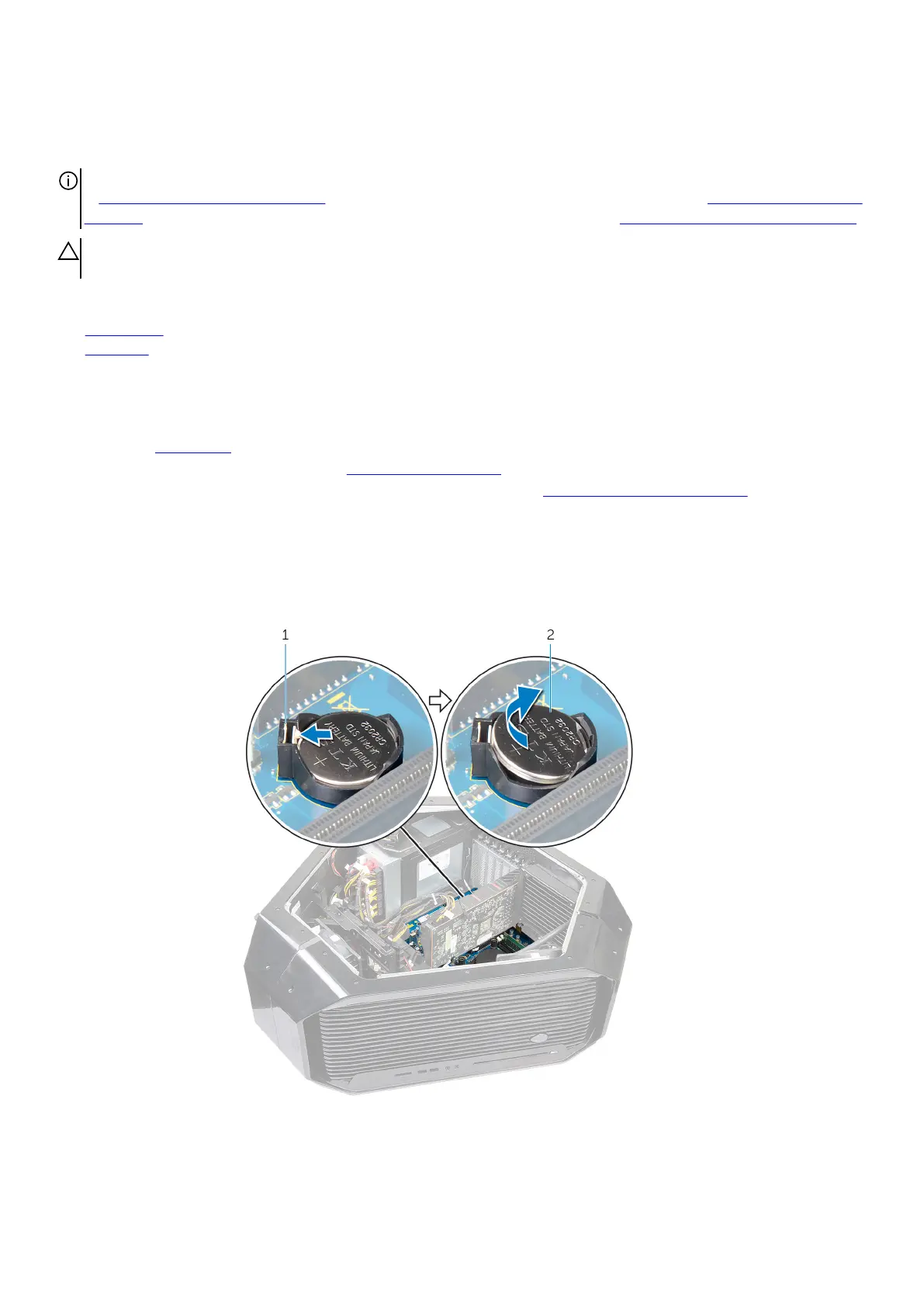
2. Push the coin-cell battery-release lever to remove the coin-cell battery.
a. coin-cell battery-release lever
b. coin-cell battery
61










 To Next Page