Creating a MODELA Player 4 File
77
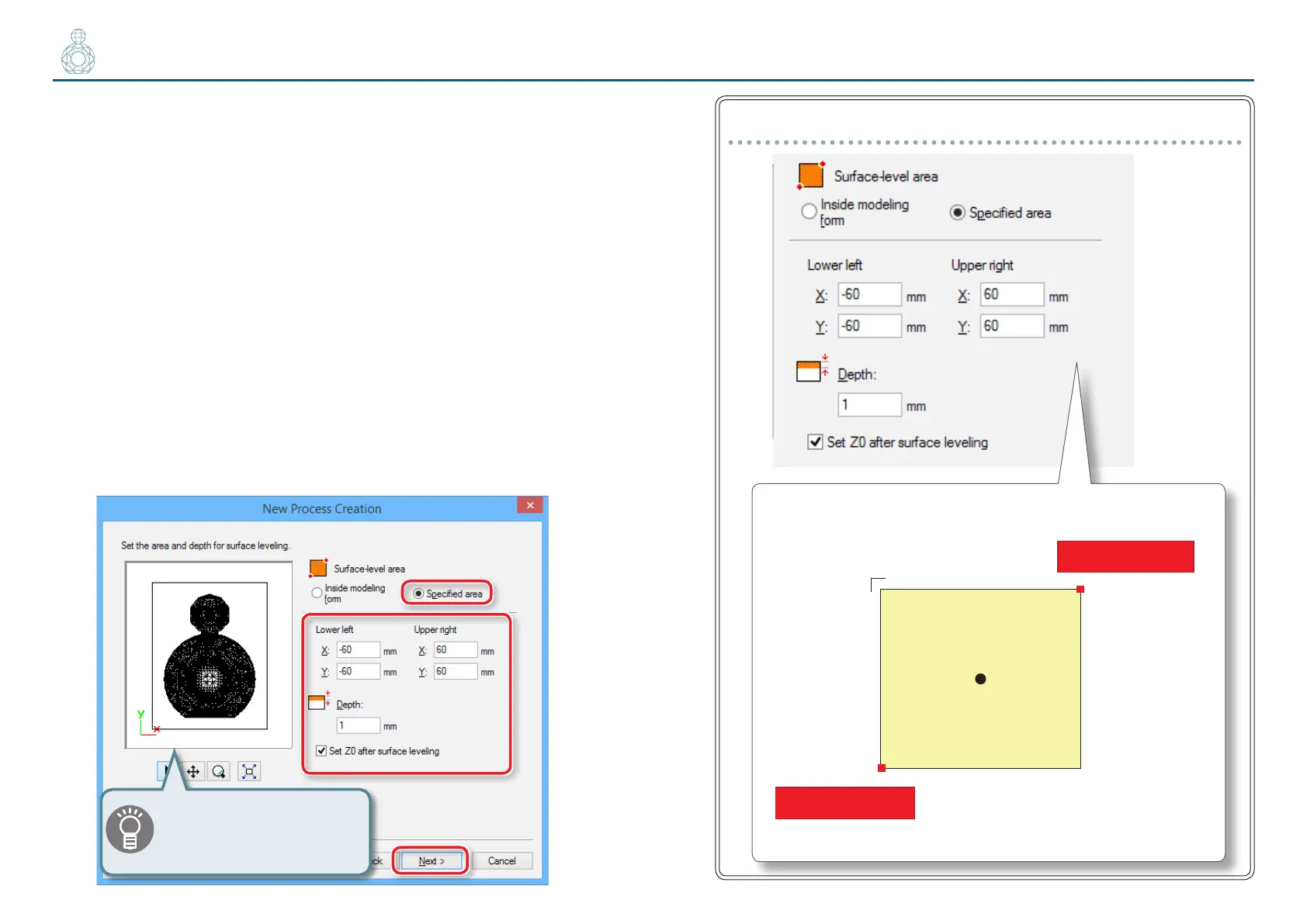
5. Set the area and depth for surface leveling.
5-1.
Set the area of surface leveling.
To level the surface of the scrap board, it is necessary to select [Specied
area] and specify the area. Enter the X and Y distance from the origin point
of the model (bottom left and top right) set in ”STEP 3 : Set the Origin
Point of the Model and Orientation” (p. 71). Set the cutting range so
that the entire top surface of the scrap board is horizontal.
5-2.
Set the depth of surface leveling.
*Enter a depth that will eliminate the slope of the scrap board.
In most cases, a depth of around 1 mm should suce. If the slope is too
large, measure it with slide calipers, and enter a depth that will make the
cutting surface parallel.
"User’s Manual “ Set Z0 after surface leveling“
5-3.
Click [Next].
The red line in the preview
screen can be dragged and a
position can also be specied.
“Perfume.stl“settings (Scrap board:120 (H) x 120 (W) x 10 (D) mm)
( 0 , 0 )
Origin Point of the model
Lower left( -60 , -60 )
Upper right( 60 , 60 )
120
120
Y
X
Front



 To Next Page