Creating a MODELA Player 4 File
78
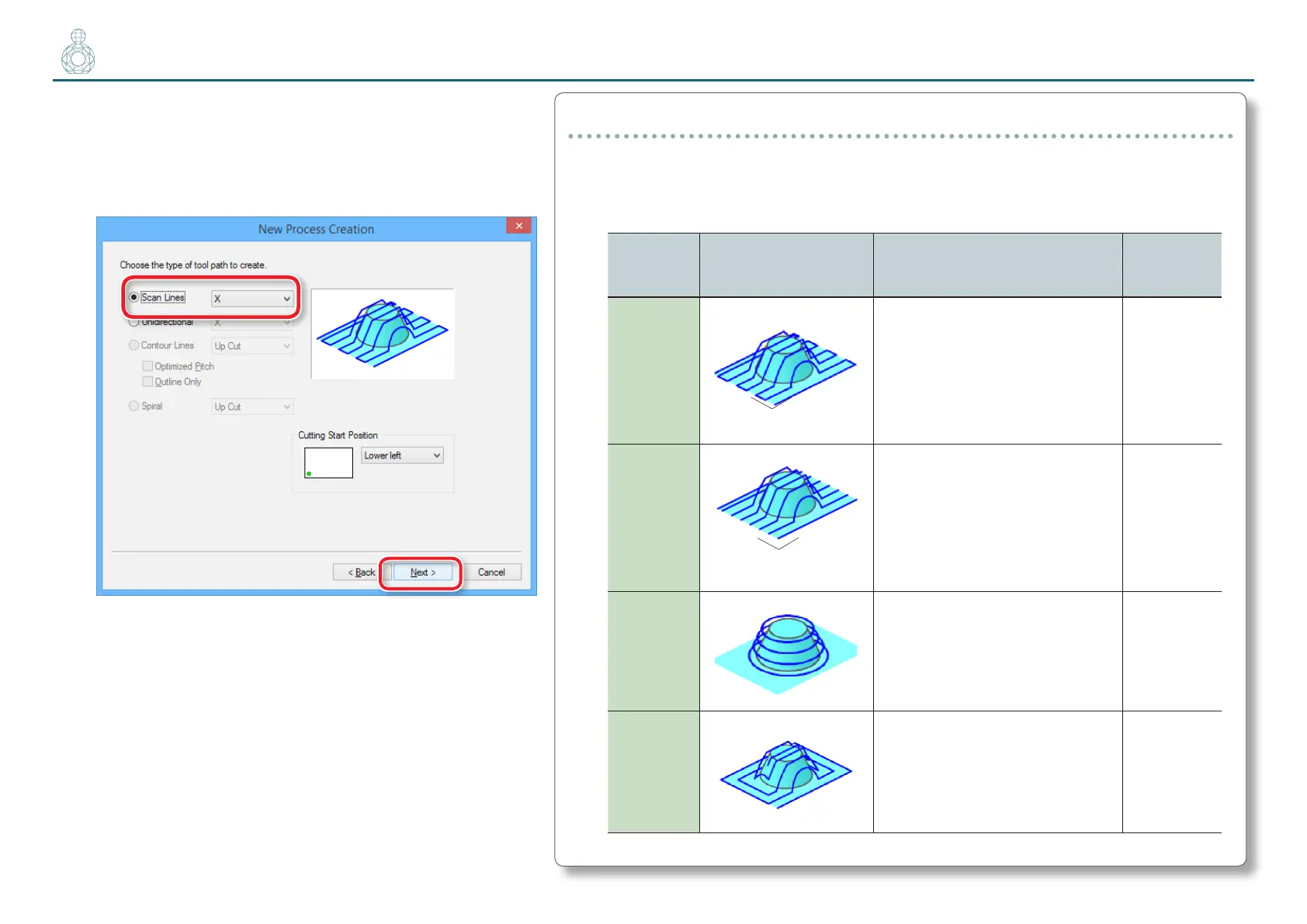
6. Set the tool path.
In the surface leveling process, select the
[
Scan Lines
]
, then click
“ N e x t .”
In “Perfume.stl”, cutting results will not change
signicantly whether [X] or [Y] is selected.
Tool Path
This is the path that is drawn when the cutting tool cuts into the material. Depending on
the CAM software used, there are many tool paths for each application.
MODELA Player4 has the following tool paths.
Name Preview Feature
Appropriate
cutting
method
Scan Lines
This creates a tool path parallel to the
specied axis. (Parallel with X axis)
The path is created in such a way that
the outbound movement and return
movement lie along the axis.
Surface
leveling /
Finishing
Uni-
directional
This creates a tool path parallel to the
specied axis. (Parallel with Y axis)
The path is created in such a way that
either only the outbound movement
or only the return movement lie
along the axis.
Surface
leveling /
Finishing
Contour
Lines
This creates a tool path that lies
along the contour lines when you're
cutting the model into rings on the
XY plane.
Roughing /
Finishing
Spiral
This creates a spiral tool path. Finishing
X
Y
X
Y



 To Next Page