Creating a MODELA Player 4 File
79
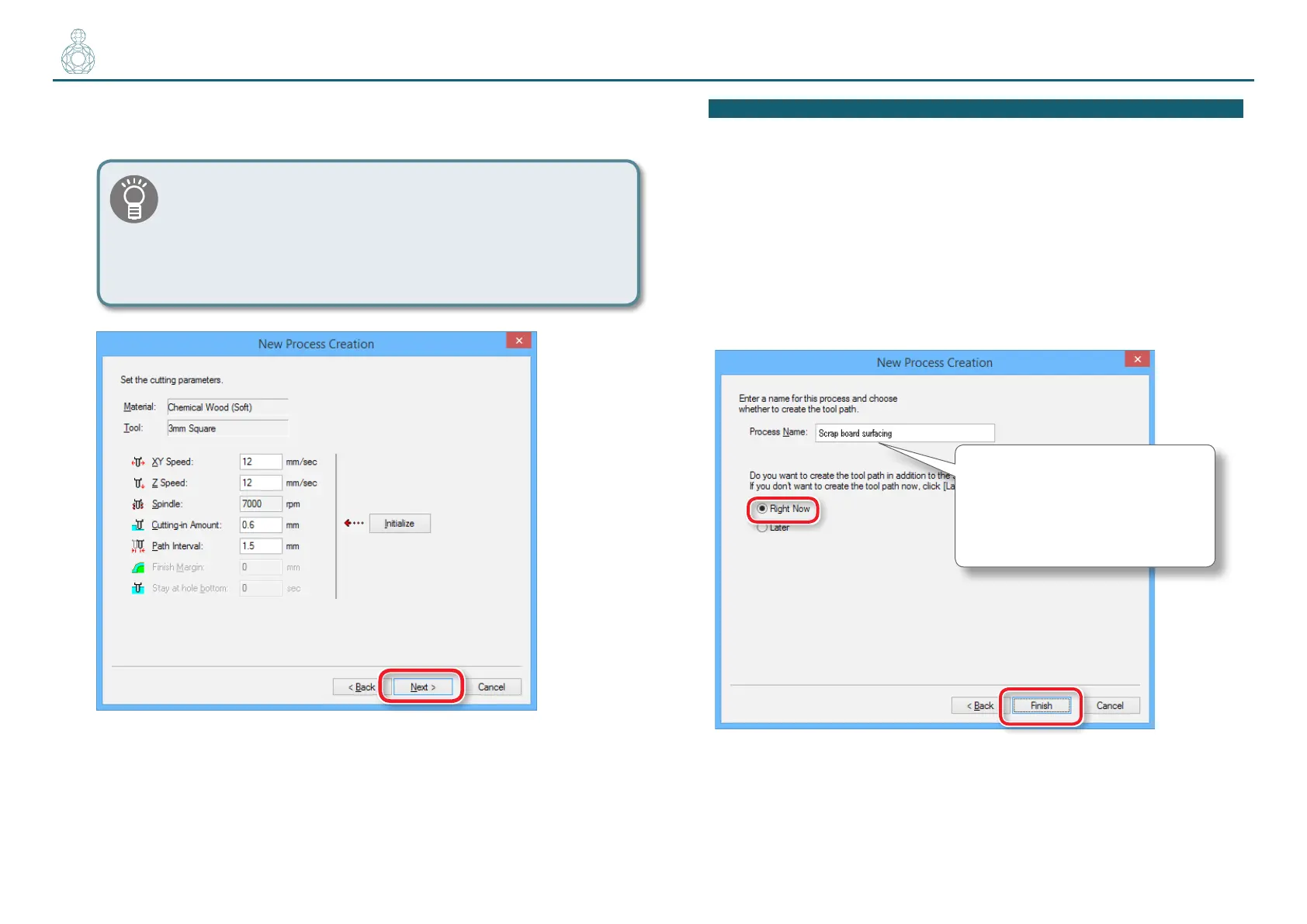
7. Set the cutting parameters.
“Perfume.stl” : No change [Next]
The appropriate conditions are displayed as the initial values
from the selected cutting tool settings and material settings.
We recommend using the settings as they are (recommended
values) except in situations where you want to make a
particular adjustment.
If the scrap board is made from something harder than the material
*In MODELA Player 4, multiple materials cannot be set up simultaneously.
Try the following method depending on the hardness of a board.
• Set the “Cutting-in Amount” cutting parameter to a small value
• Replace the cutting tool
• Create a le just for surface leveling of the scrap board
8. Enter a name for this process and create the tool path.
”Perfume.stl” : "Scrap board surfacing” [Right Now] [Finish]
Input “Scrap board surfacing”.
“Perfume.stl” needs three surfacing
processes. Naming each process so
that it is easy to identify will facilitate
the output process.



 To Next Page