Creating a MODELA Player 4 File
85
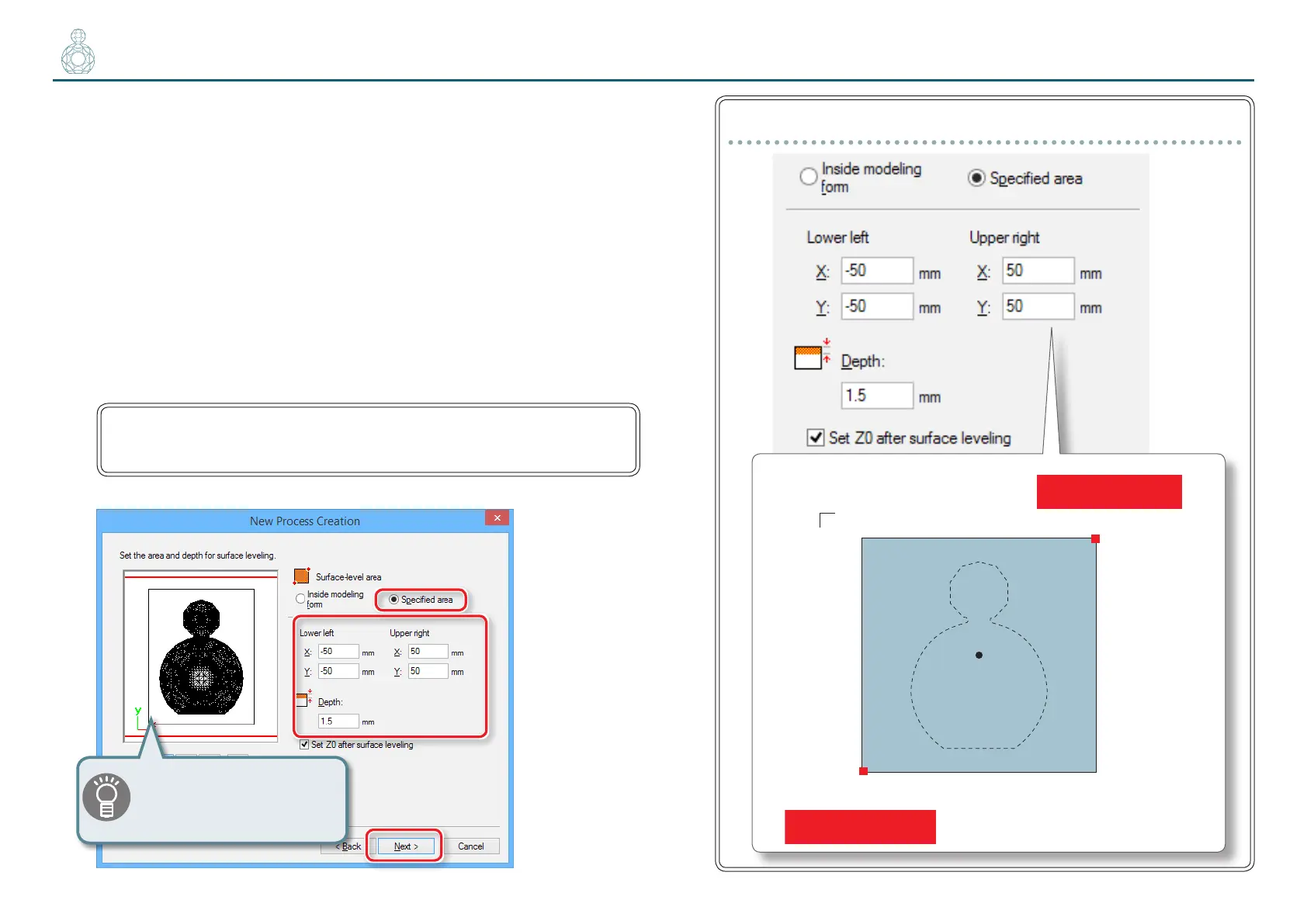
5. Set the area and depth for surface leveling.
5-1.
Select the area of surface leveling.
[Inside modeling form] : Automatic input
[Specied area] : Manual input
5-2.
If you selected [Specied area], manually enter the cutting area.
Enter the X and Y distance from the origin point of the model (bottom
left and top right) set in "STEP 3 : Set the Origin Point of the Model and
Orientation" (p. 71)
5-3.
Set the depth of surface leveling.
The leveling cutting depth should be set to a value calculated using the
following formula so that the material is not smaller than the model size:
(Material thickness) - (Model height) > Leveling cutting depth (top surface +
bottom surface)
5-4.
Click [Next].
“Perfume.stl“setting (Material :100 (H) x 100 (W) x 30 (D) mm)
Lower left( -50 , -50 )
Upper right( 50 , 50)
x
y
100
100
( 0 , 0 )
Front
The red line in the preview
screen can be dragged and a
position can also be specied.



 To Next Page