DI-5000_DP-5000_DPS-5000 Service Manual Edition 2
45
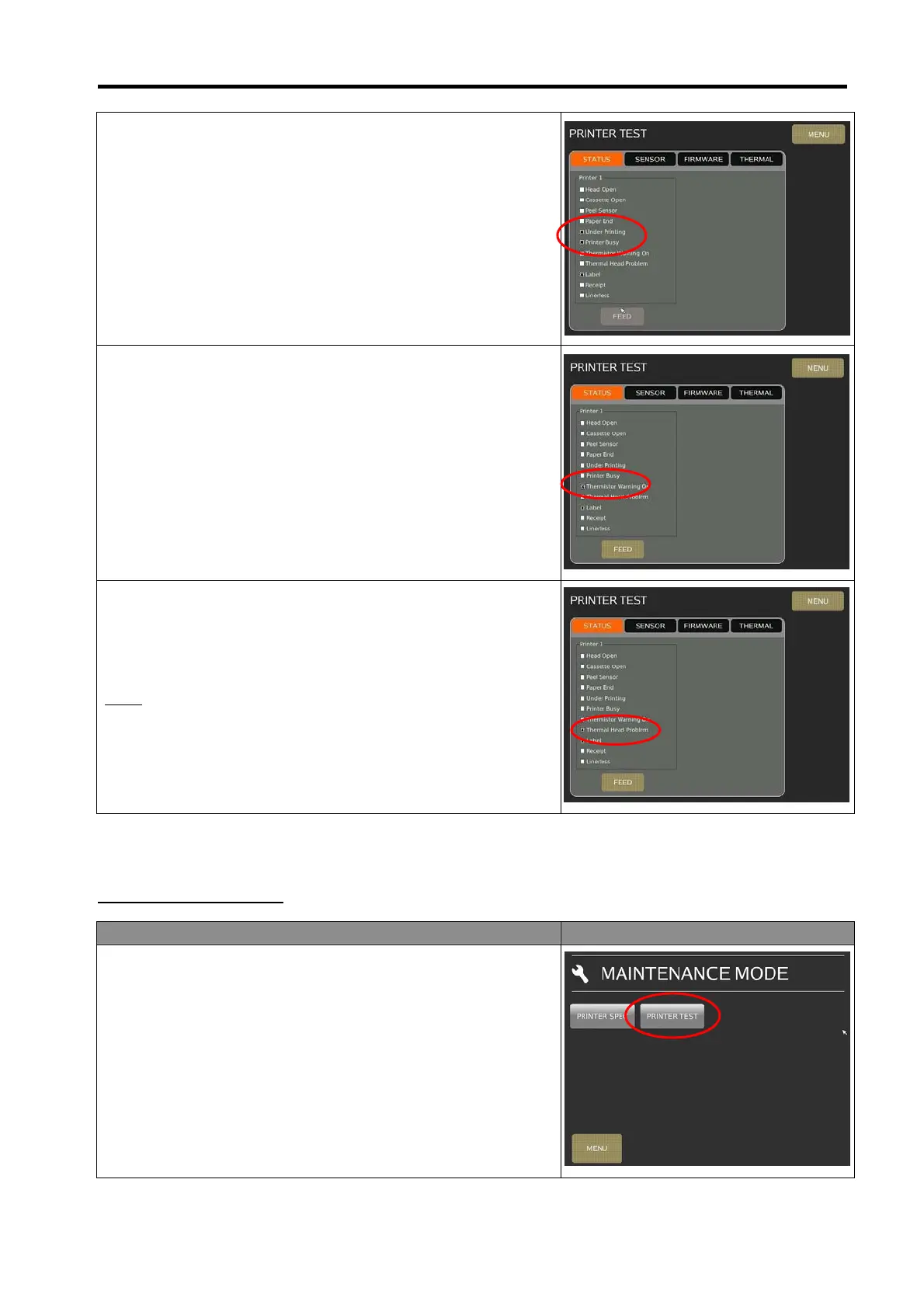
5) Close back the printer and touch [FEED] button, and check
the [Under Printing] and [Printer Busy] check box will
appear a tick mark short a while.
6) When the [Thermistor Warning ON] check box appear the
tick mark, that mean the Thermal Head over heating 80°C,
once the Thermal Head cool down lower then 60°C, the tick
mark will disappear.
7) When the [Thermal Head Problem] check box appear the
tick mark, that mean the thermal head have detected the
printing diagnostic check have problem like dot missing.
Note:
This function required the Printer Spec [143A026] Thermal Head
Diagnosis is set to [Feed] or [Feed + Dynamic].
7.1.2 Sensor Calibration
Procedure Picture
1) In Registration mode, select [MENU] [MAINTENANCE]
[MAINTENANCE] [PRINTER] [PRINTER TEST] to go to
printer test mode.



 To Next Page