TalkMasterFOCUSAdminConsoleReferenceManual
68
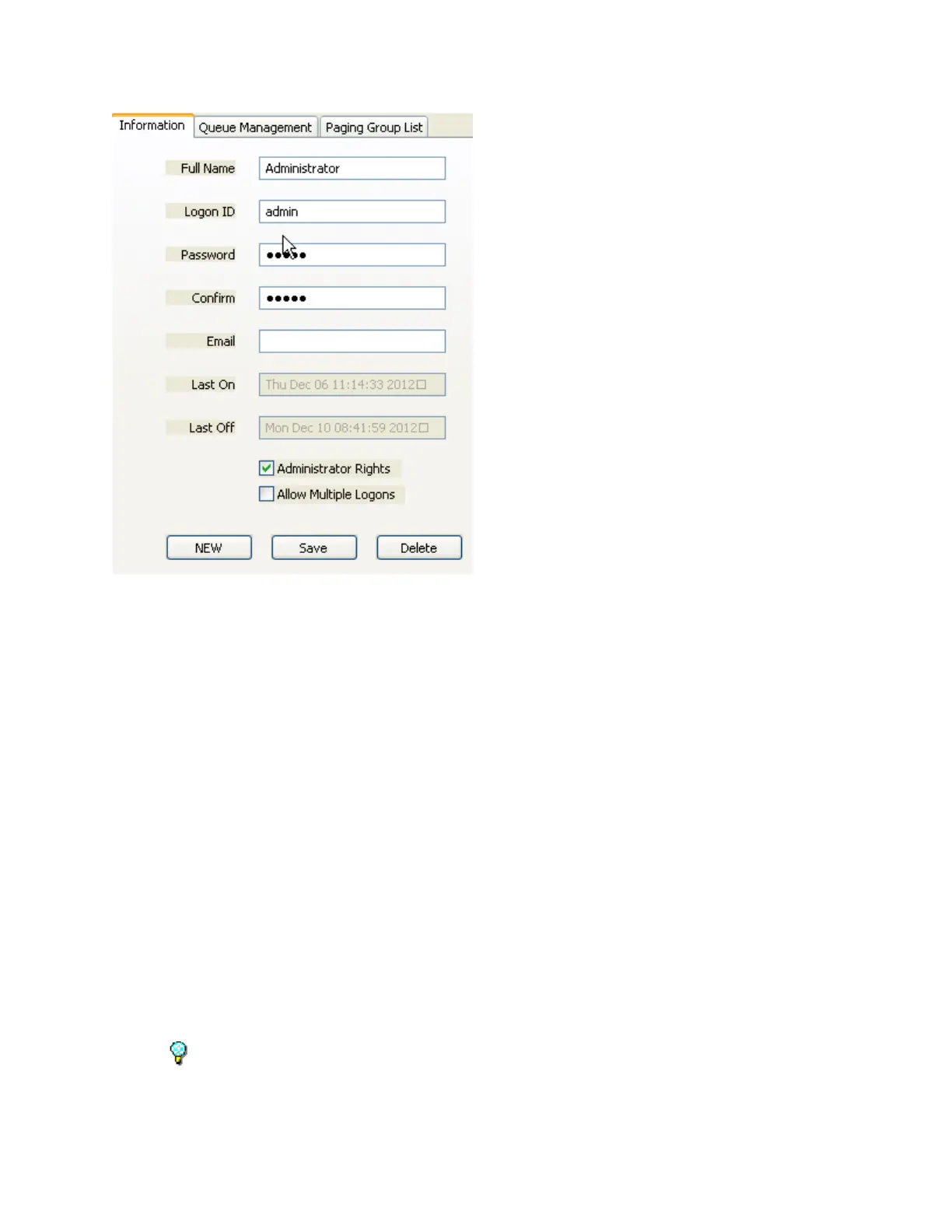
Full Name - Enter the Operators full name. This will be displayed on the Status page and on the
Title Bar of the Operator Console screen.
Logon ID - This is the ID the Operator will use to logon to a Console.
Password - The operator's password. Please note this value is case sensitive.
Confirm - Re-enter the password here to verify that it is correct.
Email - Documentation only - not used.
Last On - Records the last time this Operator logged on.
Last Off - Records the last time this Operator logged off.
Administrator Rights - Allows an operator to logon to the Administrator Console to administer
the Server settings. Also, when logged on as a Console Operator, the menu option View
Preferences becomes visible so Preferences can be set for the current Windows user. (applies
to all operators using that Windows user ID).
Allow Multiple Logons - This option allows an Operator to concurrently logon to multiple
Consoles. This option should be specified when the Immix software created by Sureview
systems is also being used. Under certain circumstances, Immix software requires that the same
operator be logged on multiple times. If an Operator is logged on multiple times, the right hand
side of the Status tab list the number of Logons after the Name.
Warning - Use of this settings may prevent the administrator from being able to distinguish
which Operator performed a specific task such as opening a Door or sending an Audio Page.



 To Next Page