4 EVOLUTION 1 SYSTEM MANUAL Issue 1.1 20 Dec 2006
NOTE:
Ingested air or severe nozzle clogs may be eliminated with the
use of the cleaning syringe/tray ordered optionally.
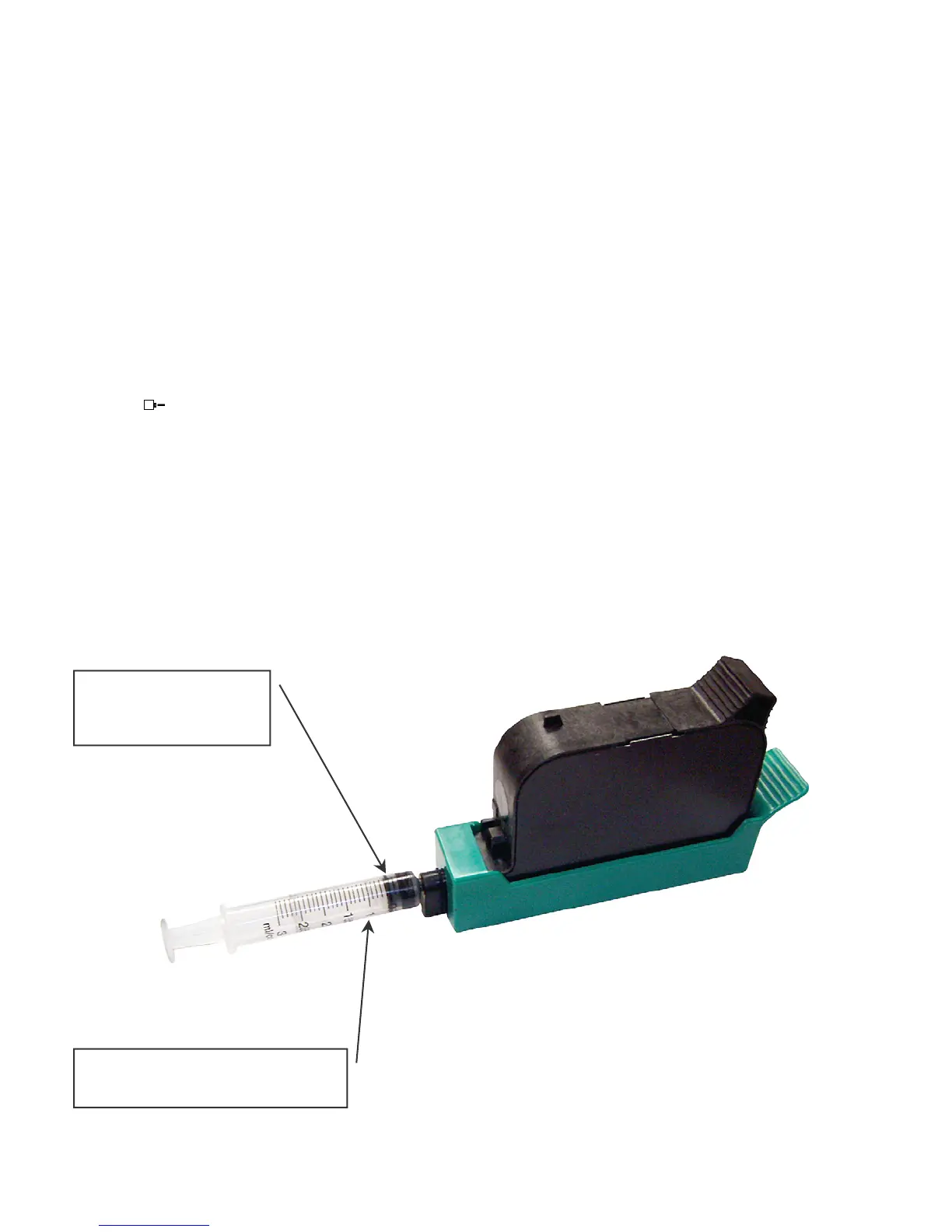
The photo below shows the correct procedure in using the syringe and cleaning
tray. Insert the ink cartridge into the tray and securely snap into place. Place the
tip of the syringe into the front of the tray. While holding the syringe securely in
place gently draw back on the syringe plunger until ink flows into the syringe.
Normally, it is not necessary to evacuate more than 0.1 cc of ink at a time as
indicated below. Following ink withdrawal remove the syringe carefully. Remove
the ink cartridge from the tray. Remove any remaining ink from the nozzle face
with a lint free wipe. Place a piece of clean white paper directly in front of the
print head and perform a purge function by pressing and releasing the purge key
. The key is activated on the release of the key. Swipe the paper quickly past
the print head to expand the purge pattern so the individual droplets may be
viewed.
Perform a test print and verify that all nozzles are firing correctly.
0.1 cc of ink drawn
at any one time
Scale gradation is in 1.0 cc
major increments



 To Next Page