7 EVOLUTION 1 SYSTEM MANUAL Issue 1.1 20 Dec 2006
EVOLUTION II MOUNTING OPTIONS
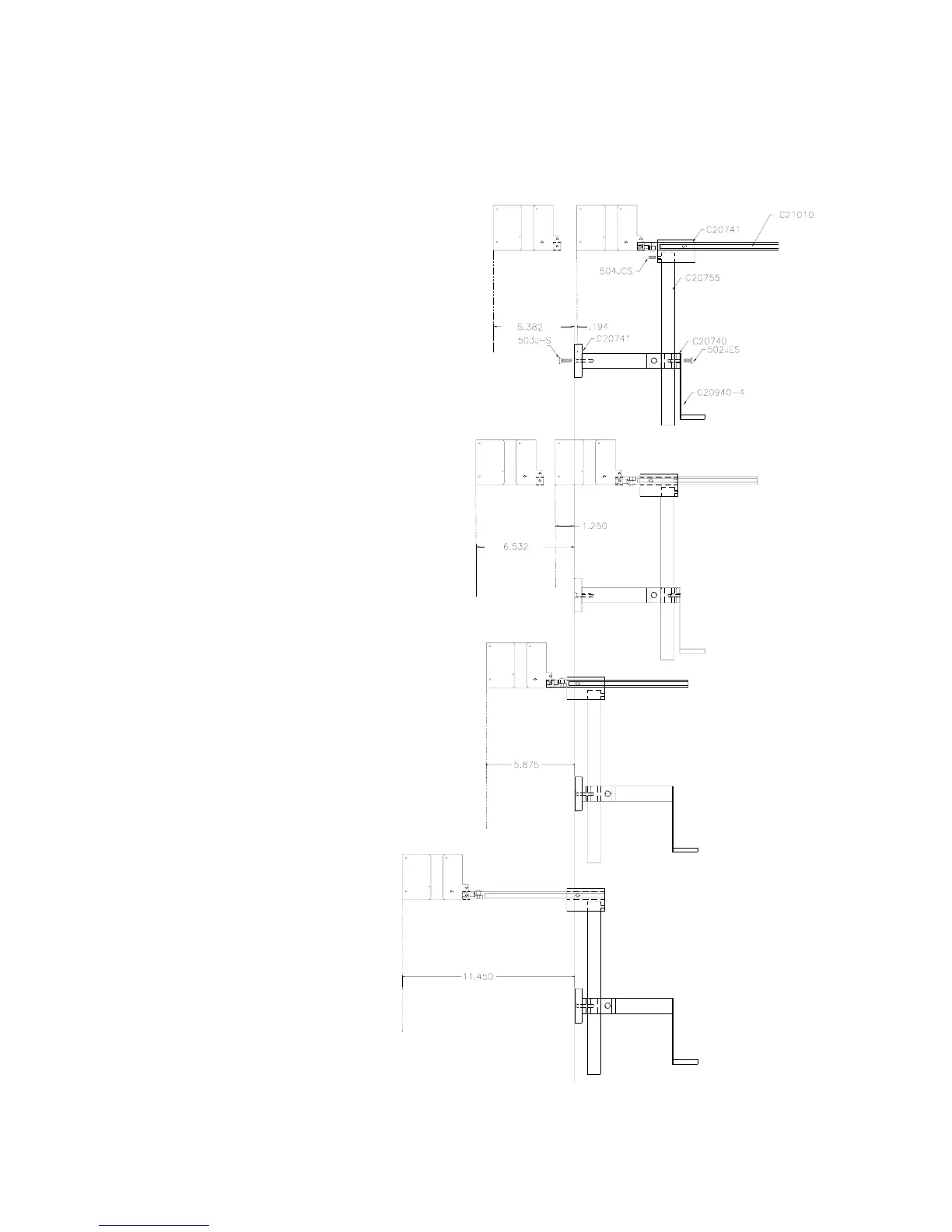
The EVOLUTION II mounting bracket assembly C21010 has a number of
possible mounting configurations, which allows adaptability to a variety of
production equipment.
The top cross slide
bracket C20741 may be
rotated 180 deg by
loosening the included
setscrew 504JCS and
rotating the bracket. This
allows the print head to be
extended by just over 1”.
Although this is not a
significant amount it might
be helpful.
Refer to the first two
pictorials to identify the
various components of the
mounting bracket system
C21005.
Rotating the horizontal
mounting bracket C20740
may further increase
extension into the
production line. The
mounting centers for both
the base block C20741
and controller holder
C20940-4 are identical.
Remove the two 502JHS
flat head screws from the
base block and the two
502JES button head
screws, rotate the bracket
and replace both the base
block and controller
holder.
The above procedure
allows for a print head
displacement from .625”
before the production line
to 11.450” into the
production line.



 To Next Page