5•Service
Doc. 031851-05 12/04 5-9
5.3 Changing the Sample Loop
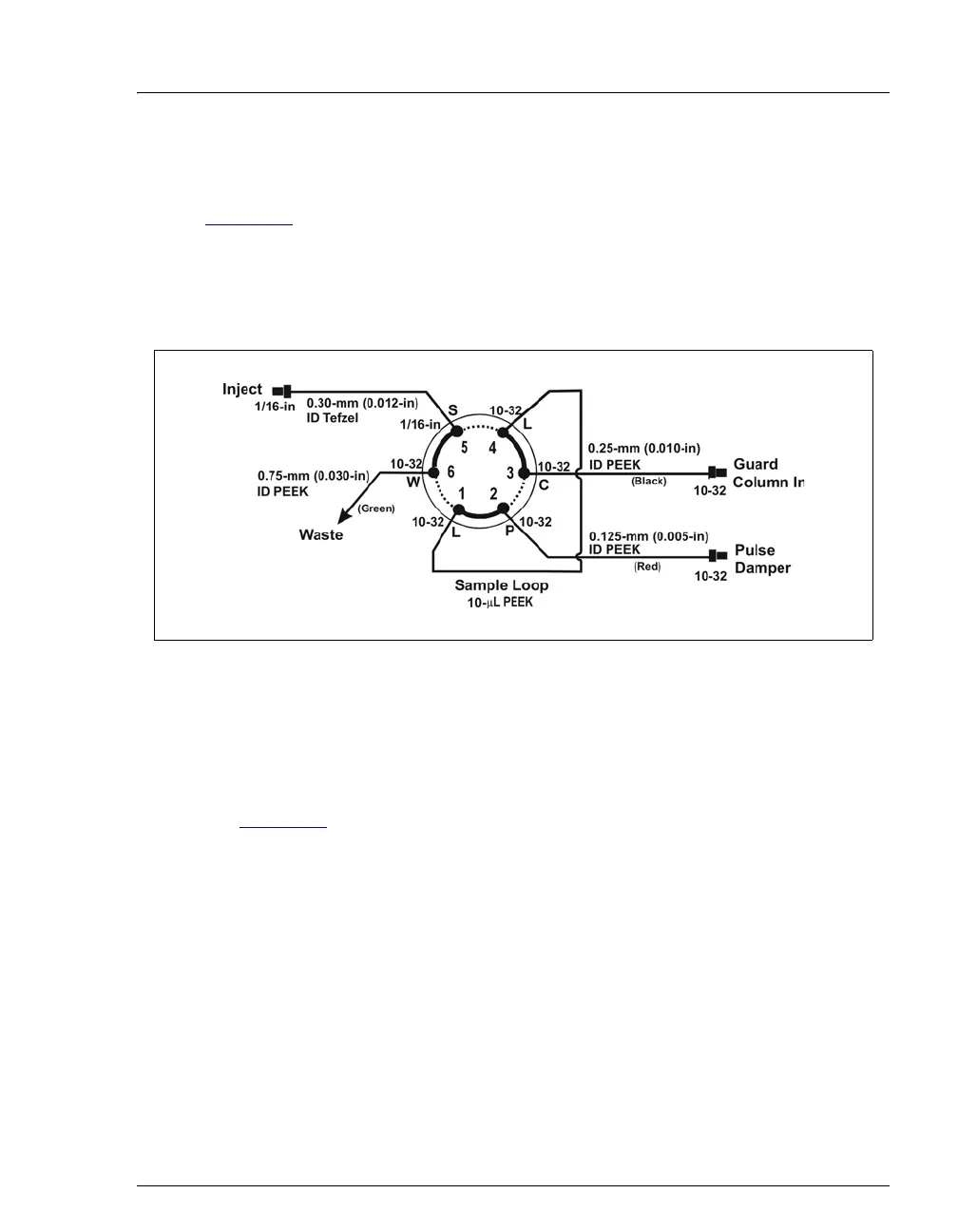
Figure 5-3 shows the injection valve connections. The injection valve is plumbed
at the factory with all tubing and fittings for connection to the pump, injection
port, and column. A 10 µL PEEK sample loop (P/N 042857) is installed at the
factory between ports L and L. Always replace the pre-installed 10 µL loop with
another of the same size.
1. Turn off the pump from the ICS-90 Control panel in Chromeleon.
2. Open the ICS-90 front door.
3. Disconnect the sample loop from ports L and L on the injection valve (see
Figure 5-3
).
4. Install the new sample loop between ports L and L on the injection valve.
5. Make sure the loop is tightly coiled so the door can close securely.
6. Close the door.
7. Turn on the pump from the ICS-90 Control panel.
Figure 5-3. Injection Valve Plumbing



 To Next Page