3 • Operation and Maintenance
Doc. 065215-02 9/09 47
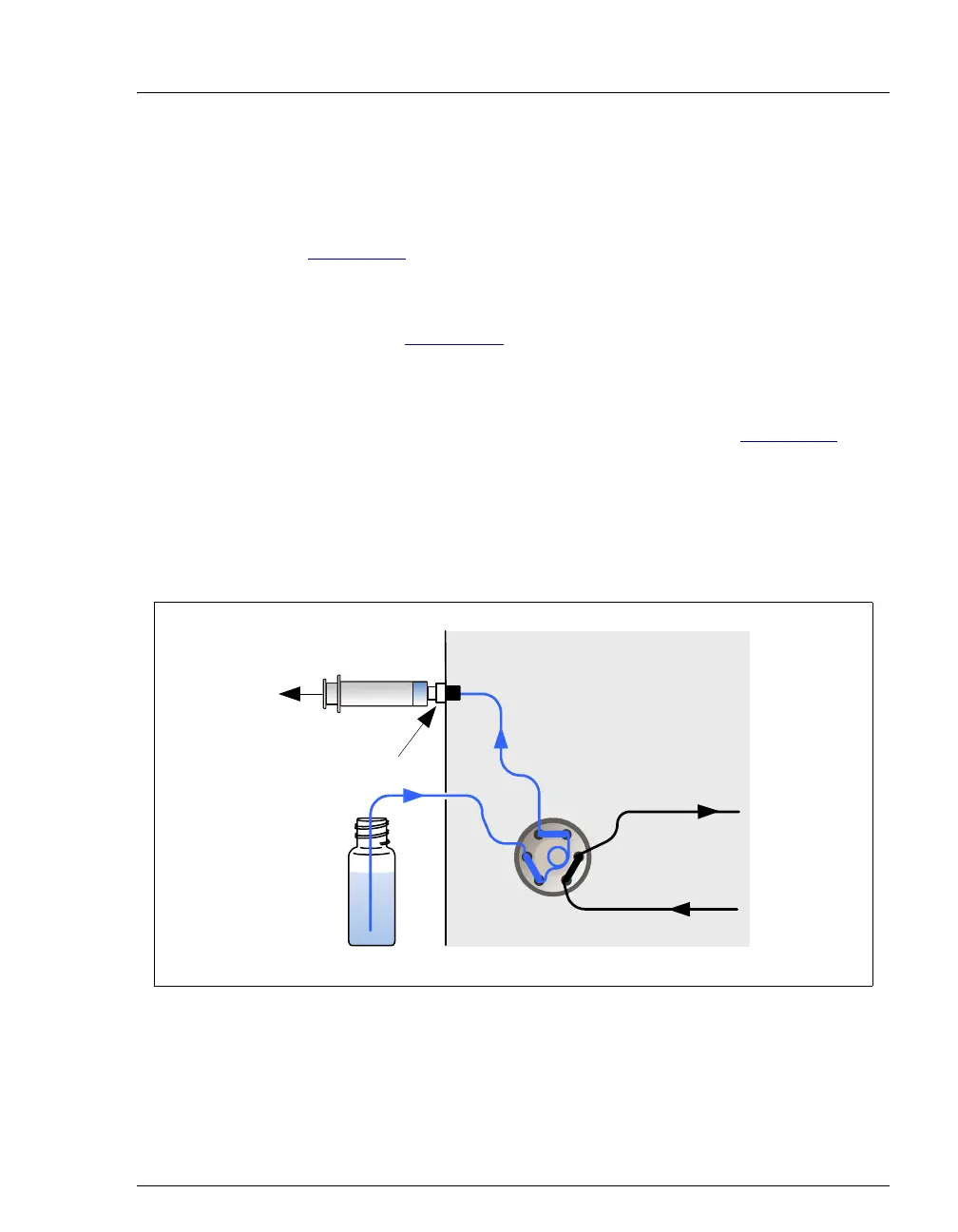
Loading Samples with a Vacuum Syringe (Pull Method)
1. Verify that the sample loading port on the front of the ICS-900 is
connected to sample port
S (5) on the injection valve (see
Figure 3-14
).
2. Disconnect the waste line from port
W (6) on the injection valve and
attach a shorter line: 25 to 30 cm (10 to 12 in) of PEEK or Teflon®
tubing (see Figure 3-14
).
3. Place the free end of this line into the sample.
4. Verify that the injection valve is in the Load position. If it is not, click
the Load button on the ICS-900 Control panel (see Figure 3-11
).
5. Insert a syringe into the sample loading port on the front door and pull
out the plunger to draw the sample into the injection valve. Draw at
least five times the sample loop volume. Remember that the line from
the sample to port
W (6) on the injection valve must be filled first
before the sample loop can be filled.
Figure 3-14. Loading Sample with a Vacuum Syringe (Pull Method)
(1)
L
L
S
W
P
C
(2)
(3)
(4)(5)
(6)
Sample
Injection Valve
Sample
Loading Port
(on front door)
Syringe



 To Next Page