5ECB-VAVS Preloaded Applications
Introduction
In the first chapter, the ECB-VAVS preloaded applications are introduced and an overview of this user
guide is provided.
Introduction to the ECB-VAVS Preloaded Applications
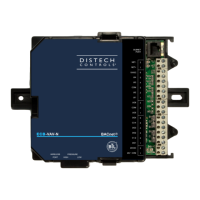
Distech Controls’ ECB-VAVS controllers come preloaded with code containing standard VAV applica-
tions. This code was created using EC-
gfx
Program, a Graphical Programming Interface (GPI) tool that
enables visual assembly of building blocks and the design of custom programs that control Building
Automation Systems.
A controller’s preloaded applications can be configured using dc
gfx
Application, an application that is
accessible through EC-Net Pro, which is powered by the Niagara Framework
®
. dc
gfx
Application pro-
vides an intuitive interface for configuring controllers.
Alternatively, an Allure™ EC-Smart-Vue can be used to configure a controller’s preloaded applications
on site. The Allure EC-Smart-Vue series communicating sensor features a backlit display and graphi-
cal menus. This sensor can be used for indoor temperature measurement, setpoint adjustment, CO
2
sensing, and occupancy state override. An Allure EC-Smart-Vue sensor can also be used to perform
system air balancing without requiring an onsite controls engineer and to commission the system.
Controllers can also be custom-programmed using EC-
gfx
Program through EC-Net Pro. With this GPI
tool, quick and easy control sequences can be created, which meet the most demanding requirements
of any engineering specification.
For detailed specifications regarding the ECB-VAVS controllers, refer to the ECB-VAVS datasheet on
SmartSource.
Introduction





 To Next Page