Chapter 3: Operation
Operation Manual: Evolution Series
Printer Sharing Configuration (Evolution 6100 Only)
The Evolution 6100 is equipped to have up to four units share one printer. This
option is configured by the printer setting located on the Advanced Option screen
in System Setup (see Figure 3-6).
The operator logged into the system must be part
of the Manager group to create a new user.
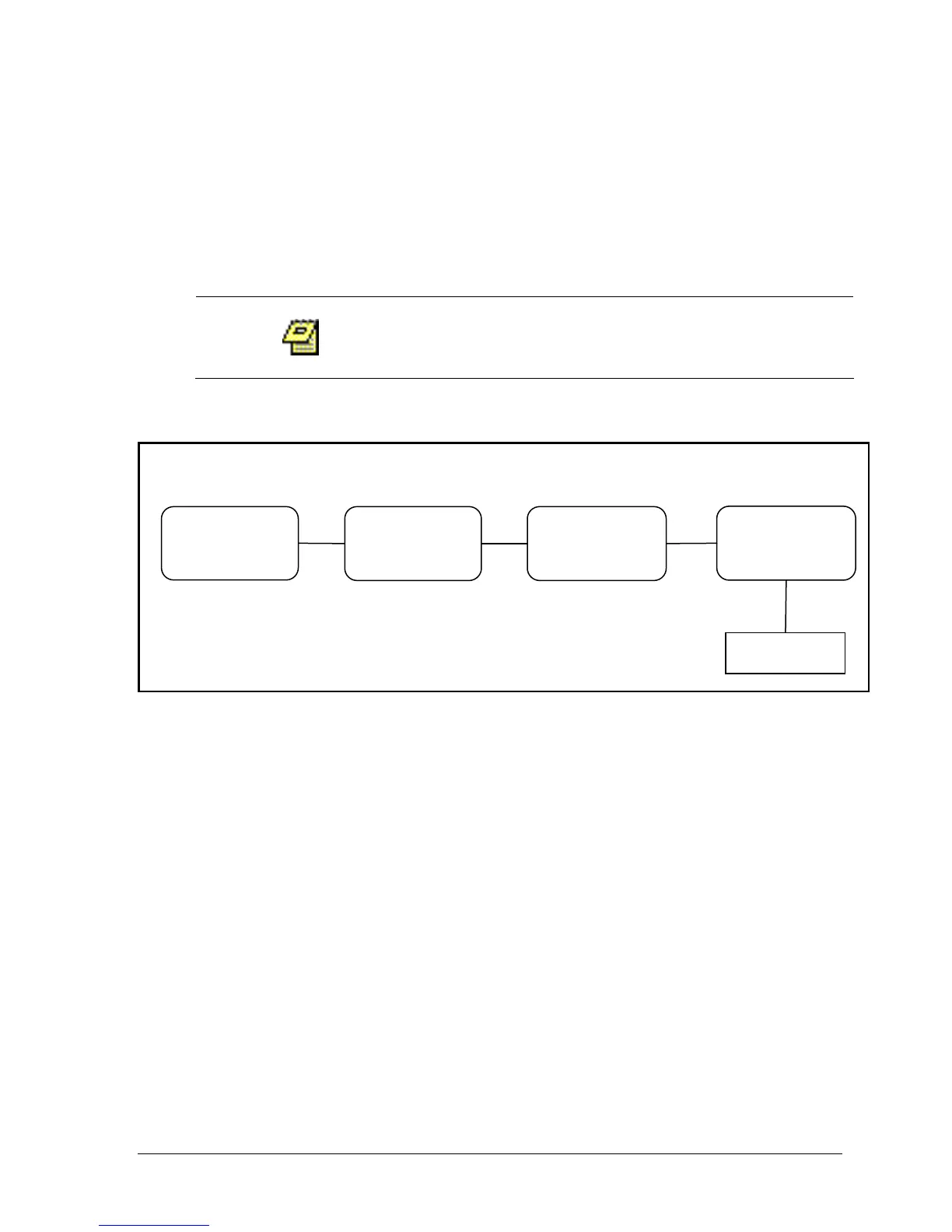
1. All units must be connected via an RS-485 cable. See diagram below.
2. Highlight the SYS. menu or SYSTEM CONFIG button from the Main screen and
press ENTER (see Figure 3-4).
3. Highlight the SYSTEM SETUP button and press ENTER (see Figure 3-11).
4. Highlight the ADV menu and press ENTER.
5. Highlight the PRINTER field and using the + and – keys scroll to the desired
value representing the address of the system which is directly connected to
the printer. Select 'L' if the printer is directly connected to the unit. For
example in the diagram above, Bath 1 will be set to 04, Bath 2 will be 04,
Bath 3 will be 04 and Bath 4 will be L.
(Unit Address 04
Printer L)
(Unit Address 01
Printer 04)
(Unit Address 02
Printer 04)
(Unit Address 03
Printer 04)
RS-485
RS-485
RS-485



 To Next Page