Chapter 3: Operation
Operation Manual: Evolution Series
Temperature and RPM Screen
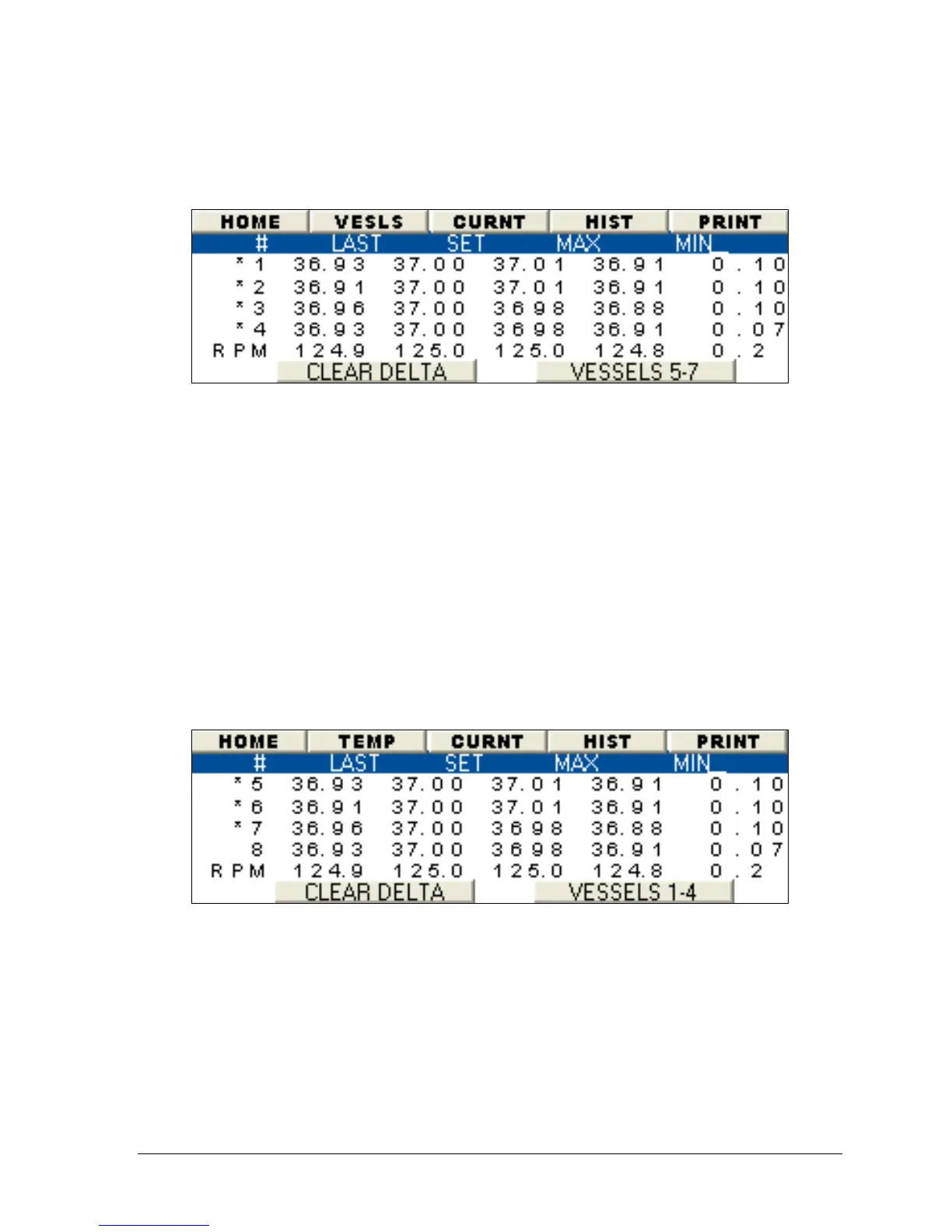
Figure 3-18: Temperature and RPM Monitor (Vessels 1-4)
• The screen in Figure 3-18 shows temperatures in vessels 1-4 and RPM values.
The "LAST" column shows the current value and the "SET" column indicated the
temperature set point.
• The "MAX" and "MIN" columns record the temperature and RPM range during a
test. "DEL" is short for delta, which is the difference between the MAX and MIN
values.
• To reset all DEL values to zero in Manual Mode, press the "CLEAR DELTA"
button. The elapsed time indicator on the top LED will be reset to zero. This
is only possible when running in Manual Mode!
• Selecting the button labeled "Vessel 5-7" will display another temperature and
RPM monitor screen showing the same values for the other vessels.
• The TEMP button on the menu bar will toggle between Figure 3-17 and Figure
3-18.
Figure 3-19: Temperature and RPM Monitor (Vessels 5-7)



 To Next Page