33
IP2159EN
11. Extension unit DAB905ESE (optional)
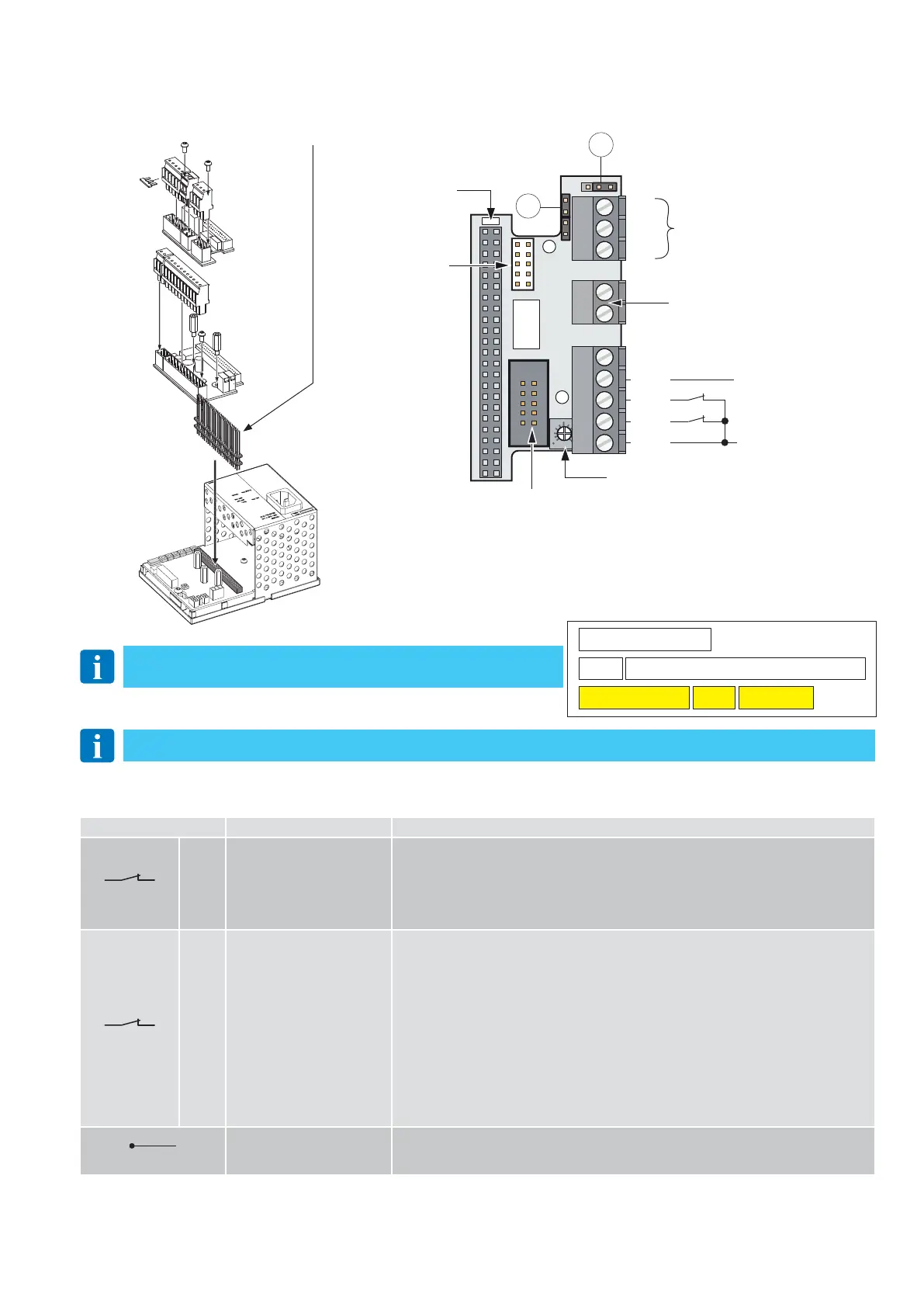
There is a command extension card for managing motion sensors, alarm indications and door status.
DAB905ESA
DAB905ESE
DAB105CU
Torx T10
5 mm
nut driver
Long used for 2 Extension Unit
Short pin used for 1 Extension Unit only
24 V
-
+
Reversal safety contact on
internal side
Safety contact on external
side opening
Safety test
891012345
NO
COM
DO NOT USE
DO NOT USE
Blanking
LED
SAFETY
EXCLUSION
TRIMMER
DO NOT USE
NC
QTST
PDET
PIMP
GND
J1
J2
Relay output 24 V 1 A
("External error indication” or
“Open door indication”,
see J1)
Remove the jumpers if a safety sensor is connected to terminals 1-2 and 1-3.
11.1 Commands
Contact Function - Accessory Description
1 2
GND-PIMP
N.C.
REVERSAL SAFETY CONTACT
INTERNAL SENSOR
The opening of the contact during the closure manoeuvre causes the movement to
invert (reopening).
NOTE: the opening of the contact of the motion sensor installed on double doors caus-
esboth doors to re-open.
The sensor is not active in DOOR CLOSED mode (set via the function selector switch), or
when the door is opened manually due to a power failure or emergency closure (KILL
1
3
GND-PDET
N.C.
OPENING SAFETY DEVICE
EXTERNAL SENSOR
The opening of the contact causes the movement to stop during the opening phase.
If the contact closes again within the automatic closer time, the door resumes its open-
ing operation and, once open, it closes after the automatic closure time.
If the automation is closed, the opening of the contact prevents the opening operation.
Adjust the safety exclusion trimmer so that the sensor does not detect the wall during
the opening phase.
During the opening phase, the safety sensor takes priority over the motion sensor.
NOTE: the opening of the contact of the motion sensor installed on double doors causes
both doors to stop, except in the case of double exit doors.
Modify the operation of the double doors by changing the pre-configured parameters as
explained in chapter 13.
The sensor is not active in DOOR CLOSED mode (set via the function selector switch), or
when the door is opened manually.
5
4
24V-QTST
SAFETY TEST
Connect the QTST terminal of the control panel to the corresponding test terminal on
the safety device.
A test will be carried out on the safety device before every operation.
612345
12345
12 345678910111213
67 8910
Fix the label to the terminal board, taking care to apply it in the correct
direction (see the figure above).




 To Next Page