________________________________________________________________________________________________________
1592025400 – Vers. 1.0 - 108
-
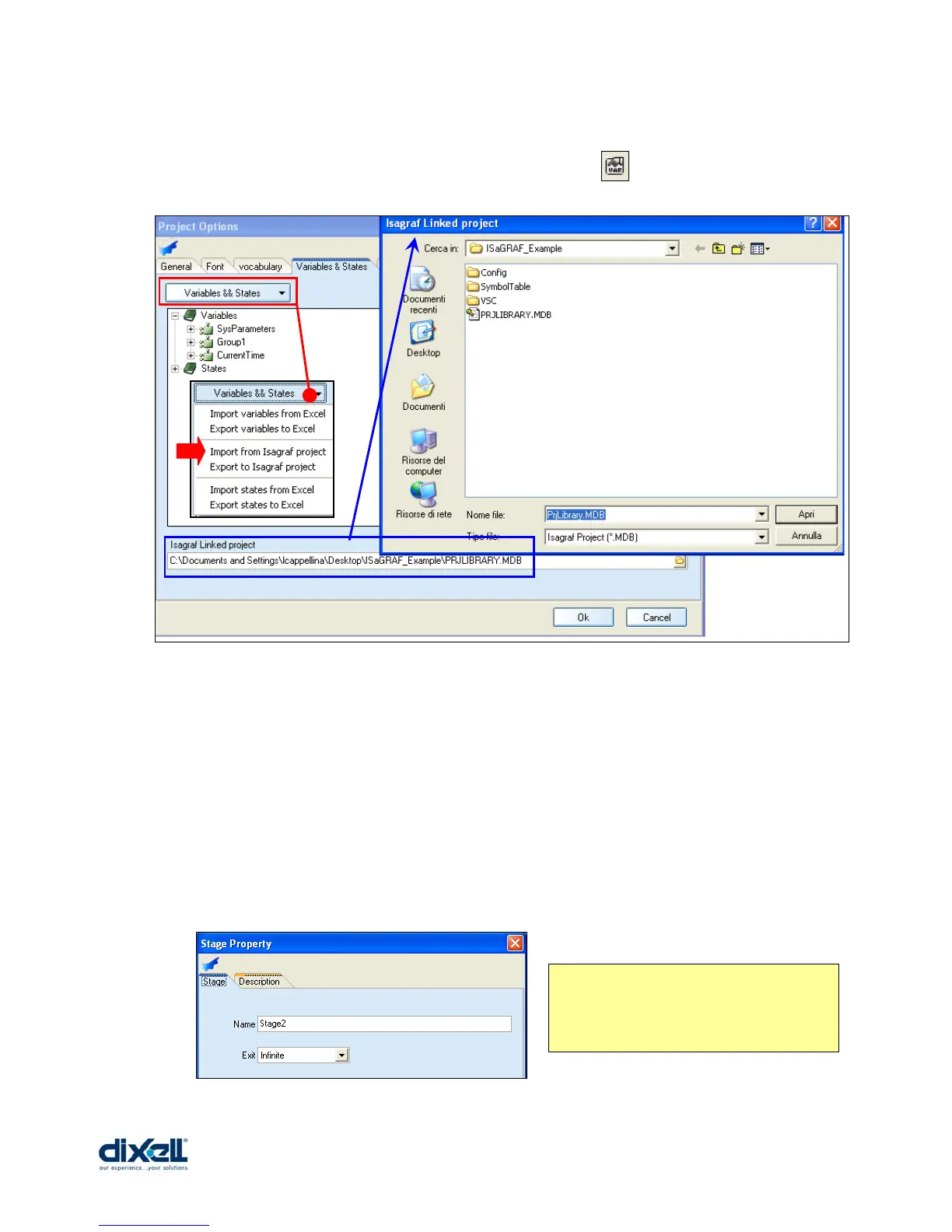
To import the variables used in ISaGRAF project choose: FILE Æ OPTION Æ and then
Variables & States tab (or click the icon, in the menu bar, ).
Operations to do in this section are:
• Link VISOPROG with the ISaGRAF project Æ Isagraf Linked project
• Click on Variables & States and choose Æ Import from Isagraf project
The controls to add in our new stage are:
• AI01 Æ the analog input of temperature
• SET Æ set point of regulator (default value, defined in ISaGRAF, is 25°C)
• BAND Æ hysteresis of regulator (default value, defined in ISaGRAF, is 3°C)
• RL01 Æ digital output of compressor (relay)
With these information we can start to create a new stage with the following characteristics:
The NAME of new stage is STAGE2
The EXIT mode is INFINITE; to change
stage is necessary to add some button.















 To Next Page